Dropbox for iOS is being updated today with iOS 10 support and new features to improve the file storage and sharing experience.

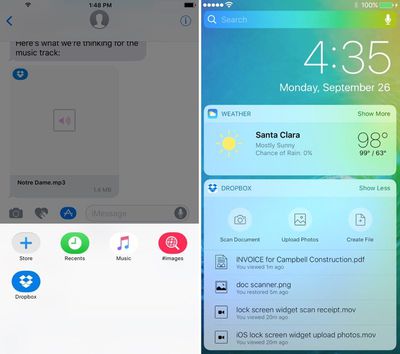
With Messages integration, Dropbox users can select Dropbox files from within the Messages app and share them with friends and colleagues, alleviating the need to open the Dropbox app and copy a link. A new Dropbox widget can be added to the lock screen, providing easier access to tools for creating, viewing, and uploading files.
dropboxmessages
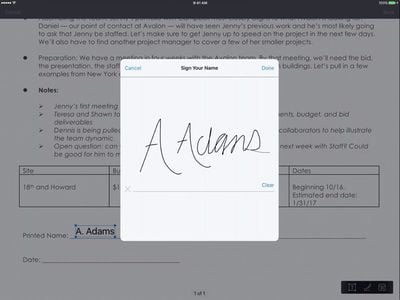
There's a new tool in the Dropbox for signing PDFs, and there are options for getting notified when a file has been updated by a colleague so it can be refreshed with a tap.
dropboxpdf
Dropbox now includes support for picture-in-picture, a feature designed to let iPad users watch videos while performing other tasks. Split-screen support for compatible iPads is also coming in the near future, but won't be included in today's update.

Dropbox can be downloaded from the App Store for free. [Direct Link]

Tag: Dropbox

Top Rated Comments

Rudy69 Avatar
121 months ago
Sorry guys, I moved on to iCloud. It was hard to give up the free space but I had enough of the macOS app
Score: 7 Votes (Like | Disagree)
nagromme Avatar
121 months ago
I suppose my needs are meager, but the Dropbox Mac and iOS apps have both been fine for me.

I use Dropbox for some things, iCloud for others, and neither has given me enough trouble to switch totally in either direction.
Score: 2 Votes (Like | Disagree)
Nuvi Avatar
121 months ago
Too little too late. OneDrive and iCloud full fill our needs. Since we (as a company) need Office day-to-day bases and therefore have Office 365 subscription not using OneDrive would make very little sense. For other uses we have iCloud. IMHO, Dropbox is bit like Evernote. Unfortunately, they both have lost their momentum they had when competitors were still trying to figure out how the cloud should be working. Now that competitors have their services up and running the old ones have either set their prices too high or lack the required integration.
Score: 1 Votes (Like | Disagree)
LV426 Avatar
121 months ago
Is this proper digital signing of PDFs, or the usual rubbish where a simple graphic gets added to a PDF, adding no legal weight whatsoever?

If someone sends me a PDF with a signature on it, it means nothing unless a) the document is immutable and b) it can be shown that the signature was added by an identifiable individual and certification authority.

It's always been a bit of a mystery to me why Apple don't offer a true digital signing service for documents (PDF, Pages, Numbers etc.) using a user's Apple ID. They are in a prime position to be able to do this.

As I understand it, Adobe and others offer such a service, but you have to pay to get documents signed. Wouldn't it be great if you could just take a PDF on your Mac, sign it with you signature, and have it locked and certified automatically by an Apple server (for free). A recipient of such a document could be confident of the document's legitimacy.
Score: 1 Votes (Like | Disagree)
subjonas Avatar
121 months ago
Pretty nice update. I'm baffled as to how such a widely used productivity app hasn't had split screen support this whole time, but I'm relieved to hear it's finally coming.
Score: 1 Votes (Like | Disagree)
Nevaborn Avatar
121 months ago
The MacoOS app is crud TBH. But due to work issues we have just started using a group share Dropbox account and it is working well. Hopefully these updates will help.

Only problem I have is if I want basic group tools I am being forced to look at. Dropbox Business account. If iCloud gets its act together and broadens our Dropbox will get dropped again.
Score: 1 Votes (Like | Disagree)

Popular Stories

iPhone Top Left Hole Punch Face ID Feature Purple

iPhone 18 Pro Launching Later This Year With These 12 New Features

Thursday January 15, 2026 10:56 am PST by
While the iPhone 18 Pro and iPhone 18 Pro Max are not expected to launch for another eight months, there are already plenty of rumors about the devices. Below, we have recapped 12 features rumored for the iPhone 18 Pro models, as of January 2026: The same overall design is expected, with 6.3-inch and 6.9-inch display sizes, and a "plateau" housing three rear cameras Under-screen Face ID...
iPhone Top Left Hole Punch Face ID Feature Purple

New Leak Reveals iPhone 18 Pro Display Sizes, Under-Screen Face ID, and More

Wednesday January 14, 2026 7:09 am PST by
While the iPhone 18 Pro models are still around eight months away, a leaker has shared some alleged details about the devices. In a post on Chinese social media platform Weibo this week, the account Digital Chat Station said the iPhone 18 Pro and iPhone 18 Pro Max will have the same 6.3-inch and 6.9-inch display sizes as the iPhone 17 Pro and iPhone 17 Pro Max. Consistent with previous...
2024 iPhone Boxes Feature

Apple Adjusts Trade-In Values for iPhones, Macs, and More

Thursday January 15, 2026 11:19 am PST by
Apple today updated its trade-in values for select iPhone, iPad, Mac, and Apple Watch models. Trade-ins can be completed on Apple's website, or at an Apple Store. The charts below provide an overview of Apple's current and previous trade-in values in the United States, according to the company's website. Most of the values declined slightly, but some of the Mac values increased. iPhone ...
Apple MacBook Pro M4 hero

These 5 Apple Products Will Reportedly Be Upgraded With OLED Displays

Friday January 16, 2026 7:07 pm PST by
Apple plans to upgrade the iPad mini, MacBook Pro, iPad Air, iMac, and MacBook Air with OLED displays between 2026 and 2028, according to DigiTimes. Bloomberg's Mark Gurman previously reported that the iPad mini and MacBook Pro will receive an OLED display as early as this year, but he does not expect the MacBook Air to adopt the technology until 2028 at the earliest. A new iPad Air is...
Verizon New

Verizon Offering $20 Credit After Major Outage, Here's How to Get It

Thursday January 15, 2026 7:37 am PST by
Verizon today announced it will be offering customers a $20 account credit after a major outage on Wednesday, and action is required to receive it. The carrier said affected customers can accept the credit by logging into the My Verizon app, but it might take some time before this option shows up in the app. Affected customers will receive a text message when the credit is available. On...