Facebook for iOS Now Features Human-Curated Events List in 10 Cities - MacRumors
Skip to Content

Facebook for iOS Now Features Human-Curated Events List in 10 Cities

by

Facebook today announced plans to add human curation to its Facebook Events feature on iOS devices, with designated curators set to highlight notable events in a select number of cities.

Facebook Events, for those unfamiliar, is the Facebook feature that allows users to create dedicated Facebook event pages for parties, festivals, and more, and sign up to attend those events. Event pages are a useful way to share event details with a large number of people, including time, location, and information on others who are attending.

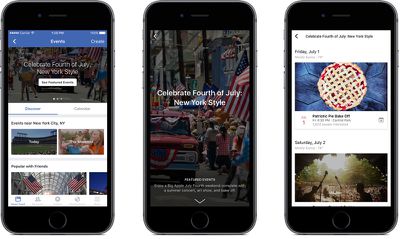
According to TechCrunch, iOS users in Boston, Chicago, Dallas, Houston, Los Angeles, Miami, New York City, San Francisco, Seattle, and Washington, D.C. will see a new "Featured Events" option on the Events section of the app. Some users, described as "highly engaged," will also receive push notifications for interesting events.
facebookevents

Facebook's curators will cull through each city's top art, entertainment, family, festival, fitness, food & drink, learning, community, music, and sports events, and select a few with the capacity to accept some extra foot traffic.

"You can think about it like a weekend or weekly digest of cool stuff that you can do in your city" Facebook Events product manager Aditya Koolwal tells [TechCrunch].

Curated Featured Events will join existing event suggestions Facebook users receive, which have included events based on interest, past attendance, and friend attendance. Facebook's goal with Featured Events is to surface events early enough to give people time to plan to attend.

Facebook is also enhancing its Events section with new event categories that include things like "Music," "Food," "The Weekend," and more. While Facebook's new Curated Events feature is only available in a limited number of cities, Facebook may consider expanding it in the future should it prove popular.

Top Rated Comments

127 months ago
I hope they fixed the constant crashing on iOS 10
You're running iOS 10 Developer Beta 1 - you should expect that some apps/functionality won't work for a while.
Score: 6 Votes (Like | Disagree)
127 months ago
Easy there champ.... Nothing wrong with hoping
Nothing wrong with hoping at all. Just stating the obvious in case someone is considering installing the first developer build on their phone with hopes that everything will work as if it were a GM release.
Score: 2 Votes (Like | Disagree)

Popular Stories

iOS 26

iOS 26.4 Adds Two New Features to CarPlay

Tuesday March 24, 2026 1:55 pm PDT by
iOS 26.4 was released today, and it includes a couple of new features for CarPlay: an Ambient Music widget and support for voice-based chatbot apps. To update your iPhone 11 or newer to iOS 26.4, open the Settings app and tap on General → Software Update. CarPlay will automatically offer the new features so long as the iPhone connected to your vehicle is running iOS 26.4 or later....
AirPods Pro Firmware Feature

Apple Releases New Firmware for AirPods Pro 3, AirPods Pro 2 and AirPods 4

Tuesday March 24, 2026 12:31 pm PDT by
Apple today released new firmware for the AirPods Pro 2, AirPods Pro 3, and the AirPods 4. The firmware has a version number of 8B39, up from 8B34 on the AirPods Pro 3, 8B28 on the AirPods Pro 2, and 8B21 on the AirPods 4. There is no word on what's included in the firmware, but Apple has a support document with limited notes. Most updates are limited to bug fixes and performance...
apple tv 4k new orange

tvOS 26.4 Adds These New Features to Your Apple TV

Wednesday March 25, 2026 3:33 pm PDT by
Apple this week released tvOS 26.4, and the software update includes a handful of new features and changes for the Apple TV. tvOS 26.4 is compatible with all Apple TV 4K and Apple TV HD models released since 2015. To update your Apple TV, open the Settings app on the device, navigate to System → Software Updates, and select Update Software. Below, we have recapped what is new in tvOS...