The United States Patent and Trademark Office recently published a new patent application originally filed by Apple last July, detailing a system in which the receiver of an iMessage could be notified when pieces of the message are scrambled incoherently by the company's autocorrect system (via AppleInsider). The patent isn't a proactive solution to enhance the sometimes spotty nature of autocorrect, but simply a way to let the person on the other end of the text know what's happening, and give each user tools to better explain what they meant.

Apple describes a new user interface that would highlight any words or phrases in a message that have been siphoned through autocorrect. The system wouldn't be advanced enough to reveal the specifically intentioned words the sender meant, but at least give the receiver a heads up about which parts of the text were corrected.
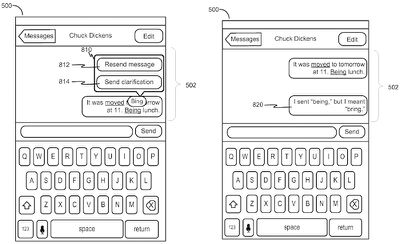
autocorrect patent 1

A design of the sender-side UI

Parts of the patent reveal iterations of the idea that can streamline the clarification process, as well. For example, a description of the sender-side user interface includes a prompt that pops up -- after a user taps on the autocorrected word -- with an option to "Send clarification" to the receiver. The canned message fills out the phrase, "I sent [wrong word], but I meant [correct word]." If they want a complete do-over, the user could also just opt to re-send the entire message.
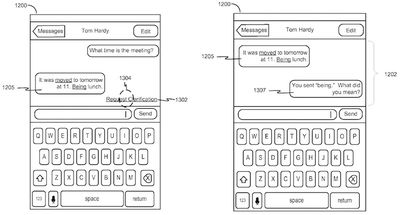
autocorrect patent 2

A design of the receiver-side UI

On the receiver-side user interface, if the sender isn't opting to fix the issue themselves, the other person can "Request clarification" by tapping on the highlighted autocorrect word or phrase. The automated message is similar to the previous sender-side phrase, asking "You sent [wrong word]. What did you mean?"

If implemented in a future version of iOS, the autocorrect highlight patent could be similar to the way iOS currently underscores vague references to dates and times when users send and receive text messages. Apple's new patent could be slightly more helpful for most users than that feature, however, especially given the speed with which iPhone users have grown accustomed to texting on the device, and how frustrating it can be to realize autocorrect interfered with your message.

Like most patents, it's still advised to be wary of how long it'll take Apple to implement the autocorrect notification system into iOS, if it ever will. Still, it's easy to see how useful and streamlined such a feature could be, without completely taking out much of the humorous -- and sometimes awkward -- mishaps for which autocorrect has become famous.

Tag: Patent

Top Rated Comments

iLoveDeveloping Avatar
126 months ago
Yey better autocorrect, it works most of the tomatoes.
Score: 22 Votes (Like | Disagree)
ArtOfWarfare Avatar
126 months ago
I feel that it would be vastly simpler to just fix autocorrect. I think if they fixed these two things, it would do away with 99% of false corrections by autocorrect:

#1: When I type a word that includes a capital in it, and it isn't the the first letter of the sentence, don't touch it. Ever. It's a name or trademark or something - it isn't ordinary English, leave it alone.

#2: When I type a valid English word, leave it alone. I don't care that it's statistically improbable that it's what I meant or whatever. AFAIK, I have never mistakenly typed one valid English word but meant another.

I remember making this suggestion when I was using my first iPhone, the 3GS, 7 years ago. I was so sure that Apple would swiftly fix it. Here we are, 7 years later with iOS 9, and autocorrect still sucks just as badly as it did then.
Score: 10 Votes (Like | Disagree)
RichTF Avatar
126 months ago
Sounds like a ducking awesome idea for iMessage!
Score: 7 Votes (Like | Disagree)
gaximus Avatar
126 months ago
Um, no. I don't have that problem. I don't press my finger in the same spot when I mean different letters, so I don't mix up top or too (because there's an o right before the letter that could be mixed up).

I definitely don't type letters in the wrong order and end up with no when I meant on or vice versa.

I could imagine there are some situations where autocorrect's current behavior is better than its behavior if you make the changes I proposed, but they seem exceedingly rare to me.
Wow I've never meet someone who never makes a mistake while typing. You must be an amazing typist or type so slow that its impossible to make a mistake. Some words I type so fast from muscle memory I'll mix up the characters, even in my own name.
Score: 6 Votes (Like | Disagree)
justperry Avatar
126 months ago
Autocorrect really sucks when you are bilingual, sometimes I deliberately type words in a different language but it autocorrects, it shouldn't do that when you have more than 1 keyboard language on your phone, or even on OS X.
Score: 6 Votes (Like | Disagree)
oneMadRssn Avatar
126 months ago
I usually turn off autocorrect.

This is my thinking - I would rather send the right word spelled wrong than the wrong word spelled right.

The former just looks like the typo, whereas the latter could entirely change the meaning of the sentence.
Score: 5 Votes (Like | Disagree)

Popular Stories

iOS 26

iOS 26.4 and iOS 27 Features Revealed in New Leak

Friday December 12, 2025 10:56 am PST by
Macworld's Filipe Espósito today revealed a handful of features that Apple is allegedly planning for iOS 26.4, iOS 27, and even iOS 28. The report said the features are referenced within the code for a leaked internal build of iOS 26 that is not meant to be seen by the public. However, it appears that Espósito and/or his sources managed to gain access to it, providing us with a sneak peek...
iOS 26

iOS 26.2 Coming Soon With These 8 New Features on Your iPhone

Thursday December 11, 2025 8:49 am PST by
Apple seeded the second iOS 26.2 Release Candidate to developers earlier this week, meaning the update will be released to the general public very soon. Apple confirmed iOS 26.2 would be released in December, but it did not provide a specific date. We expect the update to be released by early next week. iOS 26.2 includes a handful of new features and changes on the iPhone, such as a new...
iOS 26

Apple Releases iOS 26.2 With Alarms for Reminders, Lock Screen Changes, Enhanced Safety Alerts and More

Friday December 12, 2025 10:10 am PST by
Apple today released iOS 26.2, the second major update to the iOS 26 operating system that came out in September, iOS 26.2 comes a little over a month after iOS 26.1 launched. ‌iOS 26‌.2 is compatible with the ‌iPhone‌ 11 series and later, as well as the second-generation ‌iPhone‌ SE. The new software can be downloaded on eligible iPhones over-the-air by going to Settings >...
AirPods Pro Firmware Feature

Apple Releases New Firmware for AirPods Pro 2 and AirPods Pro 3

Thursday December 11, 2025 11:28 am PST by
Apple today released new firmware designed for the AirPods Pro 3 and the prior-generation AirPods Pro 2. The AirPods Pro 3 firmware is 8B30, up from 8B25, while the AirPods Pro 2 firmware is 8B28, up from 8B21. There's no word on what's include in the updated firmware, but the AirPods Pro 2 and AirPods Pro 3 are getting expanded support for Live Translation in the European Union in iOS...
macOS Tahoe 26 Thumb

Apple Releases macOS Tahoe 26.2 With Edge Light

Friday December 12, 2025 10:08 am PST by
Apple today released macOS Tahoe 26.2, the second major update to the macOS Tahoe operating system that came out in September. macOS Tahoe 26.2 comes five weeks after Apple released macOS Tahoe 26.1. Mac users can download the macOS Tahoe update by using the Software Update section of System Settings. macOS Tahoe 26.2 includes Edge Light, a feature that illuminates your face with soft...
AirTag 2 Mock Feature

Apple AirTag 2: Four New Features Found in iOS 26 Code

Thursday December 11, 2025 10:31 am PST by
The AirTag 2 will include a handful of new features that will improve tracking capabilities, according to a new report from Macworld. The site says that it was able to access an internal build of iOS 26, which includes references to multiple unreleased products. Here's what's supposedly coming: An improved pairing process, though no details were provided. AirTag pairing is already...
ipados 26 1 slide over

Apple Releases iPadOS 26.2 With Multitasking Improvements

Friday December 12, 2025 10:09 am PST by
Apple today released iPadOS 26.2, the second major update to the iPadOS 26 operating system released in September. iPadOS 26.2 comes a month after iPadOS 26.1. The new software can be downloaded on eligible iPads over-the-air by going to Settings > General > Software Update. iPadOS 26.2 continues with the multitasking improvements that were added with iPadOS 26.1. You can now drag and...
bug security vulnerability issue fix larry

Update Now: iOS 26.2 Fixes 20+ Security Vulnerabilities

Friday December 12, 2025 11:11 am PST by
Apple today released iOS 26.2, iPadOS 26.2, and macOS 26.2, all of which introduce new features, bug fixes, and security improvements. Apple says that the updates address over 20 vulnerabilities, including two bugs that are known to have been actively exploited. There are a pair of WebKit vulnerabilities that could allow maliciously crafted web content to execute code or cause memory...