Olloclip's line of Studio accessories designed to improve mobile photography on Apple's iPhones debuted in mid-2015 on Kickstarter, where the project was successfully funded. At this year's Consumer Electronics Show, Olloclip is ready to show off its completed Studio mobile photography system and has announced a January launch date for the product.
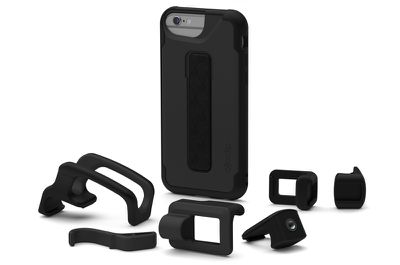
Created to work alongside Olloclip's line of iPhone lenses, the Studio combines an iPhone 6/6s or 6/6s Plus case with an integrated rail-mounting solution and a selection of mountable accessories.
"When designing the Studio system, we realized the user experience and application needed to be as simple and efficient as our lenses. The end result is the most intuitive and effortless way to grip an iPhone while filming and shooting photos, enabling users to be more immersed in the capture process than ever before," said Patrick O'Neill, founder and chief design officer of olloclip. "The new set of accessories and mounts are not only great for taking photos and shooting video, but also for new broadcasting applications like Twitter's Periscope and social media favorites like Instagram, Facebook and Snapchat."
The main component of the Studio system is the Studio Case, which can be used with the Studio accessories or as a standalone case. It's Olloclip's most protective case, designed to protect the iPhone from accidental drops. On the back of the case, there's an integrated rail mount for attaching accessory pieces, cold-shoe adapters, a finger grip, mounts, and a kickstand.
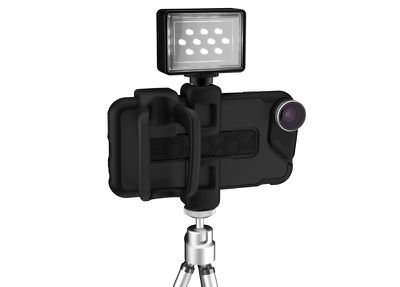
Finger Grip - Olloclip's Studio finger grip is deal for improving stability when taking photos or capturing video. It fits over two fingers and lets the user quickly switch between portrait and orientation landscape.
1/4-20 Mounts - The Studio system comes with two standard 1/4-20 mounts, ideal for attaching the iPhone (in the Studio Case) to a tripod, a grip, or a handle. There's one mount for portrait mode and one mount for landscape mode.
Cold-Shoe Adapters - The two included cold-shoe adapters can be used to attach lightweight accessories like a microphone or a light to the iPhone.
Kickstand - The Kickstand is useful for watching a movie, editing a video, or reading a website.
Olloclip's Studio for the iPhone 6, 6s, 6 Plus, and 6s Plus will be available from the Olloclip website in January of 2016. It will retail for $89.99.