Google Maps for iOS Updated With Spoken Traffic Alerts - MacRumors
Skip to Content

Google Maps for iOS Updated With Spoken Traffic Alerts

by

Google today updated its Google Maps app to version 4.12, adding spoken traffic alerts in navigation mode as well as the ability to easily add new or missing businesses from the app's sidebar.
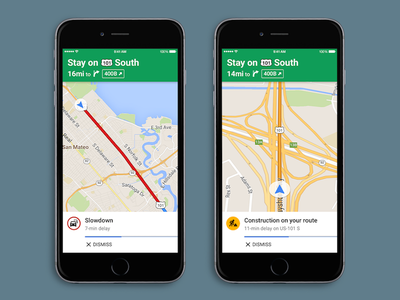
googlemapsspoken
Spoken traffic alerts will tell users about traffic congestion and incidents on a user's route. Additionally, users will get traffic descriptions summarizing traffic conditions before they set off on their journey. The feature is similar to Google-owned Waze's notifications, which also verbally points out traffic congestion, incidents and the location of police in the area.

Google Maps is a universal app available for free in the App Store. [Direct Link]

Top Rated Comments

141 months ago
Great to see Google is catching up on this feature. Apple already had this earlier this year at the start of iOS 9 beta.

Attachment Image
Score: 9 Votes (Like | Disagree)
mejsric Avatar
141 months ago
If there is no Apple Map then iPhone users probably won't receive this update...

Thanks Apple for creating Apple Map.
Score: 8 Votes (Like | Disagree)
141 months ago
It’s such a shame that Google owns these two applications, they are simply the best in their class. Pity, I don’t want to have anything to do with Google.
Score: 7 Votes (Like | Disagree)
141 months ago
shame you are missing some of the best iOS apps due to what reason?
Google’s business model and attitude towards user privacy for a start. They are ruthless in their collection of data and I’m not going to hand over a steady supply of GPS data along with persistent identifiers for them to store forever and analyse. This data is too sensitive and Apple promises not to do this. Google Maps is a carrot and stick for what they are really after and for me it isn’t a relationship I want to have.

Score: 6 Votes (Like | Disagree)
Spink10 Avatar
141 months ago
If there is no Apple Map then iPhone users probably won't receive this update...

Thanks Apple for creating Apple Map.
Very good point
Score: 4 Votes (Like | Disagree)
shamino Avatar
141 months ago
You do realise that obeying the speed limits would even be more of lifesaver ;-)
Not necessarily. Many cities (well, at least Washington DC, which I'm personally familiar with) sets up countless photo speed traps. Like when they decide stick a 35MPH sign on an interstate highway in order to issue several thousand $100+ tickets a day to everybody who is (safely) driving 55-65 on that road.

Slamming on your brakes to obey that limit would be far more dangerous than going through at 55 and getting the ticket.

Of course, avoiding Washington DC altogether is an even bigger lifesaver, but that's not always an option.
Score: 3 Votes (Like | Disagree)

Popular Stories

google ask maps

Google Maps Can Now Order Your Dinner and Track Your Train Delays

Thursday August 6, 2026 3:59 pm PDT by
Google today added new agentic capabilities to the Gemini-powered "Ask Maps" assistant in the Google Maps app. Ask Maps can complete multi-step tasks, such as ordering a meal for you on your way home. Google says you can simply say something like "order spicy pad kee mao with seafood for me to pick up on my way home," and Maps will find open restaurants along your route, let you pick one,...



Apple Event Logo

Apple Unveiled Four New Products Today

Tuesday August 25, 2026 8:39 am PDT by
Apple today unveiled a new Mac mini with M6 and M5 Pro chip options, a new Mac Studio with M5 Max and M5 Ultra chip options, a new version of the Polishing Cloth with a lower price, and updated Magic Keyboards for Macs. To learn more about these products, read our coverage below: Apple Announces New Mac Mini With M6 and M5 Pro Chips and More Apple Unveils New Mac Studio With M5 Max and M5...
apple magic keyboard with glyphs 2026 refresh

Apple Quietly Refreshes Magic Keyboards

Tuesday August 25, 2026 7:22 am PDT by
Apple today quietly introduced updated Magic Keyboard models with revised U.S. English key labeling. On the new keyboards, the tab, caps lock, shift, return, and delete keycaps are labeled with glyphs rather than edge text. On the full-size models with a numeric keypad, the change goes further, with the home, page up, page down, end, clear, and enter keys also swapping their text labels for...