Logitech Debuts New 'Logi Circle' Home Monitoring Camera - MacRumors
Skip to Content

Logitech Debuts New 'Logi Circle' Home Monitoring Camera

by

Logitech today announced its entry into the home security and monitoring market with the Circle Portable Home Connection Camera, which is debuting under its new Logi brand. The palm-sized Circle is a connected camera that's designed to let users monitor and interact with pets, children, and people at home while away.

Through a companion app, the Logi Circle streams HD video to an iPhone or iPad. It includes a two-way talk and listen feature that works using Wi-Fi, letting it go beyond simple monitoring. According to Logitech, the Circle includes "Scene Intuition" technology that sets it apart from other similar home camera systems. With Scene Intuition, the Logi Circle is able to learn home life patterns to send alerts only when interesting activity occurs to save people from having to sort through hours and hours of footage.
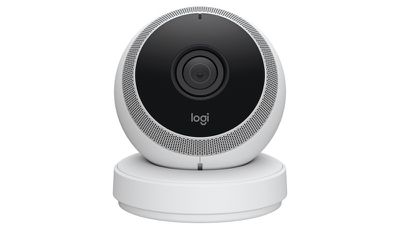
logicircle
The app also offers a "Day Briefs" feature, which is an automatically generated 30-second video that sums up the highlights of each day.

"There's a new movement in home monitoring," said Vincent Borel, director of new ventures at Logitech. "The nature of today's connected world is changing the way people interact with cameras in the home. Video surveillance is no longer just about security, it's about staying connected with our homes and loved ones. Planned or unplanned, magic moments happen in our homes every day and we designed the Logi Circle as your destination for capturing and discovering them no matter where you are or what you're doing. Now you can watch your kids playing or catch your dog chasing its tail even if you're running errands, traveling for business or at the office."

The Logi Circle has an unobtrusive design that lets it fit quietly into any room, and it's both portable and rechargeable. It can be moved from room to room and charged as needed with an included charging ring, with each charge providing three hours of streaming or 12 hours of standby time.


The camera inside the Logi Circle offers a 135 degree wide angle view and an 8x zoom ability. A light on the device blinks white when someone is watching through the app, and the light also doubles as a battery indicator, blinking red when the battery is low. The Logi Circle will store 24 hours of video at no cost, and Logitech plans to offer subscription options for longer storage times.

The Logi Circle Home Connection Camera is available for pre-order beginning today from the Logitech website. It's priced at $199.99.


Top Rated Comments

141 months ago
This is fail as it requires data stored remotely. Can you trust anyone with your home data?

These cameras should just have a day of worth of internal ssd storage that you could easily dump into your own local storage device if you need to.

Also no communication (between you and your camera) should be done using any third party mediator.
Score: 4 Votes (Like | Disagree)
Icaras Avatar
141 months ago
Really? No HomeKit compatibility? Pass.
Score: 4 Votes (Like | Disagree)
Caseynd Avatar
141 months ago
most Logitech purchases end in regret, and they priced themselves right out of the market imo
Look for these on clearance closeout shelves in 6-9 months, then maybe the dollar store after that.
Score: 2 Votes (Like | Disagree)
141 months ago
This is fail as it requires data stored remotely. Can you trust anyone with your home data?

These cameras should just have a day of worth of internal ssd storage that you could easily dump into your own local storage device if you need to.

Also no communication (between you and your camera) should be done using any third party mediator.
Doesn't really work so well as a security cam if the footage can be stolen along with the camera though, does it?
The option of cloud or local would be nice though, or even option of both.
Score: 2 Votes (Like | Disagree)
Arran Avatar
141 months ago
The problem is we are dangerously close to a world where you might get burglarized because you have cameras. Most companies do not take security seriously and they can become just as much as a liability in those cases.
Good point.

The bad guys hack into the camera, case the joint remotely and then wait until there's clearly no one home.
Score: 1 Votes (Like | Disagree)
snowmoon Avatar
141 months ago
Yeah, because getting your house burglarised and instead of having footage of them they just took the camera.
Great ideia.
The problem is we are dangerously close to a world where you might get burglarized because you have cameras. Most companies do not take security seriously and they can become just as much as a liability in those cases.
Score: 1 Votes (Like | Disagree)

Popular Stories

iphone 16 teal

'Siri AI' Lawsuit Update: Apple to Pay Owners of These iPhone Models

Thursday July 9, 2026 7:08 am PDT by
In May, Apple agreed to pay $250 million to settle a U.S. class action lawsuit over Siri AI's delayed launch, and eligible iPhone users could receive up to a $95 payout. This week, the California court overseeing the case held a hearing regarding preliminary approval of the settlement, but the judge has not yet issued a ruling. It will likely be at least a few more months before eligible...
Apple TV Thumb 3

Everything Coming in the 2026 Apple TV 4K

Wednesday July 8, 2026 4:51 pm PDT by
The Apple TV 4K hasn't been updated since 2022, and it's due for a refresh. An update is planned for 2026, but Apple is likely going to wait to launch it after Siri AI launches in iOS 27. Design Apple TV design updates don't happen often, and that's not changing. The next Apple TV is going to have the same squircle shape as the current model, and it'll continue to be made from a black...
apple wallet drivers license feature iPhone 15 pro

Apple Says iPhone Driver's Licenses Will Expand to These 6 U.S. States

Thursday July 9, 2026 7:29 am PDT by
In select U.S. states, residents can add their driver's license or state ID to the Apple Wallet app on the iPhone and Apple Watch, and then use it to display proof of identity or age at select airports and businesses, and in select apps. To set up the feature, open the Wallet app on the iPhone and tap on the plus sign in the top-right corner. Next, tap on Driver's License and ID Cards,...