Reserve Strap to Offer 30 Hours of Extra Apple Watch Battery Life, Launching in November

Reserve Strap this week released the official design specifications of its battery-charging Apple Watch band accessory, confirming a shipping date for the $249.99 strap to be November 3, 2015. Since its debut in early March, the Reserve Strap has gone through two design iterations, with developers Lane Musgrave and John Arrow attempting to get the look -- and functionality -- just right.

The strap's finalized design comes in with a width of 25mm, a thickness of 3-9mm, and a total weight of 65g. The designers have also ditched the rubber and metallic combination design of the Reserve Strap's second iteration with a uniform Thermoset Elastomer Silicone band that's "as resistant to water as Apple Watch." Coming in both 38mm and 42mm casing sizes, the Reserve Strap promises to fit wrists ranging in size from 130mm to 210mm.
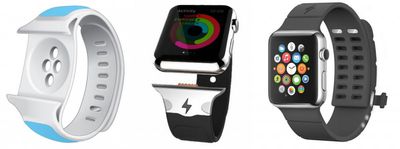
reserve-strap-change

The original Reserve Strap design (left), with the second design (middle) and the final one (right)

The design wasn't the only aspect of the strap to be overhauled, however, with the strap's developers noting a 167 percent increase in battery life, compared to the original design's 125 percent boost. Essentially, if the Reserve Strap is fully charged (via included micro-USB cable), users can expect an additional 30 hours of battery life for their Apple Watch. So, as the company notes on its website, a fully-charged Apple Watch can now expect a grand total battery life of 48 hours if both devices are topped off.

The company goes into the specifics in the new blog post on what users can expect with a day-to-day usage of the Reserve Strap, detailed below. It should be mentioned that the strap's access to the Apple Watch accessory port requires users to first remove the cover to the hidden port before using the Reserve Strap, a process detailed by creators Musgrave and Arrow in a how-to video on their YouTube channel.


How Reserve Strap Works

1. Reserve Strap will connect to the Apple Watch similar to Apple bands. It will slide in laterally then you’ll then push forward a small switch underneath the band to engage the accessory port connection to secure the Reserve Strap on the Watch.

2. At your discretion simply press the power button once to initiate charging. You can use the Watch as normal while it charges.

3. Once top-off charging is complete after 60-75 minutes, press the power button again to save the rest of Reserve Strap for another time. Or if you decide to leave Reserve Strap on, Apple Watch will use the Strap’s power to keep the Apple Watch at 100% power until the Reserve Strap is depleted.

4. Reserve Strap uses a minimal LED indicator to let you know how much charge you have left. When you turn the charge on or plug it in, the LED will glow either red, yellow or green indicating a high, medium, or low charge.

5. Recharging the Reserve Strap and Apple Watch is incredibly easy. You can leave your Strap on the Watch and simply plug it in via micro USB. This will charge the Apple Watch and Reserve Strap at the same time!

The Reserve Strap, which the developers promise fully complies with the Apple Watch Band Design Guidelines and "doesn't violate either AppleCare warranty or Apple Terms & Conditions," can be pre-ordered for $249.99 today from the company's official website. The final design can be purchased in white, grey, or black, its creators noting that only those who pre-ordered are guaranteed a strap on the November 3 launch date.
Related Roundup: Apple Watch 11
Buyer's Guide: Apple Watch (Buy Now)

Popular Stories

iOS 26

iOS 26.2 Coming Soon With These 8 New Features on Your iPhone

Thursday December 11, 2025 8:49 am PST by
Apple seeded the second iOS 26.2 Release Candidate to developers earlier this week, meaning the update will be released to the general public very soon. Apple confirmed iOS 26.2 would be released in December, but it did not provide a specific date. We expect the update to be released by early next week. iOS 26.2 includes a handful of new features and changes on the iPhone, such as a new...

AirPods Pro Firmware Feature

Apple Releases New Firmware for AirPods Pro 2 and AirPods Pro 3

Thursday December 11, 2025 11:28 am PST by
Apple today released new firmware designed for the AirPods Pro 3 and the prior-generation AirPods Pro 2. The AirPods Pro 3 firmware is 8B30, up from 8B25, while the AirPods Pro 2 firmware is 8B28, up from 8B21. There's no word on what's include in the updated firmware, but the AirPods Pro 2 and AirPods Pro 3 are getting expanded support for Live Translation in the European Union in iOS...
Google maps feaure

Google Maps Quietly Added This Long-Overdue Feature for Drivers

Wednesday December 10, 2025 2:52 am PST by
Google Maps on iOS quietly gained a new feature recently that automatically recognizes where you've parked your vehicle and saves the location for you. Announced on LinkedIn by Rio Akasaka, Google Maps' senior product manager, the new feature auto-detects your parked location even if you don't use the parking pin function, saves it for up to 48 hours, and then automatically removes it once...
iOS 26

iOS 26.4 and iOS 27 Features Revealed in New Leak

Friday December 12, 2025 10:56 am PST by
Macworld's Filipe Espósito today revealed a handful of features that Apple is allegedly planning for iOS 26.4, iOS 27, and even iOS 28. The report said the features are referenced within the code for a leaked internal build of iOS 26 that is not meant to be seen by the public. However, it appears that Espósito and/or his sources managed to gain access to it, providing us with a sneak peek...
iOS 26

Apple Releases iOS 26.2 With Alarms for Reminders, Lock Screen Changes, Enhanced Safety Alerts and More

Friday December 12, 2025 10:10 am PST by
Apple today released iOS 26.2, the second major update to the iOS 26 operating system that came out in September, iOS 26.2 comes a little over a month after iOS 26.1 launched. ‌iOS 26‌.2 is compatible with the ‌iPhone‌ 11 series and later, as well as the second-generation ‌iPhone‌ SE. The new software can be downloaded on eligible iPhones over-the-air by going to Settings >...
Foldable iPhone 2023 Feature 1

Apple to Make More Foldable iPhones Than Expected [Updated]

Tuesday December 9, 2025 9:59 am PST by
Apple has ordered 22 million OLED panels from Samsung Display for the first foldable iPhone, signaling a significantly larger production target than the display industry had previously anticipated, ET News reports. In the now-seemingly deleted report, ET News claimed that Samsung plans to mass-produce 11 million inward-folding OLED displays for Apple next year, as well as 11 million...
AirTag 2 Mock Feature

Apple AirTag 2: Four New Features Found in iOS 26 Code

Thursday December 11, 2025 10:31 am PST by
The AirTag 2 will include a handful of new features that will improve tracking capabilities, according to a new report from Macworld. The site says that it was able to access an internal build of iOS 26, which includes references to multiple unreleased products. Here's what's supposedly coming: An improved pairing process, though no details were provided. AirTag pairing is already...
iOS 26

15 New Things Your iPhone Can Do in iOS 26.2

Friday December 5, 2025 9:40 am PST by
Apple is about to release iOS 26.2, the second major point update for iPhones since iOS 26 was rolled out in September, and there are at least 15 notable changes and improvements worth checking out. We've rounded them up below. Apple is expected to roll out iOS 26.2 to compatible devices sometime between December 8 and December 16. When the update drops, you can check Apple's servers for the ...
macOS Tahoe 26 Thumb

Apple Releases macOS Tahoe 26.2 With Edge Light

Friday December 12, 2025 10:08 am PST by
Apple today released macOS Tahoe 26.2, the second major update to the macOS Tahoe operating system that came out in September. macOS Tahoe 26.2 comes five weeks after Apple released macOS Tahoe 26.1. Mac users can download the macOS Tahoe update by using the Software Update section of System Settings. macOS Tahoe 26.2 includes Edge Light, a feature that illuminates your face with soft...

Top Rated Comments

ButteryScrollin Avatar
137 months ago

users can expect an additional 30 hours of battery life for their Apple Watch.
and unlimited ugly!
Score: 6 Votes (Like | Disagree)
Z400Racer37 Avatar
137 months ago
Is it just me or is there not really a problem with battery life? I put it on at 7AM and take it off at like 9 or 10 pm an its still at 50%..

Will laugh if apple comes in with its own cheaper version. Just to teach the greedy a thing or two.
... What?
Score: 5 Votes (Like | Disagree)
Eorlas Avatar
137 months ago
People complained incessantly about the lack of 24 hour battery life in the Watch, and now that someone comes up with a solution there's complaint about what you don't like of it?

If Apple made a charge band, you'd be spending more than this. Perhaps this will encourage others to enter this market, and maybe the price will go down eventually.

As for look, it's not gorgeous but it's far from hideous. It's a simple rubber design.

$250 is more than I would spend specifically for that band, but it doesn't mean that the product itself doesn't have that value.

*shrug*
Score: 4 Votes (Like | Disagree)
Waxhead138 Avatar
137 months ago
Apple Watch: Starting at $349.99.

For the measley expense of roughly 70% of that, you can double the battery life!
Score: 4 Votes (Like | Disagree)
lobbyist Avatar
137 months ago
and unlimited ugly!
The final design compared to the original one is like day and night. Very decent looking IMO. Will consider it.

But of course that's just me.
Score: 3 Votes (Like | Disagree)
GFbob Avatar
137 months ago
Is it just me or is there not really a problem with battery life? I put it on at 7AM and take it off at like 9 or 10 pm an its still at 50%..


... What?
I'm not having any issues with battery life either. I take it off around 9 PM, let it charge for an hour and put it back on before bed. I've never run out of battery charge and I've had it on during several 1 hour+ cycling rides (which are supposed to drain the battery doing heart rate checks).
Score: 2 Votes (Like | Disagree)