Benchmarks Confirm New MacBook Air Brings Decent Speed Improvements, MacBook Pro Less So

Earlier this week, we shared some Geekbench benchmarks for the Broadwell processors in the new 13-inch Retina MacBook Pro and the new 13-inch MacBook Air, which pointed towards speeds that were comparable to mid-2014 models.

At the time, we noted the results might shift once more data came in and the machines got past their initial housekeeping tasks, and Primate Labs' John Poole has now shared additional benchmarks for all stock versions of the new machines. The new data indicate that performance improvements may indeed be somewhat better than initially thought, though still relatively moderate.

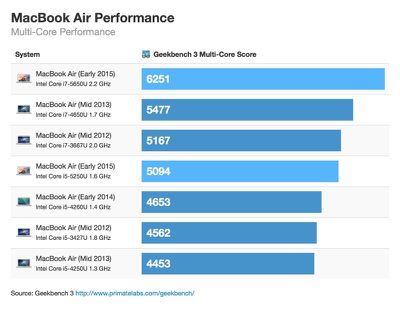
On the new MacBook Air, both the default 1.6 GHz Core i5 chip and the 2.2 GHz Core i7 chip available as an upgrade performed somewhat better than their predecessors on the 32-bit single-core test, but there were more significant gains in the multi-core test for the higher-end processors.
mba-march-2015-multicore
According to the new averages, single-core performance increased 6 percent from Haswell to Broadwell. Multi-core performance on the i5 chip increased 7 percent, while multi-core performance for the i7 model increased 14 percent.

Due to the more meaningful jump in multi-core performance between the 2.2GHz Core i7 chip and the 1.6GHz Core i5 chip, Poole recommends that MacBook Air buyers go for the processor upgrade.

If you're thinking of buying the new MacBook Air I would strongly recommend the i7 processor. It has 20% faster single-core performance and 25% faster multi-core performance for only a 15% increase in price.

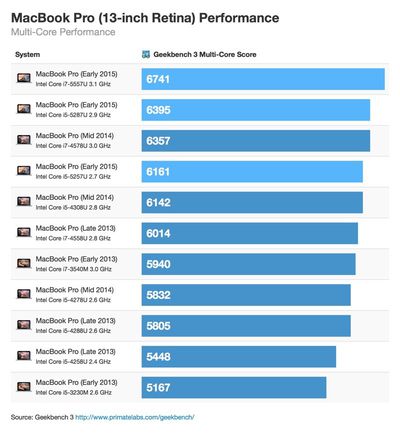
Benchmarks of the new 13-inch MacBook Pro showed slight gains over previous-generation models, but the differences were not quite as pronounced as on the MacBook Air. Single-core performance increased between 3 percent and 7 percent from Haswell to Broadwell, depending on the model, while multi-core performance increased 3 percent to 6 percent.
mbp-march-2015-multicore

I have no recommendations regarding the processor for the new MacBook Pro. The performance differences and the price differences between the processors are roughly equivalent.

Intel operates on a "Tick-Tock" chip manufacturing model. Tock upgrades represent a new microarchitecture, while tick upgrades like Broadwell are generally an improvement on tock architecture, leading to improvements in efficiency. As a tick upgrade, the minor speed improvements Broadwell brings are no surprise. Intel's last tock upgrade was Haswell, and its next tock upgrade will be Skylake, coming later this year.

Apple's new 13-inch Retina MacBook Pro and new MacBook Air models are available immediately from the online Apple Store and from Apple's retail stores.

Related Roundup: MacBook Air
Related Forums: MacBook Pro, MacBook Air

Popular Stories

iOS 26

iOS 26.4 and iOS 27 Features Revealed in New Leak

Friday December 12, 2025 10:56 am PST by
Macworld's Filipe Espósito today revealed a handful of features that Apple is allegedly planning for iOS 26.4, iOS 27, and even iOS 28. The report said the features are referenced within the code for a leaked internal build of iOS 26 that is not meant to be seen by the public. However, it appears that Espósito and/or his sources managed to gain access to it, providing us with a sneak peek...
iOS 26

iOS 26.2 Coming Soon With These 8 New Features on Your iPhone

Thursday December 11, 2025 8:49 am PST by
Apple seeded the second iOS 26.2 Release Candidate to developers earlier this week, meaning the update will be released to the general public very soon. Apple confirmed iOS 26.2 would be released in December, but it did not provide a specific date. We expect the update to be released by early next week. iOS 26.2 includes a handful of new features and changes on the iPhone, such as a new...
iOS 26

Apple Releases iOS 26.2 With Alarms for Reminders, Lock Screen Changes, Enhanced Safety Alerts and More

Friday December 12, 2025 10:10 am PST by
Apple today released iOS 26.2, the second major update to the iOS 26 operating system that came out in September, iOS 26.2 comes a little over a month after iOS 26.1 launched. ‌iOS 26‌.2 is compatible with the ‌iPhone‌ 11 series and later, as well as the second-generation ‌iPhone‌ SE. The new software can be downloaded on eligible iPhones over-the-air by going to Settings >...
AirPods Pro Firmware Feature

Apple Releases New Firmware for AirPods Pro 2 and AirPods Pro 3

Thursday December 11, 2025 11:28 am PST by
Apple today released new firmware designed for the AirPods Pro 3 and the prior-generation AirPods Pro 2. The AirPods Pro 3 firmware is 8B30, up from 8B25, while the AirPods Pro 2 firmware is 8B28, up from 8B21. There's no word on what's include in the updated firmware, but the AirPods Pro 2 and AirPods Pro 3 are getting expanded support for Live Translation in the European Union in iOS...
macOS Tahoe 26 Thumb

Apple Releases macOS Tahoe 26.2 With Edge Light

Friday December 12, 2025 10:08 am PST by
Apple today released macOS Tahoe 26.2, the second major update to the macOS Tahoe operating system that came out in September. macOS Tahoe 26.2 comes five weeks after Apple released macOS Tahoe 26.1. Mac users can download the macOS Tahoe update by using the Software Update section of System Settings. macOS Tahoe 26.2 includes Edge Light, a feature that illuminates your face with soft...
AirTag 2 Mock Feature

Apple AirTag 2: Four New Features Found in iOS 26 Code

Thursday December 11, 2025 10:31 am PST by
The AirTag 2 will include a handful of new features that will improve tracking capabilities, according to a new report from Macworld. The site says that it was able to access an internal build of iOS 26, which includes references to multiple unreleased products. Here's what's supposedly coming: An improved pairing process, though no details were provided. AirTag pairing is already...
ipados 26 1 slide over

Apple Releases iPadOS 26.2 With Multitasking Improvements

Friday December 12, 2025 10:09 am PST by
Apple today released iPadOS 26.2, the second major update to the iPadOS 26 operating system released in September. iPadOS 26.2 comes a month after iPadOS 26.1. The new software can be downloaded on eligible iPads over-the-air by going to Settings > General > Software Update. iPadOS 26.2 continues with the multitasking improvements that were added with iPadOS 26.1. You can now drag and...
bug security vulnerability issue fix larry

Update Now: iOS 26.2 Fixes 20+ Security Vulnerabilities

Friday December 12, 2025 11:11 am PST by
Apple today released iOS 26.2, iPadOS 26.2, and macOS 26.2, all of which introduce new features, bug fixes, and security improvements. Apple says that the updates address over 20 vulnerabilities, including two bugs that are known to have been actively exploited. There are a pair of WebKit vulnerabilities that could allow maliciously crafted web content to execute code or cause memory...

Top Rated Comments

Klae17 Avatar
140 months ago
Waiting for the quad-core sky lake 15in rMBP.
Score: 15 Votes (Like | Disagree)
mattopotamus Avatar
140 months ago
tick-tock always has seemed backwards to me. I would think tick would be the new microarchitecture and tock would be the improvement.
Score: 12 Votes (Like | Disagree)
HobeSoundDarryl Avatar
140 months ago
If only Apple had the skills to develop their own CPU and GPU and really show Intel, Nvidea, AMD etc, how it should be done!
YESSSS! Because nobody needs bootcamp or Parallels compatibility with Windows, nor does anyone mind waiting a couple of years for OS X software by entities other than Apple to be re-written (AGAIN) to support yet another CPU (and now GPU) change, likely leaving a few important programs for some without a re-written upgrade. Just loved the switch from PowerPC to Intel back in '06. When can we go through that again (this time without a "rosetta" to keep third party software working until they can get around to re-writing their software again)?

Personally, I think Intel and the others are quite good (great!) at what they do. And the utility that comes from also using Intel is pretty valuable to me (some software that I need only exists for Windows and some client tools only work with windows). 2 fully functional computers in one case is quite great for those who need access to both.

----------

Out of curiousity how many ports do you (or anybody else reading this) use day to day on a notebook?
It's not always about day-to-day. Does your car have optional 4-wheel drive that you can use when you need it? Does your house have heat to use when you need it (in the winter) and AC to use when you need it (in the summer)? Depending on where you live right now, why do you have the other one (heater or AC) you are not using right now?

I like having standard ports for when I need them. For example, anyone buying this very portable, "only 2 pounds" laptop to take on the road for work will almost certainly need the ability to connect to some wired things. Ethernet is still very common- even when wifi is available. For me, I have both at the hotel where I am right now: the wifi is too slow to use but the ethernet screams-- glad I have the dongle for that one with me.

Just needed to print some airline tickets and that involved either plugging in a regular USB cable OR plugging in a USB drive to then plug into the printer (no wireless printing at this hotel). If I had this new MB with me, I'd need another dongle to do the same.

I put a few movies on this MB because I may have some downtime while flying or between flights. However, right now, I have some downtime in the hotel room. The HDTV has basic cable hooked up (glorious SD upscaled to HD for that blurry, "where's the HD???" quality). If I had the HDMI jack or HDMI dongle, I could connect and actually watch something I want to watch in HD on this HDTV (the hotel might even have a HDMI-to-HDMI cable I could borrow, but they certainly would not have a USB-C to HDMI dongle). Back home, no problem, I have the movie in iTunes and an AppleTV. But here is another one of those "when I need it" situations.

Back at home, I have everything wireless so I could get by with just one port for charging. But I'm not always at home or where I can depend on the same kind of setup. Instead- for work- I can be in all kinds of situations where there are no direct connections for USB-C (yet). Depending on "just bring an adapter" and/or "just bring a dongle for what you'll need" when you can't always know exactly what you need translates into having to bring ALL of your adapters and dongles so that you are ready for just about anything you'll encounter... OR just trying to deal with ultra slow wifi and/or not being able to print those airline tickets, etc. If a client has wifi access restrictions such that I can only hook in via ethernet, I'd have to have that ethernet dongle along. Etc.

I can't completely swallow the argument for "thinner & lighter" if the price of that is to carry along several accessories to make it work well for what was previously common uses of a mobile computer. Apple might as well move the battery and circuit board outside too to make the next one even thinner & lighter. It seems if they did, some of the faithful would help spin that as a positive as well: "Why does anyone need a battery inside? I just have mine plugged into the wall socket here at home."
Score: 10 Votes (Like | Disagree)
x34 Avatar
140 months ago
Out of curiousity how many ports do you (or anybody else reading this) use day to day on a notebook?

several all at once:

-magsafe
-usb
-usb

+sd card here and there


--> 1 usb-c = LOL
Score: 9 Votes (Like | Disagree)
TWSS37 Avatar
140 months ago
Tick-tock...

Be careful, Katniss!
Score: 9 Votes (Like | Disagree)
redheeler Avatar
140 months ago
Were there any updates to the NON RETINA macbook pro?
Im interested in getting a new one but not sure if its still the 2013 model.

No updates to that model since 2012, and there aren't likely to be any more.
Score: 7 Votes (Like | Disagree)