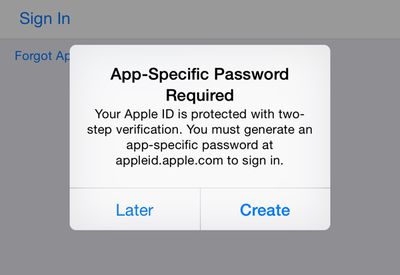
Apple's two-step verification system now covers FaceTime and iMessage, reports The Guardian. Signing into an iMessage or FaceTime account protected by two-step verification will ask users to input an app specific password, which can only be obtained by logging in to an Apple ID account on the web with an authentication code, thereby preventing any unauthorized login attempts.
Two-factor verification is an opt-in system that was first introduced in March of 2013 to increase the security of Apple ID accounts. Prior to today, a verification code was only required for making changes to an account, signing into iCloud, or making iTunes/App Store purchases from a new device.
Two-factor authentication for iCloud is a recent addition that was implemented in September following the breach of several celebrity iCloud accounts, leading to a slew of leaked photos. The hacking incident led Apple to improve the security of iCloud and it also prompted the company to send out security emails when a device is restored, iCloud is accessed, or a password change is attempted.
Last month, a Medium post highlighting some of the remaining shortcomings of two-factor authentication was shared by several technology sites, which may have inspired Apple to update the service to protect iMessage and FaceTime accounts. The post pointed out that it was still possible to log into iMessage, FaceTime, iTunes, the App Store, and into the website using an account with two-factor authentication enabled without being asked for a verification code.
It seems two-factor authentication for iMessage and FaceTime may still be rolling out to users, as MacRumors was able to log into iMessage and FaceTime accounts with two-factor authentication enabled without a code.
Update: Two-factor authentication for iMessage and FaceTime seems to be more widely available now, and it appears that logging into an account requires an app specific password rather than a code to prevent unauthorized entry attempts.