

Earlier this year, Apple announced that it was ending development on Aperture in order to work on an upcoming Photos app for OS X that will replace both Aperture and iPhoto.
At the time, Adobe, the company behind popular photo editing software Lightroom, promised to make a tool to allow Aperture users to import their photos into Lightroom 5, and today Adobe released its Aperture Import Plugin for Lightroom 5.
The free plugin, which can be downloaded from Adobe's site, will make it simple for Aperture users to migrate their libraries into Lightroom, a task that takes quite a bit of time to do manually. It is available only for Mac users and requires Lightroom 5.6 or later.
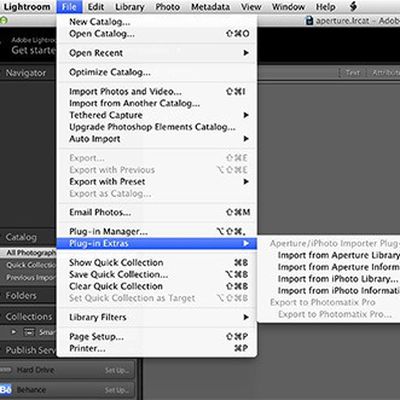
Using the plugin, Aperture users can import the following data into Lightroom: Flags, Star Ratings, Keywords, GPS Data, Rejects, Hidden Files, Color Labels, Stacks, and Face Tags.
Color Labels, Stacks, and Face Tags are imported as Lightroom keywords, and because adjustments to photos made in Aperture can't be read into Lightroom, the tool will import both original images and copies of images with adjustments applied.
Former Aperture users who sign up for Adobe's Creative Cloud Photography Plan (priced at $9.99 per month) will receive a free three-month membership to photography site KelbyOne, which offers a number of tutorials on transitioning from Aperture to Lightroom and several Lightroom training videos.
The now-discontinued Aperture has long lagged behind competing software like Lightroom for Adobe, and as its last major version update came in October of 2013, it is no surprise that Apple has opted to abandon the software. Apple has offered a final update to Aperture to allow it to run on OS X Yosemite, but plans to stop development after that.
Though Aperture is no longer being updated, early screenshots of the OS X Photos app and information from Apple representatives suggests that some of Aperture's professional-grade features might make it into the upcoming Photos app.












































![Apple Pulls Keynote, Pages and Numbers From App Store [Update: Back]](https://images.macrumors.com/t/Okb7kitB_gNr6qe5Pex9nQIysD8=/112x112/article-new/2026/01/Apple-Creator-Studio-iWork-suite.jpg)


Top Rated Comments
I'm sticking with Aperture until it actually stop working.
I always thought that was "cue", because something is preparing and not lining up.
If anything i'd say the new photos app UI is based on the aperture full screen UI, which I really liked and spent most of my time in. I find both light rooms UI and workflow to be far worse than aperture.
I'm still hoping for either the pixelmator folk to release an aperture replacement or for apple to buy them out and use the team to build some apps to compete with adobe's stranglehold on the market. Pixelmator still isn't up to photoshop levels of functionality but it's significantly faster and has a more mac native interface.
Because as nice as new features are, workflow is far more important and Lightroom is a nightmare to work with. aperture 3 was perfect for the job years ago and hasn't lost any functionality so as long as it still works i'll be using it over lightroom.
In the 16 months between Apple announcing this and their ending support for Aperture Adobe came out with this in month number 4. How is that "too late?"