Microsoft Office Apps Top App Store Charts One Day After Release

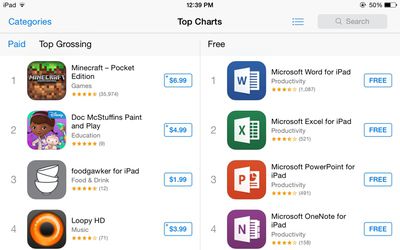
Just a day after being released into the App Store, Microsoft's new iPad Apps, including Word, Excel, and PowerPoint, appear to be quite popular with consumers, ranking as the top three free iPad apps in the App Store, with the redesigned Microsoft OneNote in the number four spot.

Microsoft Word for iPad is ranked as the number five top grossing app, while Excel is ranked twelfth, indicating Microsoft's downloads are raking in some cash in the form of Office 365 subscriptions, which are available within the apps as a $9.99/month or $99/year purchase. Users can also purchase Office 365 subscriptions outside of the app, however, which would not influence App Store charts.
microsoftappstorecharts1
While Microsoft's apps can be downloaded at no charge and allow documents to be viewed or presented, creating and editing documents requires an Office 365 subscription that also earns Apple a 30 percent cut of each in-app purchase, making the current success of the apps beneficial to both companies.

Microsoft Office apps for the iPad have been a long time coming, with Microsoft first indicating its intention to work on mobile Office apps in 2010. In early 2012, a prototype design of Office for iPad surfaced, but it wasn't until Satya Nadella took over as CEO that the apps actually saw a release.

In the past, Microsoft has used the lack of Office productivity apps on the iPad as a main advertising point for its Surface Tablet, attempting to lure customers to the product on the strength of its popular productivity software. That strategy was largely unsuccessful, however, as the original Surface failed to catch on with consumers.

All three of Microsoft's productivity apps can be downloaded from the App Store for free, with full functionality unlocked through an Office 365 subscription. While Office for iPad requires Office 365, Microsoft yesterday updated Microsoft Office Mobile for iPhone to allow both viewing and editing for free, no subscription required.

- Microsoft Word for iPad [Direct Link]
- Microsoft Excel for iPad [Direct Link]
- Microsoft PowerPoint for iPad [Direct Link]
- Microsoft Office Mobile for iPhone [Direct Link]

Popular Stories

iPhone Top Left Hole Punch Face ID Feature Purple

iPhone 18 Pro Launching Later This Year With These 12 New Features

Thursday January 15, 2026 10:56 am PST by
While the iPhone 18 Pro and iPhone 18 Pro Max are not expected to launch for another eight months, there are already plenty of rumors about the devices. Below, we have recapped 12 features rumored for the iPhone 18 Pro models, as of January 2026: The same overall design is expected, with 6.3-inch and 6.9-inch display sizes, and a "plateau" housing three rear cameras Under-screen Face ID...
Apple MacBook Pro M4 hero

These 5 Apple Products Will Reportedly Be Upgraded With OLED Displays

Friday January 16, 2026 7:07 pm PST by
Apple plans to upgrade the iPad mini, MacBook Pro, iPad Air, iMac, and MacBook Air with OLED displays between 2026 and 2028, according to DigiTimes. Bloomberg's Mark Gurman previously reported that the iPad mini and MacBook Pro will receive an OLED display as early as this year, but he does not expect the MacBook Air to adopt the technology until 2028 at the earliest. A new iPad Air is...
2024 iPhone Boxes Feature

Apple Adjusts Trade-In Values for iPhones, Macs, and More

Thursday January 15, 2026 11:19 am PST by
Apple today updated its trade-in values for select iPhone, iPad, Mac, and Apple Watch models. Trade-ins can be completed on Apple's website, or at an Apple Store. The charts below provide an overview of Apple's current and previous trade-in values in the United States, according to the company's website. Most of the values declined slightly, but some of the Mac values increased. iPhone ...
Apple Wallet ID Illinois

Apple Plans to Expand iPhone Driver's Licenses to These 7 U.S. States

Friday January 16, 2026 12:12 pm PST by
In select U.S. states, residents can add their driver's license or state ID to the Apple Wallet app on the iPhone and Apple Watch, and then use it to display proof of identity or age at select airports and businesses, and in select apps. The feature is currently available in 13 U.S. states and Puerto Rico, and it is expected to launch in at least seven more in the future. To set up the...
iPhone Top Left Hole Punch Face ID Feature Purple

New Leak Reveals iPhone 18 Pro Display Sizes, Under-Screen Face ID, and More

Wednesday January 14, 2026 7:09 am PST by
While the iPhone 18 Pro models are still around eight months away, a leaker has shared some alleged details about the devices. In a post on Chinese social media platform Weibo this week, the account Digital Chat Station said the iPhone 18 Pro and iPhone 18 Pro Max will have the same 6.3-inch and 6.9-inch display sizes as the iPhone 17 Pro and iPhone 17 Pro Max. Consistent with previous...

Top Rated Comments

dannyyankou Avatar
154 months ago
And then got deleted by thousands of people when they discovered it's $99.99/year.
Score: 135 Votes (Like | Disagree)
Dulcimer Avatar
154 months ago
…and most of them quickly realized that they couldn't actually make any documents :P
Score: 71 Votes (Like | Disagree)
ashwin4 Avatar
154 months ago
Well that's what happens when you market it as free when it really isn't...
Score: 68 Votes (Like | Disagree)
0815 Avatar
154 months ago
downloading is not the same as paying for it ...

I also downloaded it to give it a try, just to see what they came up with. But actually, you can't do anything with it without paying. Officially you can 'read' documents, but only if you have the microsoft drive (or however they call it) - there are no other ways of getting documents in there. I know I can only read, but sort of was hoping to have some decent ways of getting documents in there to read.

So yes, I downloaded, found out that not usable (even for a quick try out) and deleted.

To bad they don't have a measure for the most deleted app .....
Score: 54 Votes (Like | Disagree)
arn Avatar
154 months ago
downloading is not the same as paying for it ...

I also downloaded it to give it a try, just to see what they came up with. But actually, you can't do anything with it without paying. Officially you can 'read' documents, but only if you have the microsoft drive (or however they call it) - there are no other ways of getting documents in there. I know I can only read, but sort of was hoping to have some decent ways of getting documents in there to read.

So yes, I downloaded, found out that not usable (even for a quick try out) and deleted.

To bad they don't have a measure for the most deleted app .....

It's also near the top of the grossing charts which means people are subscribing/paying

arn
Score: 44 Votes (Like | Disagree)
samcraig Avatar
154 months ago
Funny.

I thought Microsoft was way too late to the party to have such a popular app.

Yes. It's "free" to download.

But it's also not $99 specifically to use the app.

For one - if you already subscribe to Office 365, it's free with no additional fees.

Students get a HUGE discount on 4 years of service.

And so on.

Lots of bitter people over silliness. Don't want to use Office on the iPad - then don't. The need to ridicule the app or Microsoft for having a revenue model is ridiculous.
Score: 39 Votes (Like | Disagree)