Apple Details iOS User Interface That Compensates for Device Motion
Apple has received a patent -- originally filed for in 2007, when the original iPhone was only months old -- that allows an iOS device to adjust its screen to make it easier for users to interact with the touchscreen when it detects movement (via AppleInsider).
For example, play and next/previous track buttons on the lock screen, or listings in the Contacts app, could get larger if the iPhone detects that the user is jogging. It could also have items like app buttons on the home screen move themselves slightly to give the illusion of stability.
Apple proposes using the gyroscope, proximity sensor, accelerometer and other sensors to detect movement and the angle of the display, with the iPhone then adjusting user interface elements to prevent touch errors. It also learns about how the user touches the display, allowing it to better correct for errors in the future.
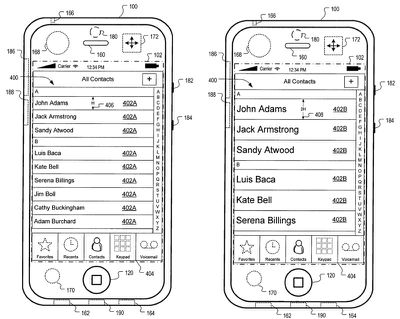
In general, one aspect of the subject matter described in this specification can be embodied in methods that include the actions of detecting a pattern of motion of a device; and adjusting a graphical user interface of the device in response to the detected pattern of motion. Other embodiments of this aspect include corresponding systems, apparatus, devices, computer program products, and computer readable media.
In general, another aspect of the subject matter described in this specification can be embodied in methods that include the actions of detecting a motion of a device; comparing the detected motion to a predetermined signature of motion; and adjusting a graphical user interface of the device based on the comparing. Other embodiments of this aspect include corresponding systems, apparatus, devices, computer program products, and computer readable media.
Particular embodiments of the subject matter described in this specification can be implemented to realize one or more of the following advantages. Loss in accuracy of a user's interactions with a touch-sensitive display of a device or user mistakes with respect to the selection of user interface elements on a touch-sensitive display, due to movement of the user and/or the device, is mitigated. A device user interface can be adjusted to provide better visibility or usability.
The patent was originally filed for back in 2007 and Apple has not yet implemented the design into iOS. Apple frequently files for patents on inventions that it never uses commercially, but something similar could appear in iOS in the future.

Popular Stories
Next year's iPhone 18 Pro and iPhone 18 Pro Max will be equipped with under-screen Face ID, and the front camera will be moved to the top-left corner of the screen, according to a new report from The Information's Wayne Ma and Qianer Liu.
As a result of these changes, the report said the iPhone 18 Pro models will not have a pill-shaped Dynamic Island cutout at the top of the screen....
There's now a dedicated Apple Music app for ChatGPT, which allows ChatGPT to make music recommendations and build playlists.
Apple Music can be added to ChatGPT through the Settings section in the Mac app, website, or iOS app. Apple Music is listed under the apps option, and connecting to it requires signing in with your Apple Account for authorization purposes.
ChatGPT can be used to...
There has been a whirlwind of rumors over the last few days, sourced from leaked internal software designed for the iPhone and the Mac, and news sites like The Information. Below, we have a quick recap of everything we've heard this week, which serves as a guide to Apple's product plans in 2026 and beyond.
We've organized the info by likely release date, though there are some products that...
We have been covering iPhone 18 Pro, iPhone 17e, and iPhone Fold details from The Information's report about future iPhone models, and next up is the iPhone Air 2.
The report says that Apple aims to make the iPhone Air 2 more attractive in two ways.
First, Apple is apparently considering adding a second rear camera to the device, which would resolve a key limitation. The current iPhone...
Apple is testing iOS 26.3, the next version of iOS 26 that will launch around January. Since iOS 26.3's testing is happening over the holidays, it is a smaller update with fewer features than we've seen in prior betas.
We've rounded up what's new so far, and we'll add to our list with subsequent betas if we come across any other features.
Transfer to Android
Apple is making it simpler...
Software from an iPhone prototype running an early build of iOS 26 leaked last week, giving us a glimpse at future Apple devices and iOS features. We recapped device codenames in our prior article, and now we have a list of some of the most notable feature flags that were found in the software code.
In some cases, it's obvious what the feature flags are referring to, while some are more...
Last week, details about unreleased Apple devices and future iOS features were shared by Macworld. This week, we learned where the information came from, plus we have more findings from the leak.
As it turns out, an Apple prototype device running an early build of iOS 26 was sold, and the person who bought it shared the software. The OS has a version number of 23A5234w, and the first...

An internal Apple kernel debug kit suggests Apple has tested a MacBook with the A15 chip, alongside a separate A18 Pro-based MacBook that appears to be closer to a shippable product.
The information comes from internal kernel debug kit files used by Apple engineers. The kit was accidentally released on Apple's website earlier this year, but it was quickly pulled after information started...
Apple is developing a high-end iMac featuring the M5 Max chip, according to information from leaked internal software.

Subscribe to the MacRumors YouTube channel for more videos.

The finding comes from leaked kernel debug kit files used by Apple engineers. These kernel debug kit files enumerate unreleased Apple hardware by internal identifiers, such as codenames and platform names, and they...