Earlier this week, we noted that Apple had begun in-store repairs of iPhone 5 displays, a $149 procedure that is part of an effort by Apple to revamp its AppleCare and warranty services.

We had been told that Apple had sent new equipment to the stores in order to allow Geniuses to calibrate the replacement displays once they had been installed, and 512 Pixels has now shared a photo of one of those machines installed in the back-of-house area of an Apple retail store.

From what I’ve heard, Apple Stores have been instructed that the iPhone is the “top priority” for the Genius Bar, and this new repair — and crazy machine — surely reflects that. In addition to the program changes, many stores have Geniuses that are dedicated to iPhone repairs for sections of their shifts. In short, Apple is pouring resources in to in-store iPhone repairs.
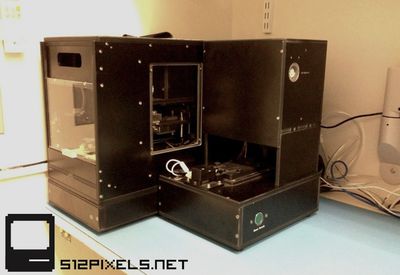
iphone_display_calibration
Apple's standard price for out-of-warranty iPhone 5 repairs is $229, so the new display replacement program may save some customers a bit of money and ensure that they receive their original devices back rather than receiving new units and having to restore backups onto them.

Related Forum: iPhone

Top Rated Comments

Kirsten Hollerd Avatar
163 months ago
This "calibration" thing is a sham. Its not something that is adjusted. The display either works or it doesn't.

Have heard reports of many of these machines arriving broken or are breaking down easily. Good luck, Apple.

Maybe they can hire us guys that fix their phones already to fix their machines that are supposed to fix their phones.

I'm interested to hear what you believe Apple's motivation would be to send non-necessary "sham" equipment out to their stores.

My friend who works there told me that the equipment runs several graphics tests on the display in conjunction with a real calibration app that pairs the display to the phone. It also tests things like the proximity sensor and ambient light sensor before it goes back to the customer.

If $149(from what I've read) is a competitive price and Apple wants to pay for equipment to ensure the best possible repair how is that a "sham", since by definition a sham is not in the customer's best interest? Where are they wronging people?
Score: 8 Votes (Like | Disagree)
tanousjm Avatar
163 months ago
Having worked in three Apple Retail Stores, and subbed in a total of seven or eight, I have NO idea how a machine like that will fit in the majority of stores. Aside from the flagship stores, BoH (Back of House) is extremely crowded. At one point during the fall rush, non-invasive Genius Bar repairs had to be performed in the already-packed employee break area.

EDIT: Hahaha, I now realize that my scale on this thing was WAY off. Oh boy.

My tired brain saw it like this:

Score: 8 Votes (Like | Disagree)
jll62 Avatar
163 months ago
I didn't say the machine is a sham. The machine replaces the display, yes. But there is no actually calibrating anything. The LCD/digitizer is already made. It either works or it doesn't. The whole "needing to be calibrated" thing is just to make the customer feel like it is the only way to do it correctly.
All displays have variability in how they represent colors. You calibrate individual displays by using special hardware and software to create a custom color profile that can then be used by the OS to correctly map colors so that what's output to an individual screen looks correct to the viewer. Photographers, designers, and other folks who care about spot on color reproduction have been calibrating their desktop and laptop displays by using special hardware to generate these color profiles for years.

I have no insight that this is what Apple's doing here, but when I hear the word "calibrate" in the context of displays, this is what instantly comes to mind. I would not be surprised to hear that this new device has a step in the process where it generates a custom color profile specific to the new display. If that is happening, then yes, they would be calibrating the new displays.
Score: 7 Votes (Like | Disagree)
charlituna Avatar
163 months ago
This "calibration" thing is a sham. Its not something that is adjusted. The display either works or it doesn't.

So you've used one. Must have if you know the machine is 'a sham'

So which store was it exactly
Score: 7 Votes (Like | Disagree)
bearbo Avatar
163 months ago
Haven't posted for years, but this is getting ridiculous.

Of course you can calibrate the touch screen. :confused:

How does touch screen work? The digitizer detects where your chubby little finger(s) touch the screen, and sending the OS the coordinates. If the digitizer was manufactured and mounted to the glass perfectly, then those coordinates would correspond to the correct location that you touched the screen.

However, if something was not perfect, for example, the digitizer is consistently telling the OS a x-coordinate 5% to the right compared the actual location of the contact, then the OS can compensate for that on the software level.

Calibrations (of the touch screen) could be done by having the machine "touch" the screen at a number of pre-specified locations, and detect where the digitizer "thinks" that the machine has touched, thereby producing a calibration map.

This kind of calibration has been done for decades on various types of touch screen, such as the likes of Wacom tablets.

Now, I don't profess knowledge of the working of this particular machine, but to say "once the touchscreen digitizer is applied to the glass/LCD, that's that" is laughable. Just because the general public cannot access the part of the OS that can report the raw data from the digitizer, and compensate for the difference, does not mean it cannot be done.

I figured I'd wake up to this storm. Haha. I think I've been a good sport!

BUT, I'm glad someone can pick apart what exactly I was talking about SPECIFICALLY relating to the touch screen. Nothing else.

As someone else stated, being in a background with dealing with touchscreens all day you kinda see one way. In my "world", when I think calibration, I relate it to people talking about the touch screen because I've heard it numerous times from uninformed people. Which I still stand by the fact that once the touchscreen digitizer is applied to the glass/LCD, that's that.

I was not talking about the display itself which would make sense, again as I have stated before.

I was blind in my one track statement talking about the touchscreen and everyone else was blind in their one track to just be "right".

To that one guy - My "first month" is going just great. ;]
Score: 4 Votes (Like | Disagree)
ijohn.8.80 Avatar
163 months ago
[idealism]About time that society as a whole got the idea that there is actually a limited amount of resources to go around and if we all wanna have our piece, this should be the norm for everything we buy. Repair not discard, that is.
[/idealism]
Score: 4 Votes (Like | Disagree)

Popular Stories

iOS 26

iOS 26.2 Coming Soon With These 8 New Features on Your iPhone

Thursday December 11, 2025 8:49 am PST by
Apple seeded the second iOS 26.2 Release Candidate to developers earlier this week, meaning the update will be released to the general public very soon. Apple confirmed iOS 26.2 would be released in December, but it did not provide a specific date. We expect the update to be released by early next week. iOS 26.2 includes a handful of new features and changes on the iPhone, such as a new...
AirPods Pro Firmware Feature

Apple Releases New Firmware for AirPods Pro 2 and AirPods Pro 3

Thursday December 11, 2025 11:28 am PST by
Apple today released new firmware designed for the AirPods Pro 3 and the prior-generation AirPods Pro 2. The AirPods Pro 3 firmware is 8B30, up from 8B25, while the AirPods Pro 2 firmware is 8B28, up from 8B21. There's no word on what's include in the updated firmware, but the AirPods Pro 2 and AirPods Pro 3 are getting expanded support for Live Translation in the European Union in iOS...
iOS 26

iOS 26.4 and iOS 27 Features Revealed in New Leak

Friday December 12, 2025 10:56 am PST by
Macworld's Filipe Espósito today revealed a handful of features that Apple is allegedly planning for iOS 26.4, iOS 27, and even iOS 28. The report said the features are referenced within the code for a leaked internal build of iOS 26 that is not meant to be seen by the public. However, it appears that Espósito and/or his sources managed to gain access to it, providing us with a sneak peek...
iOS 26

Apple Releases iOS 26.2 With Alarms for Reminders, Lock Screen Changes, Enhanced Safety Alerts and More

Friday December 12, 2025 10:10 am PST by
Apple today released iOS 26.2, the second major update to the iOS 26 operating system that came out in September, iOS 26.2 comes a little over a month after iOS 26.1 launched. ‌iOS 26‌.2 is compatible with the ‌iPhone‌ 11 series and later, as well as the second-generation ‌iPhone‌ SE. The new software can be downloaded on eligible iPhones over-the-air by going to Settings >...
Google maps feaure

Google Maps Quietly Added This Long-Overdue Feature for Drivers

Wednesday December 10, 2025 2:52 am PST by
Google Maps on iOS quietly gained a new feature recently that automatically recognizes where you've parked your vehicle and saves the location for you. Announced on LinkedIn by Rio Akasaka, Google Maps' senior product manager, the new feature auto-detects your parked location even if you don't use the parking pin function, saves it for up to 48 hours, and then automatically removes it once...
AirTag 2 Mock Feature

Apple AirTag 2: Four New Features Found in iOS 26 Code

Thursday December 11, 2025 10:31 am PST by
The AirTag 2 will include a handful of new features that will improve tracking capabilities, according to a new report from Macworld. The site says that it was able to access an internal build of iOS 26, which includes references to multiple unreleased products. Here's what's supposedly coming: An improved pairing process, though no details were provided. AirTag pairing is already...
macOS Tahoe 26 Thumb

Apple Releases macOS Tahoe 26.2 With Edge Light

Friday December 12, 2025 10:08 am PST by
Apple today released macOS Tahoe 26.2, the second major update to the macOS Tahoe operating system that came out in September. macOS Tahoe 26.2 comes five weeks after Apple released macOS Tahoe 26.1. Mac users can download the macOS Tahoe update by using the Software Update section of System Settings. macOS Tahoe 26.2 includes Edge Light, a feature that illuminates your face with soft...
iOS 26

15 New Things Your iPhone Can Do in iOS 26.2

Friday December 5, 2025 9:40 am PST by
Apple is about to release iOS 26.2, the second major point update for iPhones since iOS 26 was rolled out in September, and there are at least 15 notable changes and improvements worth checking out. We've rounded them up below. Apple is expected to roll out iOS 26.2 to compatible devices sometime between December 8 and December 16. When the update drops, you can check Apple's servers for the ...
maxresdefault

iOS 26 Code Leak Reveals Apple Smart Home Hub Details

Thursday December 11, 2025 4:02 pm PST by
Apple is working on a smart home hub that will rely heavily on the more capable version of Siri that's coming next year. We've heard quite a bit about the hub over the last two years, but a recent iOS 26 code leak provides additional insight into what we can expect and confirms rumored features. Subscribe to the MacRumors YouTube channel for more videos. Macworld claims to have access to an ...