Drafts Updated to Version 3.0, Adding Deeper Organization and New Actions - MacRumors
Skip to Content

Drafts Updated to Version 3.0, Adding Deeper Organization and New Actions

by

Drafts, the note-taking app from Agile Tortoise, was updated to version 3.0 today. Drafts is a simple app with a clean interface that allows users to quickly jot down text, thoughts, ideas, and notes.

Once written, snippets of text can be sent as a text message or an email, posted to social networks, added to the calendar or reminders, copied to the clipboard, and saved to third party apps like Evernote and Clear.

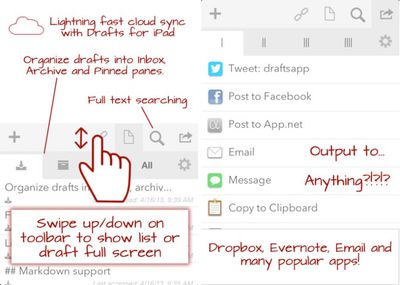
Many users utilize Drafts as a one-stop app for all text input, and those power users will be pleased to hear that Drafts is now able organize notes into four tabs, allowing for both quick access notes, archives, and a view that includes all notes.
drafts
The new tabs can be used manually, with swipe gestures, or notes can be filed automatically after an action is taken. For example, if a crafted note is tweeted, Drafts can then automatically archive the note, hiding it out of site.

Drafts 3.0 also allows actions to be organized into four separate tabs and new actions have been added as well, including expanded support for Evernote. There's also a new extended keyboard and TextExpander support. Drafts has two separate versions for the iPad and the iPhone which are both available from the App Store. For full release notes, visit the Agile Tortoise website.

-Drafts for iPhone ($2.99) [Direct Link]
-Drafts for iPad ($3.99) [Direct Link]

Top Rated Comments

173 months ago
"Drafts is a simple app..."

That's how they all start...
In reality it's the most convoluted app I've ever used. Why use this when I can post in the app I want to, to begin with.
Score: 1 Votes (Like | Disagree)

Popular Stories

apple wallet drivers license feature iPhone 15 pro

Apple Says iPhone Driver's Licenses Will Expand to These 6 U.S. States

Thursday July 9, 2026 7:29 am PDT by
In select U.S. states, residents can add their driver's license or state ID to the Apple Wallet app on the iPhone and Apple Watch, and then use it to display proof of identity or age at select airports and businesses, and in select apps. To set up the feature, open the Wallet app on the iPhone and tap on the plus sign in the top-right corner. Next, tap on Driver's License and ID Cards,...
apple silicon 1 feature

Apple Silicon is Taking an Unexpected Turn

Friday July 10, 2026 7:24 am PDT by
Ever since the Mac switched from Intel processors to Apple silicon starting in 2020, each generation of M-series chips has included higher-end Pro and Max variants. If a recent report proves to be accurate, though, that streak will be coming to an end. According to Bloomberg's Mark Gurman, Apple will be releasing a regular M6 chip, but it has no plans to offer higher-end M6 Pro and M6 Max...
iphone 16 teal

'Siri AI' Lawsuit Update: Apple to Pay Owners of These iPhone Models

Thursday July 9, 2026 7:08 am PDT by
In May, Apple agreed to pay $250 million to settle a U.S. class action lawsuit over Siri AI's delayed launch, and eligible iPhone users could receive up to a $95 payout. This week, the California court overseeing the case held a hearing regarding preliminary approval of the settlement, but the judge has not yet issued a ruling. It will likely be at least a few more months before eligible...