

CNET reports on the discovery of Windows malware embedded within an iPhone application available through the App Store. But rather than a directed attack at Windows users, the malware appears to have been accidentally included from an infected developer's system. The malware is also relatively old and easily detected by most antivirus software for Windows once the App Store package has been unwrapped.
The malware was first discovered by a user posting in the Apple support forums who noted that a download of Instaquotes-Quotes Cards For Instagram from developer Ilyas Hassani triggered warnings from the ClamXav antivirus software for Mac. While the Windows malware obviously could not harm the user's OS X installation, it was flagged as an infected file posing a danger to Windows systems. After learning about the discovery, CNET performed additional testing on the download to confirm that it was not a false positive.
Since the downloaded .ipa file is a package, these executables could be extracted using the package manager Pacifist, and then more accurately scanned. Afterward, other malware programs like Sophos that initially missed detecting the malware instantly picked it up and described it as "Mal/CoiDung-A," a worm written in visual basic that installs files within the Windows system directory and then modifies the Windows registry to execute the malware when the system is restarted.
Copying the malware to a Windows virtual machine running the latest version of Microsoft Security Essentials resulted in the malware being immediately detected and removed from the system.
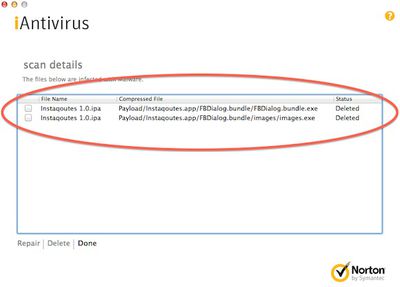 It is unclear exactly how or why the malware came to be included in the App Store package, but it seems almost certain to have been an accidental inclusion. As delivered inside the application package, it appears to pose no harm to Windows users, who would have to decompress the package and manually run the infected file in order to expose themselves to the malware.
The infected application debuted in the App Store on July 19 and is currently still available for download after a temporary price drop from $0.99 to free over the weekend.












































![Apple Pulls Keynote, Pages and Numbers From App Store [Update: Back]](https://images.macrumors.com/t/Okb7kitB_gNr6qe5Pex9nQIysD8=/112x112/article-new/2026/01/Apple-Creator-Studio-iWork-suite.jpg)


Top Rated Comments
I keep reading that Windows doesn't collect virus anymore yet continually I see the
ramifications of believing this.
Obviously, I'm not a developer, so I'm sure I'm missing something, just curious as to what...
Then, why choose that particular folder? It isn't showing up in every folder path. Even if he says it wasn't deliberate, is it possible to get there, and only there, without it being on purpose?
But .ipa files are not packages, as the article indicates, they're just renamed ZIP files. Pacifist should not be necessary to open them; just rename the file to something.zip and double click it.
Windows viruses usually attach to Windows files known to be executables or have vulnerabilities that allow it to execute.
An .ipa file is totally foreign to Windows, and the locations where the virus installed itself are too much to be a mere coincidence.
Weird... just weird...