Apple Researching Methods for Facilitating Emergency Phone Calls

A patent application entitled Method and system for prolonging emergency calls, filed in December 2007 and disclosed today, reveals that Apple has been researching methods for facilitating emergency phone calls from the iPhone. The scope of Apple's work extends to recognition of when a given call is an emergency call, activation of power-saving measures, use of confirmation buttons and tasks to decrease chances of premature disconnection, and the use of pre-determined "phrase buttons" to enable sending of automated messages and information.

In determining which telephone calls are emergency calls, Apple specifies that certain numbers such as 911 could automatically be categorized as "emergency", while others could be user-defined, such as within a dedicated field in the iPhone's "Contacts" application. Once an emergency call is detected, the iPhone could then implement a series of measures to facilitate the call. In one such measure, an extra step could be required before termination of the call could be permitted.

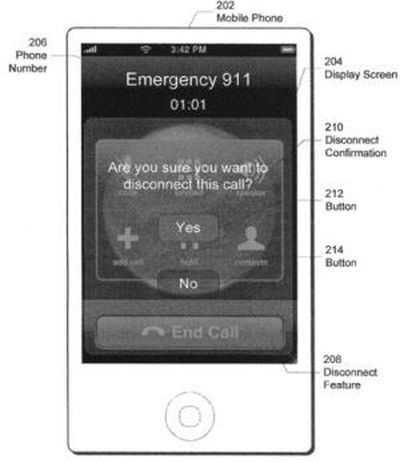
For example, if the user presses a button to disconnect an emergency call, emergency-mode processor 106 may query the user for confirmation before disconnecting the call. The confirmation may be in the form of a button, a code or password, a verbal acknowledgement, and/or other input by the user. Emergency-mode processor 106 may even disable the user's ability to disconnect the call. As a result, the call may only be disconnected by someone (e.g., an emergency operator) on the other end of the emergency call. Further, the user may select settings to specify the level of difficulty and the methods of disconnecting emergency calls. The user may also select settings for each individual emergency number. For example, the user may disable the ability to disconnect a 911 call while activating a disconnect confirmation in other emergency calls.
104933 confirm disconnect 300
Confirmation buttons for emergency call disconnection

The iPhone's emergency mode could also enact a number of power-saving steps in order to preserve the device's battery life. For example, Apple proposes such actions as dimming the display screen and turning off non-essential hardware components such as Bluetooth, Wi-Fi or camera sensors.

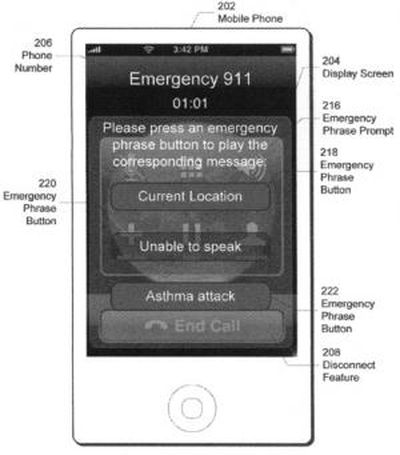
Finally, Apple describes the use of "emergency phrase buttons" that could allow for preset actions in the event that the caller is unable to speak. Apple cites examples of pre-recorded audio files that could be activated to notify 911 dispatchers that the caller is choking, automatic transmission of GPS coordinates, or automated requests to contact a friend or family member.
104934 phrase buttons 300
iPhone "emergency phrase buttons"

Related Forum: iPhone

Popular Stories

iOS 26

iOS 26.4 and iOS 27 Features Revealed in New Leak

Friday December 12, 2025 10:56 am PST by
Macworld's Filipe Espósito today revealed a handful of features that Apple is allegedly planning for iOS 26.4, iOS 27, and even iOS 28. The report said the features are referenced within the code for a leaked internal build of iOS 26 that is not meant to be seen by the public. However, it appears that Espósito and/or his sources managed to gain access to it, providing us with a sneak peek...
iOS 26

iOS 26.2 Coming Soon With These 8 New Features on Your iPhone

Thursday December 11, 2025 8:49 am PST by
Apple seeded the second iOS 26.2 Release Candidate to developers earlier this week, meaning the update will be released to the general public very soon. Apple confirmed iOS 26.2 would be released in December, but it did not provide a specific date. We expect the update to be released by early next week. iOS 26.2 includes a handful of new features and changes on the iPhone, such as a new...
iOS 26

Apple Releases iOS 26.2 With Alarms for Reminders, Lock Screen Changes, Enhanced Safety Alerts and More

Friday December 12, 2025 10:10 am PST by
Apple today released iOS 26.2, the second major update to the iOS 26 operating system that came out in September, iOS 26.2 comes a little over a month after iOS 26.1 launched. ‌iOS 26‌.2 is compatible with the ‌iPhone‌ 11 series and later, as well as the second-generation ‌iPhone‌ SE. The new software can be downloaded on eligible iPhones over-the-air by going to Settings >...
AirPods Pro Firmware Feature

Apple Releases New Firmware for AirPods Pro 2 and AirPods Pro 3

Thursday December 11, 2025 11:28 am PST by
Apple today released new firmware designed for the AirPods Pro 3 and the prior-generation AirPods Pro 2. The AirPods Pro 3 firmware is 8B30, up from 8B25, while the AirPods Pro 2 firmware is 8B28, up from 8B21. There's no word on what's include in the updated firmware, but the AirPods Pro 2 and AirPods Pro 3 are getting expanded support for Live Translation in the European Union in iOS...
macOS Tahoe 26 Thumb

Apple Releases macOS Tahoe 26.2 With Edge Light

Friday December 12, 2025 10:08 am PST by
Apple today released macOS Tahoe 26.2, the second major update to the macOS Tahoe operating system that came out in September. macOS Tahoe 26.2 comes five weeks after Apple released macOS Tahoe 26.1. Mac users can download the macOS Tahoe update by using the Software Update section of System Settings. macOS Tahoe 26.2 includes Edge Light, a feature that illuminates your face with soft...
AirTag 2 Mock Feature

Apple AirTag 2: Four New Features Found in iOS 26 Code

Thursday December 11, 2025 10:31 am PST by
The AirTag 2 will include a handful of new features that will improve tracking capabilities, according to a new report from Macworld. The site says that it was able to access an internal build of iOS 26, which includes references to multiple unreleased products. Here's what's supposedly coming: An improved pairing process, though no details were provided. AirTag pairing is already...
ipados 26 1 slide over

Apple Releases iPadOS 26.2 With Multitasking Improvements

Friday December 12, 2025 10:09 am PST by
Apple today released iPadOS 26.2, the second major update to the iPadOS 26 operating system released in September. iPadOS 26.2 comes a month after iPadOS 26.1. The new software can be downloaded on eligible iPads over-the-air by going to Settings > General > Software Update. iPadOS 26.2 continues with the multitasking improvements that were added with iPadOS 26.1. You can now drag and...
bug security vulnerability issue fix larry

Update Now: iOS 26.2 Fixes 20+ Security Vulnerabilities

Friday December 12, 2025 11:11 am PST by
Apple today released iOS 26.2, iPadOS 26.2, and macOS 26.2, all of which introduce new features, bug fixes, and security improvements. Apple says that the updates address over 20 vulnerabilities, including two bugs that are known to have been actively exploited. There are a pair of WebKit vulnerabilities that could allow maliciously crafted web content to execute code or cause memory...