

Multi-iPhone households have likely already been thrust into the dilemma of whether or not to purchase their favorite iPhone applications multiple times for multiple iPhones in their possession (but synced to multiple iTunes libraries, as in a family situation). Now, one user has discovered a way around the predicament.

The solution uses the abilities currently present in iTunes to authorize and download the application to other iTunes libraries. Essentially the method is as follows:

1. Log-in to second iTunes library using the AppleID you used to purchase the Application.
2. Go to the desired application and click "Buy Application". The App Store should give the following prompt:
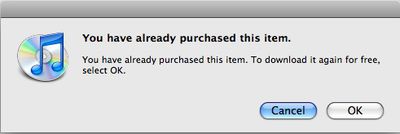
073911 freeappstoreapp

3. Download the app, then log out of your account, and you should be able to sync the application with the iPhone that is connected to that iTunes library!

Credit to Melvin Rivera for posting the method.

Alternative Method: As noted in our forums and elsewhere, another way to share applications is to drag and drop the application .ipa file from the "Mobile Applications" folder on the computer where the app was purchased onto the iTunes library that doesn't contain the application. If the iTunes library has been authorized to play your music content from iTunes, the application will transfer and will sync on the the other iPhone as above.


Related Forum: iPhone

Popular Stories

iPhone Top Left Hole Punch Face ID Feature Purple

iPhone 18 Pro Launching Later This Year With These 12 New Features

Thursday January 15, 2026 10:56 am PST by
While the iPhone 18 Pro and iPhone 18 Pro Max are not expected to launch for another eight months, there are already plenty of rumors about the devices. Below, we have recapped 12 features rumored for the iPhone 18 Pro models, as of January 2026: The same overall design is expected, with 6.3-inch and 6.9-inch display sizes, and a "plateau" housing three rear cameras Under-screen Face ID...
Apple MacBook Pro M4 hero

These 5 Apple Products Will Reportedly Be Upgraded With OLED Displays

Friday January 16, 2026 7:07 pm PST by
Apple plans to upgrade the iPad mini, MacBook Pro, iPad Air, iMac, and MacBook Air with OLED displays between 2026 and 2028, according to DigiTimes. Bloomberg's Mark Gurman previously reported that the iPad mini and MacBook Pro will receive an OLED display as early as this year, but he does not expect the MacBook Air to adopt the technology until 2028 at the earliest. A new iPad Air is...
iOS 27 Mock Quick

iOS 27 Will Add These 8 New Features to Your iPhone

Sunday January 18, 2026 3:51 pm PST by
iOS 27 is still many months away, but there are already plenty of rumors about new features that will be included in the software update. The first beta of iOS 27 will be released during WWDC 2026 in June, and the update should be released to all users with a compatible iPhone in September. Bloomberg's Mark Gurman said that iOS 27 will be similar to Mac OS X Snow Leopard, in the sense...
Apple Wallet ID Illinois

Apple Plans to Expand iPhone Driver's Licenses to These 7 U.S. States

Friday January 16, 2026 12:12 pm PST by
In select U.S. states, residents can add their driver's license or state ID to the Apple Wallet app on the iPhone and Apple Watch, and then use it to display proof of identity or age at select airports and businesses, and in select apps. The feature is currently available in 13 U.S. states and Puerto Rico, and it is expected to launch in at least seven more in the future. To set up the...
14 inch MacBook Pro Keyboard

MacBook Pro Buyers Now Facing Up to a Two-Month Wait Ahead of New Models

Sunday January 18, 2026 6:50 pm PST by
MacBook Pro availability is tightening on Apple's online store, with select configurations facing up to a two-month delivery timeframe in the United States. A few 14-inch and 16-inch MacBook Pro configurations with an M4 Pro chip are not facing any shipping delay, but estimated delivery dates for many configurations with an M4 Max chip range from February 6 to February 24 or even later. At...















