Apple debuted its custom-designed C1 modem in the iPhone 16e last month, as part of a multi-year plan to transition away from Qualcomm modems. However, the C1 modem does not extend to the new iPads unveiled earlier this week.
Daring Fireball's John Gruber today said he spoke with an Apple representative who confirmed that the new iPad Air and entry-level iPad models are not equipped with the C1 modem. In addition, FCC documents viewed by MacRumors indicate that cellular configurations of both new iPads are equipped with a Qualcomm modem.
There is still at least one other device that is expected to have an Apple-designed modem this year. According to Apple supply chain analyst Ming-Chi Kuo, the rumored "iPhone 17 Air" model coming in September will also be equipped with the C1 modem.
Apple's modem supply agreement with Qualcomm runs through March 2027, so the company still has time to transition to its own custom-designed modems. Apple develops chips several years before they ship, so it should come as no surprise that the company is reportedly already working on its next-generation C2 and C3 modems.
It's been a busy week for Apple, with new products announced on Tuesday and Wednesday. We're now caught up on what's been rumored for a spring launch, so we thought we'd recap everything Apple came out with this week.
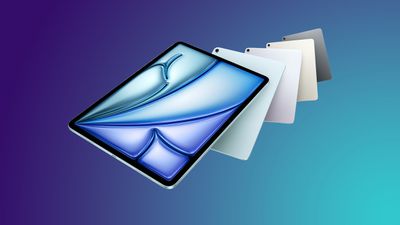
Apple updated the iPad Air on Tuesday, updating it with the new M3 chip. The iPad Air still comes in 11-inch and 13-inch sizes, but there were no design changes and few other new features.
The 3nm M3 chip has an 8-core CPU and a 9-core GPU, an improvement over the 5nm M2 chip. It's faster and more efficient, with some modest performance gains. The chip supports hardware accelerated ray tracing and mesh shading, so you'll be able to play console quality games on the iPad Air.
Apple also debuted a new Magic Keyboard for iPad Air to go along with the M3 iPad Air. It has a larger trackpad and a row of function keys, and it connects to the iPad Air magnetically, receiving power through the Smart Connector. The iPad Air works with the Apple Pencil Pro, much like the prior model.
iPad
The low-cost iPad was also updated, and it got an A16 chip instead of the A14 chip. The A16 chip decision was a bit of a surprise because some rumors said it would get an A17 Pro for Apple Intelligence support, but that didn't happen. If you get Apple's cheapest iPad, which starts at $349, you won't get Apple Intelligence.
The A16 in the iPad has a 5-core CPU and 4-core GPU, along with a 16-core Neural Engine.
Apple says the new iPad has an 11-inch display, while the prior model had a 10.9-inch display, but there haven't been any changes to the display size, in fact. Apple is just rounding differently.
MacBook Air
Apple updated the MacBook Air with the M4 chip and a new light blue color that replaces the space gray color, but there are no other changes.
The M4 MacBook Air starts with a 10-core CPU an 8-core GPU, but there is a 10-core GPU option. It supports up to 32GB RAM instead of 24GB like the prior model, and memory bandwidth is 120GB/s, up from 100GB/s.
Apple also added an updated 12-megapixel front-facing camera with Center Stage support, which will be a major improvement over the prior 1080p FaceTime camera. Like other M4 Macs, the MacBook Air supports two 6K external displays (so two Studio Displays), and clamshell mode isn't needed for it.
Mac Studio
The Mac Studio might be Apple's most exciting announcement, not because there were design changes, but because it's got the only all-new chip we haven't seen before.
Apple is offering the Mac Studio with the M4 Max chip, which was previously unveiled in the MacBook Pro, but there's also an M3 Ultra variant. The M3 Ultra chip is two M3 Max chips linked together for faster performance.
It has up to a 32-core CPU and an 80-core GPU, along with a 32-core Neural Engine and 819GB/s memory bandwidth. It's Apple's most advanced Mac to date. It supports up to 512GB unified memory, and 16TB of storage. If you spec it out with the maximum feature set, it's going to cost you over $14,000.
Launch Dates
You can pre-order all of Apple's new iPads and Macs this week, and a launch is set for March 12. Some custom configurations will take longer to ship.
Is Apple Done?
Unless Apple has a surprise in store that we're not anticipating, launch week has come to an end. We haven't heard rumors about any other products due for a spring refresh, but later this year, we're expecting Apple to launch a new smart home hub, a refreshed Apple TV, new Macs with M5 chips, the AirTag 2, a new HomePod mini, AirPods Pro 3, new iPhone 17 models, new Apple Watch models, and possibly even another Vision Pro.
Our next major round of announcements will come at WWDC with the unveiling of iOS 19 and macOS 16.
Note: MacRumors is an affiliate partner with Best Buy. When you click a link and make a purchase, we may receive a small payment, which helps us keep the site running.

If you are a My Best Buy Plus/Total member, prices start at $949.00 for the 8-Core GPU, 16GB RAM, 256GB SSD 13-inch MacBook Air, down from $999.00. Best Buy also has both 512GB 13-inch models on sale for $50 off.
Note: You will need a My Best Buy Plus/Total membership to see this deal.
Best Buy has the 15-inch M4 MacBook Air on sale as well, starting at $1,149.00 for the 256GB model, down from $1,199.00. You can also find both 512GB models on sale for $50 off if you're a My Best Buy Plus/Total member.
Note: You will need a My Best Buy Plus/Total membership to see this deal.
The new MacBook Air features the M4 chip, plus an upgraded camera and a new Sky Blue color option. The computer will officially launch on March 12.
If you're on the hunt for more discounts, be sure to visit our Apple Deals roundup where we recap the best Apple-related bargains of the past week.
Deals Newsletter
Interested in hearing more about the best deals you can find in 2025? Sign up for our Deals Newsletter and we'll keep you updated so you don't miss the biggest deals of the season!
Apple today updated its Shazam app, improving the syncing feature for adding songs identified with Shazam to music apps like Apple Music and Spotify.
According to the release notes for the new 18.9 update, Shazam will include songs recognized with the Music Recognition feature on the iPhone and iPad to the dedicated My Shazam Tracks playlist that's available for Spotify and Apple Music users.
Prior to now, songs identified manually with the Shazam app were added to this list, but songs recognized using the built-in Control Center option were not included.
We've made syncing songs to Apple Music and Spotify better than ever! Shazam will now include songs found via Music Recognition in Control Centre, Siri, and Shortcuts to your "My Shazam Tracks" playlist in Apple Music or Spotify.
Simply toggle "Sync your songs" off and on in Shazam settings to re-sync all your previously discovered songs from the Shazam app. You may need to reopen Spotify to see the playlist refreshed
Don't forget to keep your Shazam History safe and in sync between your devices. To do this, turn on iCloud sync in Shazam Settings.
To update songs that are synced, Apple says that users should toggle "Sync your songs" off and on in the Shazam app settings, a move that will re-sync all previously discovered songs.
Tapbots, known for the now-defunct Tweetbot app, is planning to release a new app for the Bluesky social network later this year.
Called Phoenix, the app will be developed for iPhone and Mac in tandem with Ivory, the app that Tapbots created for the Mastodon social network. Tapbots says that Bluesky has become so popular that its clients are now split between Mastodon and Bluesky, and it is no longer possible for the company to survive on Ivory alone.
Tapbots does not plan to stop development on Ivory, and work on the Mastodon app will continue after Phoenix is released. The two apps will share features, but will be separate. Tapbots says that it made more sense to develop two separate apps than to create a single combo app to provide a better customer experience, but cross-platform posting is a feature planned for the future.
After Twitter (now X) stopped supporting third-party platforms like Tweetbot, Tapbots pivoted to Ivory, an iPhone and Mac app designed for posting on the Mastodon social network. Both Mastodon and Bluesky are popular alternatives to Twitter/X.
Tapbots plans to release Phoenix sometime this summer, with a limited public alpha coming in the near future. More information is available on the Tapbots website.
Apple today updated the MacBook Air with the M4 chip, and the laptop is also available in an all-new Sky Blue finish alongside Silver, Starlight, and Midnight.
YouTuber Andru Edwards has showed off the Sky Blue color in a few real-world photos.
Keep in mind that the Sky Blue finish is not very saturated. However, the color's appearance will vary based on lighting conditions.
Here is what Apple said about the Sky Blue finish:
Adding a new choice to the lineup of MacBook Air colors is the all-new sky blue. A beautiful, metallic light blue that creates a dynamic gradient when light reflects off of its surface, sky blue joins midnight, starlight, and silver to complete the brilliant array of color choices for MacBook Air. All color options, including sky blue, come with a color-matched MagSafe charge cable.
Apple introduced a new sky blue shade for the M4 MacBook Air models, with the color replacing the previous space gray color option that Apple offered.
For the MacBook Air models, Apple makes color-matched MagSafe cables to ship along with them, and there is a new sky blue variant available as of today, which can be purchased standalone.
The USB-C to MagSafe 3 cable is two meters in length and it allows the MacBook Air to be charged using MagSafe rather than USB-C. MagSafe has the benefit of being magnetic, so if someone trips on your cord, it'll pull out rather than send the machine crashing to the ground.
If you're purchasing a new MacBook Air model, it comes with an included MagSafe cable, so you only need to get this one if you need a second cable or want a different color. Apple also sells it in space gray, midnight, starlight, space black, and silver.
MacRumors has confirmed that Apple's new entry-level iPad unveiled this week is equipped with more RAM than the iPad 10 that it replaced.
The new iPad with the A16 chip includes 6GB of RAM, according to data from the latest beta of Apple's developer tool Xcode, released today. That is up from 4GB of RAM in the previous-generation iPad 10 with the A14 Bionic chip.
iPhone 14 Pro, iPhone 14 Pro Max, iPhone 15, and iPhone 15 Plus models with the A16 chip also have 6GB of RAM, but the A16 chip has slightly reduced CPU and GPU specifications in the new entry-level iPad, so it was not entirely clear until now if the device would also have 6GB of RAM, or stick with the same 4GB as the previous model.
Unfortunately, the new entry-level iPad lacks support for Apple Intelligence, which currently requires at least 8GB of RAM.
Still, increased RAM contributes to faster performance, particularly for multitasking.
The new iPad can be pre-ordered now, and it is set to launch on Wednesday, March 12.
Apple today said it will be easier than ever to set up the new MacBook Air and Mac Studio models with a nearby iPhone or iPad.
Once the new MacBook Air or Mac Studio are updated to macOS Sequoia 15.4, which is set to be released in April, users will be able to simply bring their iPhone or iPad close to the Mac to quickly sign in to their Apple Account. This will simplify the process of getting the user's files, photos, messages, passwords, and more on to the new Mac.
Next month, macOS Sequoia 15.4 will make it easier than ever to set up the new MacBook Air with iPhone. By simply bringing iPhone close to Mac, users can quickly and conveniently sign in to their Apple Account to get their files, photos, messages, passwords, and more on their new MacBook Air.
Apple's press release for the new Mac Studio has a nearly-identical paragraph.
We previously discovered that this feature might extend to at least some existing Mac models with the macOS Sequoia 15.4 update.
The nearby iPhone or iPad must be updated to iOS 18.4 or iPadOS 18.4 or newer. Those updates will also be released in April.
All of the software updates are currently in beta.
Simultaneously supports full native resolution on the built-in display at 1 billion colors and: Up to two external displays with up to 6K resolution at 60Hz
This is a significant quality-of-life improvement for the MacBook Air in the Apple silicon era. MacBook Air models with the M1 chip and M2 chip officially support only one external display, while MacBook Air models with the M3 chip gained support for two external displays, but only with the lid closed. With the new model, users can have a total of three screens, with the MacBook Air open next to two external displays.
Apple silicon MacBook Air models already worked with multiple external displays with the use of DisplayLink adapters, but many casual customers in the MacBook Air's target market might not have known about that option, so official plug-and-play support for two external displays with the lid open is a welcomed improvement.
The latest 14-inch MacBook Pro with the M4 chip, released last year, also natively supports two external displays while the lid is open.
The new MacBook Air can be pre-ordered now, and it launches Wednesday, March 12.
Apple just announced a new MacBook Air, introducing its latest chip, an enhanced camera, and a striking new color option. Simultaneously, it discontinued the two previous generations. So how does the new model compare?
Before the introduction of the latest model, the 13-inch M3 MacBook Air started at $1,099 and the 15-inch model started at $1,299. The 13.6-inch MacBook Air with the M2 chip from 2022 remained in the lineup at a price of $999. Now, the 13-inch M4 model starts at $999. It is also worth remembering that it is possible to shave at least $100 off the price of a new MacBook Air directly from Apple with education pricing.
The main upgrade offered by the three MacBook Air models are their chips. In benchmark tests, the M3 outperforms the M2 by about 17% in single-core tasks and approximately 21% in multi-core tasks. In GPU performance measured by Metal benchmarks, the M3 exhibits a notable improvement of around 15% over the M2. The M4 outperforms the M3 by about 25% in single-core tasks and 30% in multi-core tasks. In GPU performance, the M4 offers improvement of around 21% over the M3.
There are a number of other notable differences between the three MacBook Air generations beyond their chips. While these upgrades are fairly small, they are worth bearing in mind when contemplating whether to get the latest model, or a used or refurbished unit for a lower price.
Read on to find out about all of the differences between the M2, M3, and M4 MacBook Air models to help you decide which model will suffice for you, as well as if it may be worth upgrading.
Redesigned GPU architecture with improved efficiency
Same GPU architecture as M3
Dynamic Caching
Dynamic Caching
Hardware-accelerated ray tracing
Hardware-accelerated mesh shading
LPDDR5 memory
LPDDR5 memory
LPDDR5X memory
100 GB/s memory bandwidth
120 GB/s memory bandwidth
8GB, 16GB, or 24GB memory (8GB discontinued in 2024)
16GB, 24GB, or 32GB memory
16-core Neural Engine, 15.8 trillion operations per second
16-core Neural Engine, 18 trillion operations per second
16-core Neural Engine, 38 trillion operations per second
Dedicated display engine
Support for one external display
Support for up to two external displays when the lid is closed
Support for up to two external displays when the lid is open
Support for AV1 decode
Wi-Fi 6 connectivity
Wi-Fi 6E connectivity
Anodization seal to reduce fingerprints (Midnight finish only)
Available in Midnight, Starlight, Silver, and Space Gray
Available in Midnight, Starlight, Silver, and Sky Blue
Introduced in June 2022 (13-inch) and June 2023 (15-inch)
Introduced in March 2024
Introduced in March 2025
Started at $1,099, dropped to $999 in 2024
Started at $1,099
Starts at $999
Overall, the M3 and M4 MacBook Airs represent minor upgrades over their predecessors, largely focusing on enhanced performance rather than new capabilities. Their main target audiences are those who have an older MacBook Air, such as an M1 or Intel-based model, or no MacBook Air at all.
Unless you can leverage the specific advantages of the M4 chip and require maximum performance from its highly portable form factor, it is likely not worth buying the M4 MacBook Air over the previous MacBook Air for most users, providing you can get it for a good enough price.
However, if future-proofing is a major priority because you tend to keep your computer for many years, the extra cash to get the latest model will probably be warranted. The M4 model's significantly improved camera and enhanced support for two external displays may also justifiably swing your buying decision if you make a lot of video calls or have multiple monitors.
It is certainly not worth upgrading from the M2 or M3 to the M4 MacBook Air for the overwhelming majority of customers. Upgrading from an M2 13-inch MacBook Air to an M4 15-inch MacBook Air may be more justifiable owing to the display size increase, but there is little that the latest generation meaningfully offers over its predecessor. The two older machines are still highly capable.
The new M4 MacBook Air models that Apple announced today are a better deal than ever, with pricing that starts at $999. That's $100 less than the previous $1,099 starting price for the prior-generation M3 MacBook Air models.
Before today, Apple sold the M3 MacBook Air starting at $1,099, and the prior-generation M2 MacBook Air starting at $999, but both of those models have been discontinued and now Apple only has the M4 MacBook Air models available. Here are the base configurations and price points.
As noted in the pricing above, while $999 is the starting price for the 13-inch model, the next move up to the 13-inch model with a 10-core GPU is priced at $1,199, with no $1,099 model available for purchase. The 15-inch model continues to start at $1,199, the same as the M3 version, and there is no version with an 8-core GPU available.
The base MacBook Air models that Apple offers can be customized with upgraded memory and SSD storage, with up to 32GB of unified memory and 2TB of storage as options.
Pre-orders for the MacBook Air models are available starting today, with a launch to follow on March 12.
As expected, YouTube has announced the expansion of its $7.99 a month Premium Lite plan to the United States, following a months-long pilot phase in international markets. The new, lower-priced version of YouTube's paid video subscription service functions largely without ads, though music videos on the platform continue to include them.
Today we'll begin expanding our Premium Lite pilot to users in the US. Premium Lite gives viewers a new, more affordable way to enjoy most videos on YouTube ad-free for $7.99 per month. In the coming weeks, we'll also make Premium Lite available to all users in our current pilot countries - Thailand, Germany, and Australia.
According to the Google subsidiary, YouTube Premium Lite is aimed at people who want to consume podcasting, make-up, gaming streams, tutorials, and other core creator content on YouTube that is distinguishable from music.
It's important to note that the new Premium Lite plan does not include the ability to download and background play YouTube videos on devices. For users who want ad-free music on YouTube and YouTube Music, plus offline and background play, YouTube continues to recommend its Premium plan ($13.99 per month).
YouTube said it will continue to expand its Premium Lite pilots to additional countries this year and introduce more ways for users to get the most from their subscriptions. YouTube also revealed today that it now has over 125 million users worldwide who subscribe to YouTube Premium or YouTube Music.
A spokesperson for Apple has told French technology website Numerama that its M4 Max chip lacks an UltraFusion connector, which would have paved the way for the release of a doubled-up M4 Ultra chip in the future.
As we recently covered, Apple told Ars Technica that not every generation of M-series chips for Macs will include an "Ultra" chip. That seems like Apple indirectly confirming that it has no plans to release an M4 Ultra chip, and the M4 Max's lack of UltraFusion technology makes it even more likely there won't be an M4 Ultra chip.
Apple could still design an M4 Ultra chip from scratch, but it seems to have downplayed this possibility, according to the Numerama report.
The new Mac Studio announced today is available with M4 Max and M3 Ultra chip options, with no M4 Ultra chip offered. Apple says the M3 Ultra chip is essentially two M3 Max chips fused together with its UltraFusion technology, so the chip's specs are all doubled compared to the M3 Max. There was speculation last year about the M3 Max chip lacking UltraFusion technology, but Apple's announcement today has proven that rumor was false.
In summary, the M3 Max chip has an UltraFusion connector, but the M4 Max chip does not.
The M3 Ultra chip features up to a 32-core CPU, up to an 80-core GPU, a 32-core Neural Engine, and support for up to 512GB of unified RAM. Apple says the M3 Ultra chip is up to 1.5x faster than the M2 Ultra chip, and up to 1.8x faster than the M1 Ultra chip. To learn more about the chip, read our coverage of Apple's announcement.
Apple today updated the Mac Studio with mismatched M4 Max and M3 Ultra chip options. Naturally, this has led people to wonder why Apple opted for an M3 Ultra instead of an M4 Ultra chip, and the answer is fairly interesting.
"When asked why the high-end Mac Studio was getting an M3 Ultra chip instead of an M4 Ultra, Apple told us that not every chip generation will get an 'Ultra' tier," he wrote.
Perhaps that means we will never get an M4 Ultra chip?
Apple's explanation leads us to wonder which chip the next Mac Pro desktop tower will use. Both the Mac Studio and Mac Pro were updated with the M2 Ultra chip simultaneously in June 2023, and many people in the Apple community felt that the Mac Pro was thereby a bad buy since it costs thousands of dollars more than the Mac Studio despite there being a perceived lack of differentiation between the computers.
When the rumor broke yesterday that the Mac Studio would be updated with M3 Ultra chip, there was hope that Apple would eventually update the Mac Pro with an M4 Ultra chip, for increased differentiation between the computers. Apple's explanation doesn't bode well for that possibility, although it does not explicitly rule it out.
The next Mac Pro could simply end up getting the M3 Ultra chip, and maintain that lack of differentiation over the Mac Studio.
To learn more about the M3 Ultra chip, which is effectively two M3 Max chips combined, read our coverage of Apple's announcement.
Apple today announced refreshed Mac Studio models with M4 Max and M3 Ultra Apple silicon chips, and when configured with the highest specs, the faster M3 Ultra costs $14,099, which is $10,100 more than the starting price.
Starting at $3,999, the Mac Studio with M3 Ultra comes with an Apple M3 Ultra chip with 28-core CPU, 60-core GPU, and 32-core Neural Engine, 96GB of RAM, and 1TB of storage. When configuring the machine with the following highest specifications possible, the pricing breakdown is as follows:
Apple M3 Ultra chip with 32-core CPU, 80-core GPU, and 32-core Neural Engine: +$1,500
512GB of unified memory: +$4,000
16TB of storage: +$4,600
Customers can also purchase Final Cut Pro ($299.99) and/or Logic Pro ($199.99) at Apple's checkout, which if chosen would result in a cost totaling $14,598.98.
Apple says the M3 Ultra is the fastest Mac chip it has ever released, thanks to its strategy of fusing two M3 Max chips together using the company's "UltraFusion" technology. This makes the chip's specs double that of the M3 Max. The new Mac Studio is available to pre-order starting today, and it launches on Wednesday, March 12.
Amazon is back with an all-time low price on Apple Studio Display, available for $1,299.99, down from $1,599.00. This is the standard glass version of the Studio Display with the tilt adjustable stand, and right now it's the only model on sale at Amazon.
Note: MacRumors is an affiliate partner with Amazon. When you click a link and make a purchase, we may receive a small payment, which helps us keep the site running.
The Apple Studio Display pairs perfectly with the Mac Studio, so anyone looking to purchase the updated Mac Studio with M4 Max and M3 Ultra chip options might be interested in Amazon's low price on the Studio Display.

The Studio Display features a 27-inch 5K Retina display with a 5120 x 2880 resolution and up to 600 nits of brightness. Apple says that the standard display is engineered for "extremely low reflectivity," but for rooms where there is a lot of glare, Apple suggests the nano-texture glass option with even less reflectivity.
If you're on the hunt for more discounts, be sure to visit our Apple Deals roundup where we recap the best Apple-related bargains of the past week.
Deals Newsletter
Interested in hearing more about the best deals you can find in 2025? Sign up for our Deals Newsletter and we'll keep you updated so you don't miss the biggest deals of the season!
Apple today announced the next of its M4 Mac models, but how much better really is the M4 chip over its predecessor?
The M4 chip debuted in the iPad Pro last year, promising around 20% faster performance than the M3 chip in both single and multi-core tasks. All of the key differences between the two chip generations are listed below:
Up to 10 CPU cores (4 performance + 6 efficiency cores)
4.05 GHz CPU clock speed
4.3 GHz CPU clock speed
16-core Neural Engine, 18 trillion operations per second
16-core Neural Engine, 38 trillion operations per second (+111%)
LPDDR5 memory
LPDDR5X memory
100 GB/s memory bandwidth
120 GB/s memory bandwidth (+20%)
Dedicated display engine
GPU with standard power efficiency
More power-efficient GPU: Maintains performance with significantly less power
Most of these upgrades, with the exception of core counts and memory bandwidth, apply to the entire selection M3 and M4 chips. Using Geekbench benchmarks, these are the approximate performance gains you can expect from the M4 chip:
Benchmark Type
M3 Chip Performance
M4 Chip Performance (Improvement)
Single-core CPU
3,088
3,864 (+25.1%)
Multi-core CPU
11,711
15,288 (+30.5%)
Metal GPU
47,466
57,603 (+21.4%)
While the M4 chip features notable enhancements over the M3, such as increased CPU and GPU performance and improved efficiency, the practical differences for users upgrading from an M3 system may not be as radical as the specifications suggest. The M3 chip already delivers impressive performance and efficiency, making it a formidable contender in its own right.
The 25.1% improvement in single-core performance and 30.5% in multi-core performance highlight technical advancements, but for many users, especially those already equipped with M3-based devices, the everyday experience will likely not feel dramatically different. Tasks that benefit from single-core speeds, like launching apps and light productivity work, will be snappier, but for those accustomed to the M3's capabilities, this difference may not significantly impact their workflow.
Similarly, the 21.4% increase in GPU performance means better graphics rendering and gaming capabilities, yet users who have enjoyed the M3's performance may find these enhancements less noticeable in routine tasks. The improvements in gaming and creative applications will benefit users who are heavily engaged in graphics-intensive work, but those using the M3 might not feel compelled to upgrade solely for these reasons.
The 111% boost in the Neural Engine is a standout figure, demonstrating the chip's impressive artificial intelligence and advanced machine learning capabilities. However, for many users, especially with less demanding requirements, the difference might not justify the upgrade, especially as both the M3 and M4 chip support Apple Intelligence. That being said, the M4 chip's significantly improved Neural Engine makes it more likely to support and effectively run new Apple Intelligence and AI features as they emerge over the years.
In terms of memory bandwidth, the 20% increase allows for faster data transfer, which is beneficial for data-heavy applications. Yet, again, for users already using the M3, this improvement may not translate into a dramatic change in performance.
Ultimately, while the M4 chip certainly pushes the boundaries of what is possible with Apple silicon, it may not represent a radical shift for those already using the M3. Instead, the M4 is likely aimed at users looking to upgrade from M1 chips or older Intel systems, where the jump in performance is far more pronounced. It is telling that Apple primarily compares the M4 to the M1 rather than the M2 or M3.
For existing M3 users, the decision to upgrade may hinge more on specific needs and applications rather than a broad expectation of enhanced performance. For example, M3 Max chip users who push their system to the limit with highly intensive tasks may have good reason to upgrade. Likewise, if your current M3 or M3 Pro system seems to be insufficient for your workflow, you could consider upgrading to an M4 Pro or M4 Max device, but these upgrade paths will be unusual.