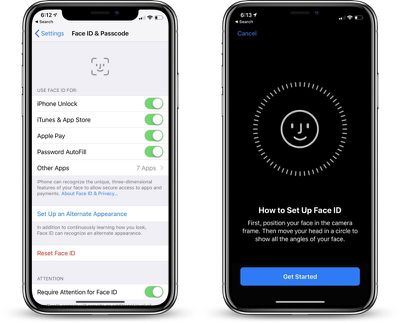
When the iPhone X launched, there was no option to record multiple faces like there was to enter in multiple fingerprints with Touch ID, but that's something Apple changed in iOS 12 and later.
Now you can add a second face to Face ID, which is useful if you have a job where your face dramatically changes, such as with a surgeon's mask or protective goggles.
Face ID can learn to overcome items like hats, sunglasses, and scarves, recognizing you anyway, but having the option for a second face while you're wearing frequently worn items makes sure Face ID works more seamlessly.
Open the Settings app.
Scroll down to Face ID & Passcode and tap it.
Enter your passcode.
Choose the "Set Up an Alternate Appearance."
From there, you can set up Face ID as you did when you first purchased and set up your iPhone X for the first time.
The iPhone will walk you through the steps of positioning your face in the camera and then moving your head in a circle.
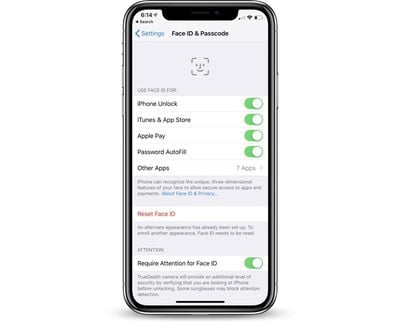
Once your alternate appearance has been entered, there's no option to delete it. To re-add an appearance, you will need to tap the "Reset Face ID" button that has replaced the "Set Up Alternate Appearance" option.
Be aware, there's no confirmation screen when you tap the "Reset Face ID" option. Once it's tapped, all of your Face ID data is cleared.
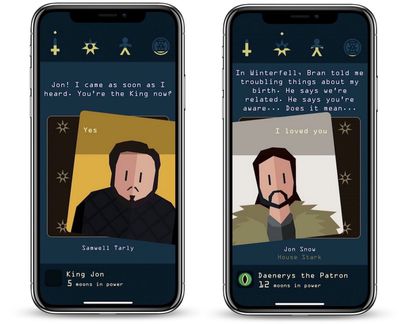
Our sister site TouchArcade this week went hands-on with the just-announced iOS game "Reigns: Game of Thrones." For those unaware, "Reigns" is a series of games created by Devolver Digital that tasks players with making important monarchical decisions using a simple left swipe and right swipe mechanic.
The first two games in the series [Direct Links: Reigns and Reigns: Her Majesty] focused on generic characters in medieval and renaissance eras. Now the developer has partnered with HBO to meld the "Reigns" gameplay mechanics with characters, events, and locations from "Game of Thrones" and George R.R. Martin's "A Song of Ice and Fire" series as a whole.
In "Reigns: Game of Thrones," players take the viewpoint of a character gazing into the flames of the Red Priestess Melisandre, witnessing the potential outcome of events without those events specifically tying into plot points from the books and HBO series.
As TouchArcade points out, this enhances "Reigns: Game of Thrones," since it gives fans of the fantasy series numerous "what if" scenarios to watch play out:
This allows them to utilize the Game of Thrones universe and its associated characters while having plot lines in the game that are best described as “zany," in a good way- With many “what if" scenarios, like exploring what would happen if Sansa Stark married Jamie Lannister.
Unlike previous "Reigns" titles, the Game of Thrones spinoff tasks you with controlling numerous point-of-view characters instead of just one king or one queen. These include well-known Game of Thrones characters like Daenerys, Tyrion, Jon, Cersei, and more, with each character needing to manage relationships with the military, church, public, and all facing negative status effects and even potential death.
TouchArcade explains that watching your decisions play out leads to a fun gameplay experience, for both Game of Thrones fans and non-fans:
The interesting thing about the way this game is written is that if you know Game of Thrones, Reigns: Game of Thrones will be like main lining fan service. If you don’t know Game of Thrones, it’ll be just as enjoyable as any other Reigns games, you might just not understand some references (or the significance of some of the events).
For more coverage, be sure to read Eli Hodapp's full hands on with "Reigns: Game of Thrones" over at TouchArcade. Those interested can pre-order the game on the iOS App Store [Direct Link] for $3.99, ahead of its launch on October 18. It'll also be available on Android and Steam.
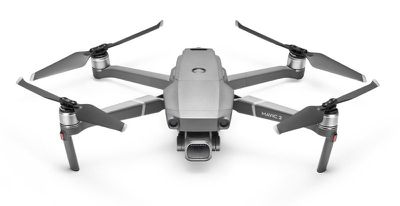
Both of the two new drones feature an upgraded design that incorporates cameras with DJI's latest three-axis gimbal technology for smooth, stable footage. The drones also feature the same convenient, foldable design that was first introduced with the Mavic Pro.
The body of the Mavic 2 Pro and Mavic 2 Zoom has a refined chassis with low-noise propellers, allowing for a smoother, quieter flight, and both support up to 31 minutes of flight time. The two drones can reach maximum speeds of 72 KPH in Sport Mode.
For the first time, the drones include obstacle sensors on all sides of the aircraft, which transmit data to a more powerful central processor for better obstacle avoidance. There are also new auxiliary lights at the bottom to assist the downward sensors in low-light conditions.
The Mavic 2 Pro, priced at $1,449, includes a 20-megapixel L1D-20c camera from Hasselblad, which includes Hasselblad's Natural Color Solution technology for detailed aerial shots with rich colors. The camera features an adjustable f2.8-11 aperture lens, and uses a 1-inch sensor that's the same size as the sensor in the Phantom 4. It also features support for a 10-bit Dlog-M color profile for better dynamic range.
DJI's Mavic 2 Zoom, priced at $1,249, focuses on flexibility with a 12-megapixel 2x optical lens (24-48mm) with a 1/2.3-inch sensor. A dolly zoom feature is included for "an otherworldly warped perspective."
Both the Mavic 2 Pro and the Mavic 2 Zoom record 4K video with H.265 compression for more detail along with enhanced HDR photos. They also support several recording modes like Hyperlapse, Circle Hyperlapse, and Waypoint Hyperlapse, along with Active Tracking 2.0.
A new Ocusync 2.0 Digital Video Transmission System offers a 1080p transmission signal up to eight kilometers for editing full HD footage directly on a mobile device, and there's an included controller that works with a smartphone.
The Mavic 2 Pro and Mavic 2 Zoom can be purchased from the DJI website starting today for $1,249 (Zoom) and $1,449 (Pro), with DJI Googles also available for an additional fee.
Note: MacRumors is an affiliate partner with DJI. When you click a link and make a purchase, we may receive a small payment, which helps us keep the site running.
Apple has followed through with plans to create a television series based on Isaac Asimov's famous Foundation novels and has recently given a straight to series order for the show, reports Deadline.
Apple first inked a deal for the TV series adaptation of Foundation back in April, but the show was still in development at that time.
The Foundation TV series is being developed by Skydance, with David S. Goyer and Josh Friedman serving as executive producers and showrunners. Goyer has previously worked on "The Dark Knight," "Batman Begins," Ghost Rider," and more, while Friedman is known for "Terminator: The Sarah Connor Chronicles" and "Emerald City."
Foundation is Isaac Asimov's most popular and well-known science fiction series, which includes titular novel Foundation, Foundation and Empire, and Second Foundation, along with additional books Foundation's Edge and Foundation and Earth.
The series follows psychohistory expert and mathematician Hari Seldon who is able to predict the future. Seldon creates a group called the Foundation to preserve humanity's collective knowledge ahead of the impending fall of the Galactic Empire. The novels span many years and cover the rise and fall of multiple empires, making it an ambitious television project.
In addition to the Foundation series, Apple has more than a dozen TV shows in development in total, and rumors have suggested we could see the first of these debut starting in March of 2019. For a full list of what Apple's working on, make sure to check out the original content section of our Apple TV roundup.
In just a few weeks, Lisa Brennan-Jobs will launch "Small Fry," a memoir about her life that includes a focus on the tumultuous relationship she held with her father, Apple co-founder Steve Jobs. As the book launch grows closer, Brennan-Jobs is in the midst of a publicity tour and today her latest interview has been shared by The New York Times, which also provides a few snippets from the book.
Naturally, much of Brennan-Jobs' overview of her childhood includes numerous passages regarding her father's "coldness." Still, the author doesn't want "Small Fry" to be regarded as a tell-all about Steve Jobs, but as more of a "nuanced portrait of a family," as well a book about her own story and not her father's.
Brennan-Jobs says she began work on what would eventually become "Small Fry" in 2011, not long after Jobs passed in October of that year. She returned to Silicon Valley over the years, interviewing her family, her mother's ex-boyfriends, and Jobs' own ex-girlfriend. In an effort to ensure she'd finish the book on her own terms, she took a 90 percent cut in her book advance and switched from Penguin Press to a smaller publisher named Grove.
Brennan-Jobs focuses much of the memoir on her parents, and her mother Chrisann Brennan has already read the book:
Her mother, Ms. Brennan, is portrayed as a free spirit who nurtured her daughter’s creativity — but could be mercurial, hot-tempered and sometimes neglectful. “It was horrendous for me to read,” Ms. Brennan said in an interview. “It was very, very hard. But she got it right.”
Ms. Brennan said that her daughter has, if anything, underplayed the chaos of her childhood. “She didn’t go into how bad it really was, if you can believe that,” she said.
She also recounts numerous instances when her father would "frequently" use money to "confuse or frighten her," during the years when he claimed paternity:
Ms. Brennan-Jobs describes her father’s frequent use of money to confuse or frighten her. “Sometimes he decided not to pay for things at the very last minute,” she writes, “walking out of restaurants without paying the bill.” When her mother found a beautiful house and asked Mr. Jobs to buy it for her and Lisa, he agreed it was nice — but bought it for himself and moved in with his wife, Laurene Powell Jobs.
Brennan-Jobs also recounts "moments of joy" that she had with Jobs, stating that ultimately she has forgiven her father, and her goal is that she wants the reader to forgive him too:
But “Small Fry” also contains moments of joy that capture Mr. Jobs’s spontaneity and unparalleled mind. When Ms. Brennan-Jobs goes on a school trip to Japan, he arrives unannounced and pulls her out of the program for a day. Father and daughter sit, talking about God and how he sees consciousness. “I was afraid of him and, at the same time, I felt a quaking, electric love,” she writes.
Triumphantly, she loves him, and she wants the book’s scenes of their roller skating and laughing together to be as viral as the scenes of him telling her she will inherit nothing.
“Have I failed?” she asked, in one of our conversations. “Have I failed in fully representing the dearness and the pleasure? The dearness of my father, and the outrageous pleasure of being with him when he was in good form?”
According to Brennan-Jobs, her father did grant her a "movie ending" by apologizing to her toward the end of his life for not spending more time with her, disappearing during her adulthood, forgetting birthdays, and not returning phone calls. She recalls the moment, stating that Jobs claims he acted the way he did in her adulthood because he was offended that she "didn't invite" him to a matriculation event at Harvard during her first year. He ultimately stated "I owe you one."
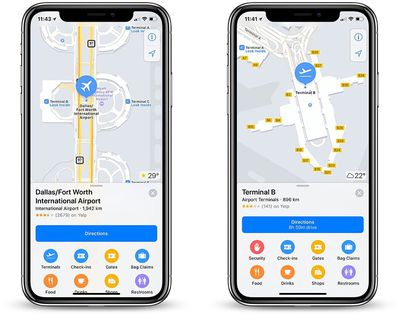
Apple Maps has recently been updated with indoor maps of five airports across Canada, Finland, and the United States.
The new additions:
Logan International Airport in Boston
Dallas-Fort Worth International Airport
Dallas Love Field Airport
Halifax Stanfield International Airport
Helsinki Airport
Apple Maps also recently added indoor maps of various shopping malls in the Spanish cities of Barcelona, Bilbao, and Madrid, along with at least one mall in the Miami area and four in the Phoenix area:
Apple launched indoor maps at select airports and shopping malls in 2017, with a list of locations available on its iOS Feature Availability page. To view an indoor map, open the Apple Maps app on an iPhone or iPad running iOS 11 or later, search for a supported location, zoom in, and tap on "Look Inside" if necessary.
Indoor maps at shopping malls make it easier to find the exact location of stores, restaurants, and restrooms on each floor, in addition to guest services, parking, escalators, stairs, and so forth. Or, swipe up on the place card to browse by category, such as clothes, shoes, accessories, beauty, food, and drinks.
Likewise, at airports, Apple Maps users can zoom in to view terminals, boarding gates, security checkpoints, airline check-in desks, baggage claim carousels, information kiosks, restrooms, stores, restaurants, parking, and more.
The latest Apple-related auction will kick off on September 25, offering bidders the chance to get their hands on a rare Apple-1 computer. On sale by RR Auction, the Apple-1 is fully operational and one of around 70 Apple-1 computers that remain of the first 200 built by Steve Jobs and Steve Wozniak in 1976.
Executive vice president at RR Auction, Bobby Livingston, says that the Apple-1 originates from a person who purchased it at The Byte Shop, the store where Jobs and Wozniak originally sold the computers for $666.66. The owner learned BASIC on the computer, wrote small programs, and decided to hold onto the Apple-1 after it became outdated, "realizing it could one day be a piece of computing history." He then tried to sell the Apple-1 to Wozniak in 1982 for $10,000, which "went unanswered."
This Apple-1 computer was restored to its original, operational state in June 2018 by Apple-1 expert Corey Cohen, and a video of it running and functioning is available upon request. A comprehensive, technical condition report prepared by Cohen is available to qualified bidders; he evaluates the current condition of the unit as 8.5/10. The most remarkable aspect of this Apple-1 computer is that it is documented to be fully operational: the system was operated without fault for approximately eight hours in a comprehensive test.
Apple-1 computers have been up for auction a few times in the past few years, and the record auction price for an Apple-1 was established in 2016 when one of the computers sold for $815,000. That computer was the "Celebration" Apple-1 and was very rare due to its blank "green" PCB board that was never sold to the public and was not a part of a known production run. Slightly more common, publicly-sold units have recently sold for $130,000.
Additionally, the auction is being promoted with a unique digital "DNA" scan, performed by Invaluable with technology built by Artmyn. This technology scans artwork and objects like the Apple-1, capturing "tens of thousands of photographs" using various light sources and spectrums, including UV lights. The scan generates a "5D interactive file" and an immersive video that lets owners, auction houses, consignors, and buyers see greatly detailed angles, views, and textures for the scanned objects.
“We couldn’t be more excited about the sale of this historic piece of technology,” said Invaluable CEO Rob Weisberg. “The innovative scanning technology we’re showcasing is a giant step towards greater transparency in the art and collectibles market that we believe will increase buyer confidence in the online art market. To showcase it with an Apple-1 is just incredible and fitting.”
In the case of the Apple-1, the scan will allow a 5D look at the iconic desktop, offering zeroed-in views of distinguishing details on the top and bottom of the piece.
The auction for the Apple-1 will take place at 1 p.m. on September 25, 2018 at WeWorks in Boston.
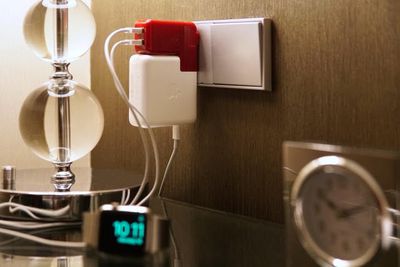
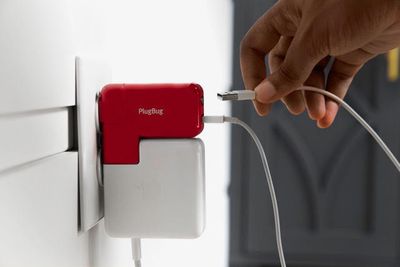
Twelve South today announced the launch of the PlugBug Duo, a follow up to the company's popular MacBook travel companion, the PlugBug World.
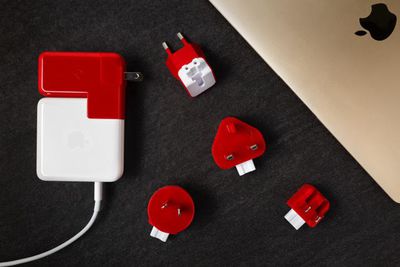
The New PlugBug Duo, like the PlugBug World, attaches to the MacBook Power Adapter to add a selection of snap-on international plugs for travel purposes along with USB ports for charging additional accessories.
Twelve South's PlugBug World included a single USB-A port for charging, but the PlugBug Duo adds a second USB-A port for a total of two ports for charging accessories like iPhones, Apple Watches, and iPads.
12W charging speeds are supported, so the PlugBug Duo will charge devices like the iPhone more quickly than the standard power adapter.
The snap-on plugs that are included with the PlugBug Duo are designed to work in many countries around the world including the UK, the US, Hong Kong, Singapore, Australia, New Zealand, Continental Europe, North America and Japan.
The PlugBug Duo is compatible with MagSafe, MagSafe 2, and USB-C Power Adapters.
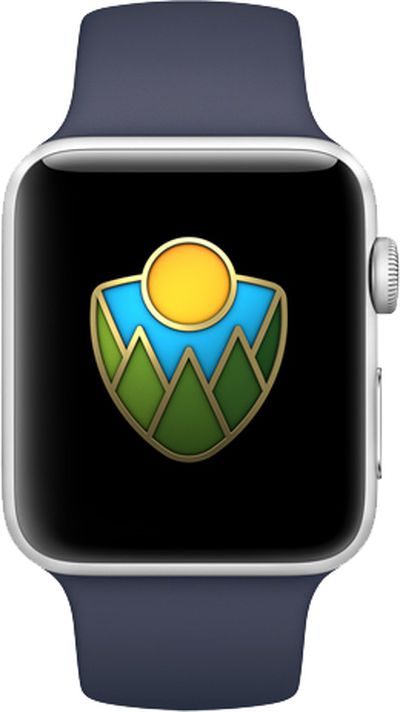
Apple today introduced an Apple Pay donation program and a new Activity Challenge on the Apple Watch in support of U.S. national parks.
From August 24 through August 31, Apple said it will donate $1 to the National Park Foundation, the official charity of the U.S. National Park Service, for every purchase made with Apple Pay at any Apple Store, on Apple.com, or through the Apple Store app for iPhone and iPad in the United States.
Proceeds will support the National Park Foundation's mission to protect national parks through projects like habitat restoration and historic preservation, and support programs like Open OutDoors for Kids, according to Apple.
Apple CEO Tim Cook:
America's national parks are treasures everyone should experience, and we're proud to support them again this month by donating a dollar for every purchase made with Apple Pay at one of our stores. These awe-inspiring places are our national inheritance, and Apple is doing our part to pass them on to future generations — just as extraordinary, beautiful and wild as we found them.
On September 1, Apple Watch users around the world who complete a walk, run, or wheelchair workout of 50 minutes of more will earn an Activity app award and animated iMessage stickers, inspired by national parks. The challenge pays homage to Redwood National Park's 50th anniversary celebration this year.
The App Store will also highlight a collection of some of the best apps to help users easily navigate and explore U.S. national parks.
Apple supported U.S. national parks in these same ways in July 2017.
Taiwanese manufacturer TSMC will likely remain Apple's contract chipmaker next year, as the exclusive supplier of "A13" chips for 2019 iPhones, according to industry analysts cited in a report by the EE Times.
"As long as TSMC continues to offer something new at leading-edge every year and continues to execute well on yield, I could see Apple remaining sole source on foundry at TSMC for years to come," Arete Research analyst Brett Simpson said in an interview with EE Times.
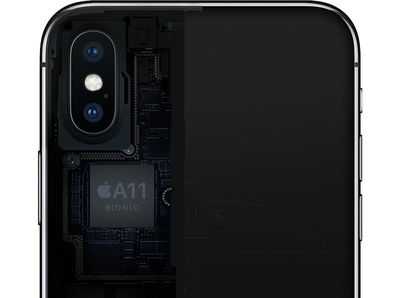
TSMC has been Apple's exclusive supplier of A-series chips since 2016, fulfilling all orders for the A10 Fusion chip in the iPhone 7 and iPhone 7 Plus, and the A11 Bionic chip in the iPhone 8, iPhone 8 Plus, and iPhone X. Multiple reports indicate TSMC will also be the exclusive supplier of the "A12" chip in 2018 iPhones.
TSMC's packaging offerings are widely considered to be superior to that of other chipmakers, including Samsung and Intel, so it won't be surprising if that exclusivity continues with the "A13" chip in 2019.
TSMC has been gradually shrinking the size of its dies over the years as it continues to refine its manufacturing process: A10 Fusion is 16nm, A11 Bionic is 10nm, and this year's "A12" is expected to be a 7nm chip. The "A13" will likely be a 7nm+ chip with extreme ultraviolet lithography (EUV), with volume production expected to begin in the second quarter of 2019, in time for a fall iPhone launch next year.
TSMC's favor with Apple comes at the expense of Samsung, which was the exclusive manufacturer of iPhone processors for many years, starting with the ARM11 chip in the original iPhone through to the A7 chip in the iPhone 5s. TSMC manufactured the A8 chip in 2014, and TSMC and Samsung shared A9 chip orders in 2015.
Samsung isn't backing down easily, however, as DigiTimes last month reported that the South Korean company is developing its own InFO packaging technology. Samsung claims to have outpaced TSMC in kicking off official production of 7nm+ with EUV, seeking to win back orders from Apple in 2019.
As far as how this all impacts customers, Apple's industry-leading mobile chip designs and TSMC's continued packaging advancements are beneficial for the performance, battery life, and thermal management of future iPhones.
Video game designer Shigeru Miyamoto wants the gaming industry to stop "nickel-and-diming" users, and launch games at fixed prices (via Bloomberg).
As long as the upfront prices aren't too high, such "premium" games would create a more sustainable business model over the long term, Miyamoto says, seemingly referencing video games across mobile, console, and PC. The Super Mario creator made the comments during the Computer Entertainment Developers Conference on Wednesday in Yokohama, Japan.
“We’re lucky to have such a giant market, so our thinking is, if we can deliver games at reasonable prices to as many people as possible, we will see big profits,” Miyamoto said at the Computer Entertainment Developers Conference (CEDEC) on Wednesday in Yokohama, Japan.
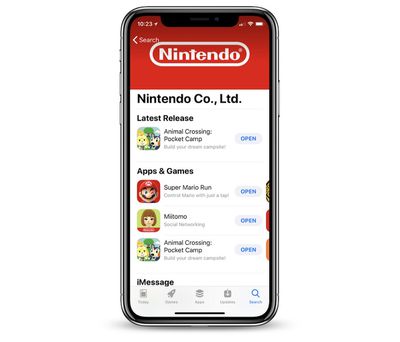
Nintendo has tried both models on smartphones: in "Super Mario Run" it charged an upfront price of $9.99 to gain access to the full game, and in "Animal Crossing: Pocket Camp" and "Fire Emblem Heroes" it launched the games for free, with numerous opportunities for in-game purchases. Nintendo has previously said it prefers the pay-once structure of "Super Mario Run," but it still released two free-to-play apps in the year after that game launched.
Additionally, even one year after launch "Super Mario Run" had yet to reach an "acceptable profit point," while stories about revenue from the freemium games were consistently more positive. Miyamoto admits that the "Super Mario Run" model hasn't exactly been a success, but says the company will "continue pushing" the pay-once model forward in an effort to avoid freemium mobile games and promote a healthier, more "comfortable" development environment in the industry.
“I can’t say that our fixed-cost model has really been a success,” the usually candid Miyamoto said. “But we’re going to continue pushing it forward until it becomes entrenched. That way everyone can develop games in a comfortable environment. By focusing on bringing games to the widest range of people possible, we can continue boosting our mobile game business.”
Next, Nintendo will launch "Dragalia Lost" on iOS and Android in North America and Europe later this year, through a partnership with Japanese mobile developer Cygames. The payment structure of the game is unknown, but previous apps by Cygames have been reliant upon Japan's popular "gacha" system, which encourages players to spend real money on in-game currency that they can use to unlock random items.
In total, Nintendo's mobile game library includes the now-defunct "Miitomo," "Super Mario Run," "Fire Emblem Heroes," and "Animal Crossing: Pocket Camp." The next smartphone game inspired by a Nintendo property will be "Mario Kart Tour," expected to launch by March 2019.
Nintendo's new president, Shuntaro Furukawa, has said that mobile gaming will be a priority of his time leading the company, with plans to increase the output of smartphone games and launch a singular "game-changing" app that surges in popularity, akin to "Pokémon Go."
In iOS 12, Apple has added the ability to share pictures or video in your Photo Library using an iCloud.com link that lasts for 30 days.
Not only is sharing a link quicker and less burdensome on your data allowance than sending several images or gigabytes of video, you can also share the same link as many times as you want within the expiry limit.
For the new photo link option to appear, you'll need to ensure iCloud Photos is enabled on your iOS device. To do so, launch the Settings app, tap your Apple ID at the top, select iCloud -> Photos, and make sure the toggle next to iCloud Photos is on.
Tap the photo you want to link to. If you want to share a link to several photos, tap Select in the upper right corner of the screen and tap the photos you want to include.
Next, tap the Share Sheet button at the lower left corner of the screen.
Tap the Copy Link button in the third row of the Share Sheet.
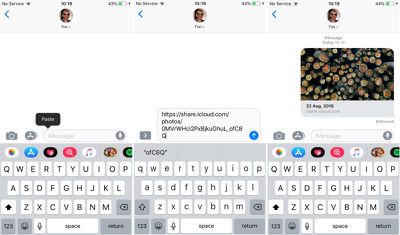
Launch the app or service you want to use to share the link. We're using Messages in our example.
In the message text field, tap and hold your finger.
Tap Paste.
Send the message to share the link.
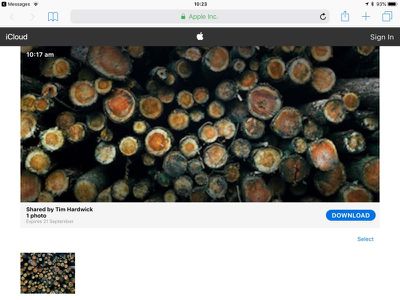
If you share the link over Messages and the recipient is using an iOS device, they'll see a tappable thumbnail of the shared photo(s). If they're on an Android device, they'll just see the URL.
Tapping the thumbnail/URL link will take them to an iCloud.com web page similar to the one above, with a preview image, the author's name, the photo's title, an expiry date, and an option to download the photo or add it to an existing Apple Photos library. If several photos have been shared, the recipient can select which ones they'd like to add or download.
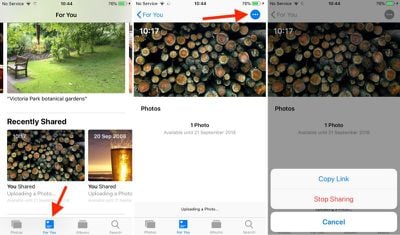
To share the same link again within the 30-day time limit, or simply stop sharing the photo altogether, launch the Photos app and navigate to the For You tab, where you'll find a Recently Shared section.
Tap the photo you shared and then tap the blue dotted button in the upper right corner of the screen, and you should see two options: Copy Link and Stop Sharing.
Apple's plans for its first flagship store in Australia have been dealt another blow, with The Age reporting that the proposed location in Melbourne has won Heritage Protection status until late 2018.
The Victorian branch of Australia's National Trust is said to have nominated Federation Square for protection earlier this month, shortly after Apple submitted revised blueprints for the planned store on July 19.
Apple's revised Federation Square design
The Heritage Protection status means no work on the square can take place until December 21, 2018 without explicit permission from the National Trust. With Apple not hoping to start construction until next year, the date on its own isn't a problem, but the move by Heritage Victoria suggests that permanent protection is the final goal.
The construction of the new store would require the demolition of the well-known Yarra building, which has infuriated Melbourne residents and led to major protests suggesting the public space should not be given over to a corporation.
In February, Melbourne's City Council backed a motion to lobby for a new store design, and Apple's revised plan was positively received by the Federation Square leadership, but it looks as if public community groups have yet to be convinced.
"The interim protection order allows us to take stock and think about what makes Fed Square truly special," said Citizens for Melbourne president Tania Davidge, speaking to The Age. "Hopefully, after eight months of discussion behind closed doors, Victorians will now have the opportunity to have a say about the future of their public, cultural and civic square."
Another view of the new design
The city of Melbourne's Heritage portfolio chair Rohan Leppert said the public backlash to the proposed Apple store proved that Federation Square "is a site of state significance", and said he was glad that Heritage Victoria was taking the proposal to permanently protect Federation Square seriously.
"Heritage Victoria's decision to apply an IPO formalises these public heritage values and is very welcome, as is the exceptional leadership of the National Trust," he said.
Despite the square being granted temporary protection status, the state government is still siding with Apple on the issue. Responding to the news, tourism and major events minister John Eren said it would be "unprecedented" to heritage list a site that is only 16 years old.
"To do so could lead to significant implications for future projects," Eren told The Age. "This will not stop us delivering the Metro Tunnel and other vital projects that are good for Melbourne and good for jobs."
According to Apple, the Kyoto store is surrounded by many of the famous shrines and temples in the city, with the store design taking inspiration from local architecture.
The upper levels of the building are "clad in a translucent envelope inspired by Japanese lanterns," with Apple using a lightweight timber frame and special paper in homage to traditional Japanese houses.
Apple says the store is centered around a multi-level atrium where Today at Apple sessions on photography, music, and coding will be held on a daily basis. The interior also features a Genius Grove where customers can get help with Apple products and The Avenue, where iPhones, iPads, Macs, and other devices are shown off and are available for purchase alongside third-party accessories.
As was announced last week, the new Kyoto Apple Store is set to open at 10:00 a.m. local time on Saturday, August 25.
Apple Kyoto will be Apple's ninth retail store in Japan, and the first that's located in Kyoto. Apple has several other stores in Tokyo, along with locations in Osaka, Aichi, Miyagi, and Fukuoka.
Apple earlier this month told Facebook officials that the Onavo app, which serves as a virtual private network, violates June App Store rules that prevent apps from harvesting data to build advertising profiles or contact databases.
Earlier this month, Apple officials informed Facebook that the app violated new rules outlined in June designed to limit data collection by app developers, the person familiar with the situation said. Apple informed Facebook that Onavo also violated a part of its developer agreement that prevents apps from using data in ways that go beyond what is directly relevant to the app or to provide advertising, the person added.
Facebook and Apple met last week to discuss the Onavo app, and last Thursday, Apple suggested that Facebook voluntarily remove the Onavo app, which Facebook agreed to do.
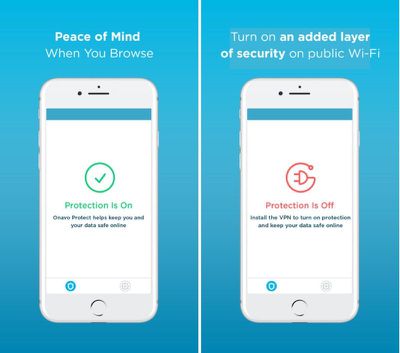
Onavo, a free VPN, promised to "keep you and your data safe when you browse and share information on the web," but the app's real purpose was tracking user activity across multiple different apps to learn insights about how Facebook customers use third-party apps.
Whenever a person using Onavo opens up an app or website, traffic is redirected to Facebook's servers, which log the action in a database to allow Facebook to draw conclusions about app usage from aggregated data.
As of earlier this year, Onavo for iOS and Android had been installed on more than 33 million devices, giving Facebook a wealth of user data. Facebook was up front about the data collection in the app's description, but the data that was being collected is now above and beyond what Apple allows.
To provide this layer of protection, Onavo uses a VPN to establish a secure connection to direct all of your network communications through Onavo's servers. As part of this process, Onavo collects your mobile data traffic. This helps us improve and operate the Onavo service by analyzing your use of websites, apps and data. Because we're part of Facebook, we also use this info to improve Facebook products and services, gain insights into the products and services people value, and build better experiences.
It appears that the Onavo app has indeed been removed from the App Store at this time. People who have previously downloaded the app will still be able to use it, but it will no longer be updated. Onavo for Android will continue to be available.
Customers who have installed Onavo but do not want to be tracked by Facebook should uninstall the app from their iOS or Android device.
Update: Apple provided the following statement on the removal of Onavo: We work hard to protect user privacy and data security throughout the Apple ecosystem. With the latest update to our guidelines, we made it explicitly clear that apps should not collect information about which other apps are installed on a user's device for the purposes of analytics or advertising/marketing and must make it clear what user data will be collected and how it will be used.
Apple in iOS 12 introduced a new Password AutoFill API for apps like 1Password and LastPass, designed to allow password management apps to provide stored usernames and passwords for not only websites but also third-party apps.
1Password has introduced support for Password AutoFill in a beta capacity ahead of the launch of iOS 12, giving us a look at just how simple and easy Password AutoFill makes entering login details.
Note: This 1Password feature is not widely available yet because it is implemented in a beta version of the app, but it will be available for everyone when the 1Password app is updated following the release of iOS 12.
Set Up
Once a password management app that supports Password AutoFill has been installed, the feature needs to be enabled on an iOS device.
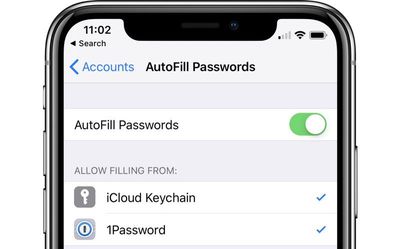
Go to Settings > Passwords & Accounts > AutoFill Passwords and toggle on the AutoFill Passwords option while also making sure your password management app, such as 1Password, is selected.
You can use third-party password management apps right alongside iCloud Keychain, or you can choose to disable iCloud Keychain and use just a password management app.
How it Works
The Password AutoFill feature lets a third-party app function just like iCloud Keychain, with your sensitive data protected but easily accessible within apps when you need your login information.
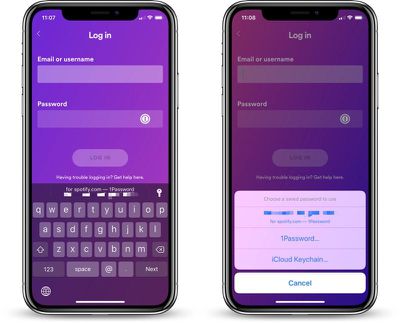
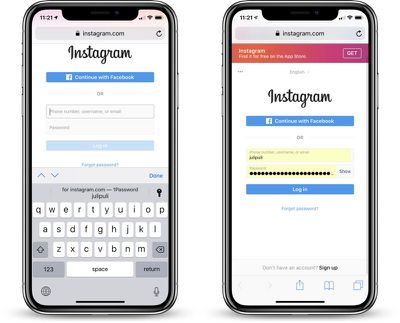
When you encounter a login field in an app or on the web, tapping in the entry field will display the stored username and password from your password management app if you've saved one.
From there, you can tap the information to enter it into the app or website's login window, such as in the Spotify example below.
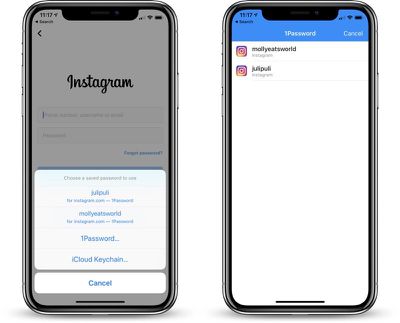
There are instances where 1Password does not have saved information entirely right or where you have multiple logins, such as in the case of multiple Twitter or Instagram accounts.
In these situations, if you tap on the key icon and then select the "1Password" option, you can view all of the available accounts for a particular service.
In the case of Instagram, this means that when I'm logging into the Instagram app, I see my two Instagram accounts listed in 1Password and I can tap either one to enter my login information.
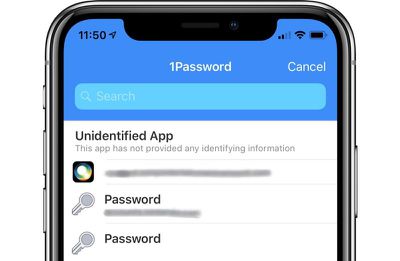
For apps that 1Password cannot automatically identify, you will be able to access your entire password vault to find the login information that you need.
Where it Works
What's great about the Password AutoFill API is that it does not require developers to implement any kind of integrations with your password management app to function, as was required in previous versions of iOS for this kind of functionality.
1Password's Password AutoFill feature, for example, works automatically in most apps and websites, with your 1Password archive available no matter where you're logging in.
As a caveat, 1Password will not recognize some apps and you'll see a message that the app is "Unidentified" with no identifying information provided. In this situation, you can still access your 1Password vault to search for the password that's required.
One-Time Passwords
When logging into apps and websites that require two-factor authentication, using a one-time password is also simplified.
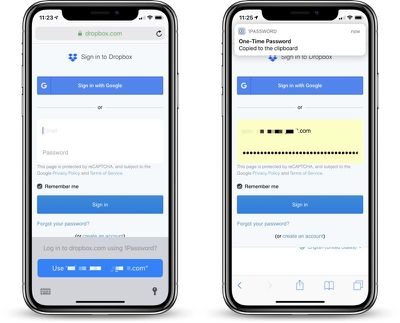
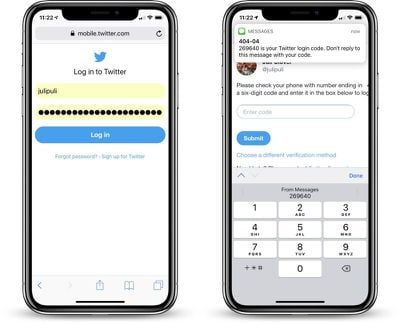
If your two-factor authentication setup is linked to 1Password, when you log into an app or website that requires two-factor authentication, your password is entered in the field and your one-time authentication password is automatically copied and pasted to the clipboard for easy entry.
For apps that use your phone number for authentication purposes, iOS 12 introduces a feature that takes a code from an incoming iMessage and copies it to the clipboard, so two-factor authentication is simplified no matter the method.
Password AutoFill on Apple TV
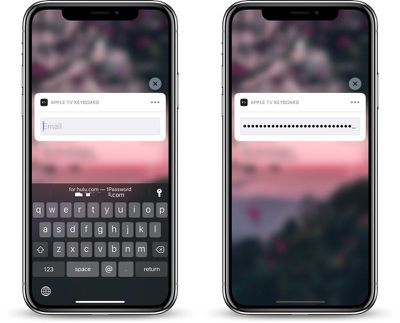
Password AutoFill extends to the Apple TV using the continuity keyboard that permits the iPhone to be used to enter passwords and login information on the Apple TV.
For this to work, both the Apple TV and the iOS device need to be signed into the same iCloud account, and from there, the process is identical to using Password AutoFill on the iPhone.
In a text entry field, when prompted to use the iPhone to enter login information, passwords stored in a password management app and linked to Password AutoFill will be able to be entered on the Apple TV.
Note: tvOS 12 and iOS 12 are required for Password AutoFill to work on the Apple TV.
Security
Every time your password management account is activated, you will need to confirm your identity with either Face ID or Touch ID to enter a password.
If Face ID or Touch ID fails, you will need to enter a password. In the case of 1Password, this means that if biometric authentication does not work, you will need to use the master password.
Release Date
1Password's Password AutoFill update will be available following the release of iOS 12, which we expect to see debut next month, shortly ahead of the launch of new iPhones. 1Password is available on Macs and iOS devices for as little as $2.99 per month for an individual account. A free 30 day trial is available from the 1Password website.
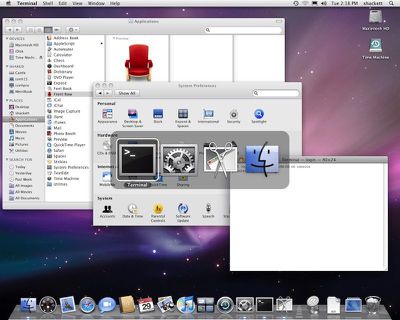
Relay FM co-founder Stephen Hackett today shared an extensive collection of screenshots for every major release of the Mac operating system in the past 18 years, over which time its name has changed from Mac OS X to OS X to macOS.
The library of over 1,500 screenshots is available on Hackett's blog 512 Pixels, providing a look back at the visual history of Mac OS X Cheetah in 2000 through macOS High Sierra in 2017. Hackett plans to update the library for every major release of macOS going forward, including Mojave in the next couple of months.
Hackett says he ran every macOS release on actual hardware, including various models of the Power Mac G4, Mac mini, and MacBook Pro, capturing screenshots of major features and other elements he felt were important over the years.
The screenshots show the evolution of the Mac's visual theme Aqua, ranging from gloss and pinstripes in the early days, to brushed metal and corinthian leather during the skeuomorphic days, to the flatter, translucent look of today. Highlights are available in a related blog post on 512 Pixels.
Hackett says he put an extraordinary amount of time into the collection, which is certainly worth checking out for a trip down memory lane.
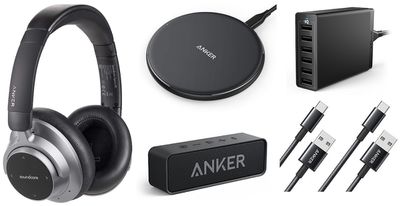
Anker this week has debuted a large new collection of promo codes on Amazon, offering up to 45 percent off wireless chargers, Lightning cables, portable battery packs, and more. Most of the codes last through the end of the week, but some extend into September. We've listed a few of the best deals below, but for the full collection be sure to visit our Deals Roundup and scroll down to the "Anker Sale at Amazon" section.
Note: MacRumors is an affiliate partner with these vendors. When you click a link and make a purchase, we may receive a small payment, which helps us keep the site running.
On eBay, the retailer today kicked off its latest coupon code discount, this one aimed at end-of-summer savings on eyewear, smartphones, drones, luggage, and more. While not sitewide, anyone interested can browse the full list of supported sellers at the bottom of this landing page, add $25 worth of eligible items to your cart, and enter the code JUSTSAVE10 to save 10 percent on your order. This code lasts through 11:59 p.m. PT on August 26.
Pad and Quill is hosting a sitewide sale for Labor Day, allowing customers to save 15 percent sitewide. The sale doesn't require a coupon code, so you can simply browse Pad and Quill to see the discount automatically applied to the company's leather iPhone and iPad cases, wallets, bags, Apple Watch bands, and more.
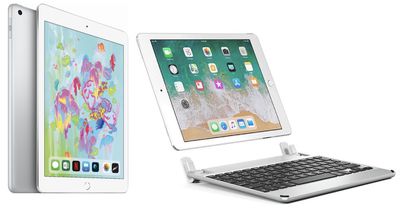
Additionally, Best Buy is taking $30 off the latest iPad models. This means that the 9.7-inch 2018 iPad with 32GB is available for $299.99 and the 128GB model is $399.99, some of the best prices for these models online. You can also get $50 off the Apple Watch Series 3, with the GPS Aluminum models down to $279.00 (38mm) and $309.00 (42mm).
A few of Brydge's iPad keyboard offers are still up on its website as well, with the Brydge 9.7 available for $99.99, down from $129.99, and a Brydge 9.7 Bundle (with a 5,000 mAh portable battery and Lightning cable) available for $129.99, down from $179.99. Head over to Brydge's website to see more of its keyboards, including those supporting the 12.9-inch iPad Pro and iPad mini.






 Apple has followed through with plans to create a television series based on Isaac Asimov's famous Foundation novels and has recently given a straight to series order for the show, reports

 In iOS 12, Apple has added the ability to share pictures or video in your Photo Library using an iCloud.com link that lasts for 30 days.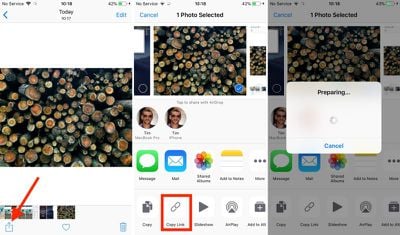





 Note: MacRumors is an affiliate partner with these vendors. When you click a link and make a purchase, we may receive a small payment, which helps us keep the site running.