Starting in September, existing owners of the 2018 Mazda6, excluding the Sport base model, will be able to book an appointment with a Mazda dealership to have CarPlay and Android Auto installed at no extra cost. Mazda says the hardware and software updates take approximately two hours to be completed.
The upgraded Mazda6 models will also receive a faster-charging 2.1-amp USB port, and the latest software version of MAZDA CONNECT.
Then, starting in November, CarPlay and Android Auto will be preinstalled as original equipment in brand new 2018 Mazda6 vehicles, excluding the Sport model, at Mazda dealerships across the United States.
CarPlay will enable iPhone users to access a range of apps from the MAZDA CONNECT infotainment system, such as Messages, Apple Maps, Apple Music, Podcasts, Overcast, Spotify, SiriusXM Radio, Pandora, WhatsApp, Downcast, Slacker Radio, Stitcher, and, starting with iOS 12, Google Maps and Waze.
Back in March, on its Canadian website, Mazda said CarPlay and Android Auto will first be offered in the 2019 CX‑9, and then rolled out across the entire model lineup thereafter. Mazda also said the platforms will be available as a genuine retrofit for MAZDA CONNECT systems starting this fall.
Mazda also announced the addition of Apple CarPlay and Android Auto support to its vehicle line-up. In Canada, these mobile device connectivity technologies will first be offered in the 2019 CX‑9 launching this summer, and then rolled out across the entire model line-up thereafter. In addition, Apple CarPlay and Android Auto will be available as a Genuine Mazda Accessory retrofit for MAZDA CONNECT systems starting this fall.
The press release suggests that Mazda vehicles released as early as 2014 could eventually support CarPlay and Android Auto, but it's unclear if the backwards compatibility will extend to the United States.
Mazda is one of the last major automakers in the United States to offer CarPlay, around six months after Toyota and Lexus announced support.
Update: Here's a video walkthrough of CarPlay in the 2018 Mazda6. Thanks, Eli.
The official Apple Store app for iOS devices has recently undergone changes in design and function, but Apple still occasionally uses it to host time-limited offers to download select paid apps for free.
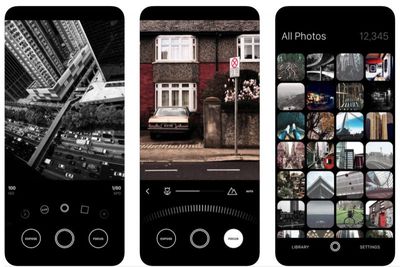
From today, users who scroll down the Discover tab should find an option to download camera app Obscura 2 for free via a redeem code, rather than paying $4.99 to download it from the App Store.
Obscura brings together incredible features in an easy-to-use interface that helps you take great photos, without getting in your way. It has a bunch of gorgeous filters to make your photos pop, and plenty of pro features to help push your photography skills further.
Obscura 2 allows users to shoot in a range of formats including RAW, HEIC, JPEG, Live Photo, and Portrait modes, and offers 19 filters designed for use with a wide range of scenes.
The Obscura camera features also provide flash control, grids, shutter time, and spirit level, while a dedicated library browser lets you edit, share, copy, favorite, hide, delete, and trash your pictures.
To download the app for free, tap on the featured app in the Discover section of the Apple Store app, tap Download now for free, and you will be redirected to the App Store's Redeem code screen. Your free redeem code should already be entered – all you need to do is tap Redeem in the upper right corner to begin downloading the app.
The offer to download Obscura for free through the Apple Store iOS app expires on September 25, 2018. Note that free app offers usually vary from region to region.
Mobile leaker Steve Hemmerstoffer this morning shared a hands-on video featuring alleged dummy units of the upcoming 6.5-inch iPhone X Plus and 6.1-inch LCD iPhone, just two days after rival leaker Ben Geskin posted images of two similar-looking dummy units.
The video, provided by Tigermobiles.com, offers a clearer view size-wise of the two new Face ID-equipped all-screen models, which are expected to accompany a second-generation iPhone X in Apple's 2018 smartphone line-up, due to launch in the fall.
Besides size, the clearest differentiator between the two handsets is the dual-lens rear camera on the iPhone X Plus and the single-lens on the 6.1-inch LCD iPhone. Both lenses clearly protrude from the back of the chassis.
Both models in the video feature a shiny silver frame, although Geskin's images depicted a frame on the 6.5-inch device that better matched the body color, similar to the current-generation iPhone X. Apple is thought to be using a steel frame on the larger device and an aluminum frame on the 6.1-inch iPhone as a cost-saving measure. Less clear on the video are the larger bezels on the 6.1-inch device to accommodate the lower-spec LCD display.
The dummy units used here both have white backs; well-connected Apple analyst Ming-Chi Kuo believes the next-generation iPhone X models will be available in Black, White, and Gold, while the 6.1-inch model could come in a wide array of colors, including red, blue, orange, gray, and white.
Dummy units are typically based on design schematics leaked from Apple's supply chain in China, and these handsets tally with the rumors we've heard already, but we'll have to wait for Apple's official iPhone launch in September or thereabouts for the full story on the new smartphones' full feature set.
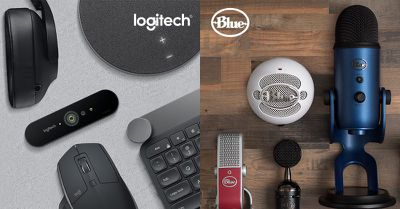
Logitech has announced its acquisition of Blue, the California-based maker of studio-quality microphones, in a $117 million cash deal.
Blue, creator of the popular Yeti and Snowball microphone lines, will join Logitech's portfolio of other brands, which includes Jaybird, Ultimate Ears, and ASTRO gaming.
In a blog post, Logitech CEO Bracken Darrell explained how the acquisition would allow the firm to expand into the growing broadcast market and complement its existing range of accessory products.
Logitech's acquisition of Blue Microphones will accelerate our entry into a growing market, and offers another way for us to help bring people's passions (from music to blogging) to life. Joining with Blue is an adjacent opportunity for us – a new way to grow – with additional synergies related to our existing gaming, PC webcam and audio categories.
In a separate blog post, Blue Microphones CEO John Maier said he was "super excited" about the partnership, which would allow his firm to continue making "the coolest microphones on the planet".
All of us here at Blue will keep creating cool stuff for professional musicians, gamers, podcasters, YouTubers, and streamers; Logitech will help us conquer the world. It's a great partnership full of possibilities.
Logitech has gained a favorable reputation for acquiring companies with a view to investing in established brands, so the purchase shouldn't overly concern fans of Blue products going forward.
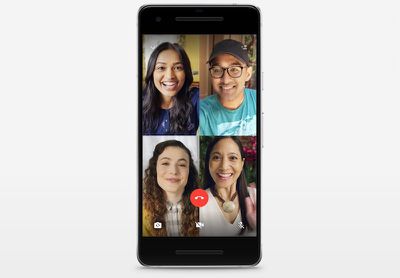
Popular Facebook-owned messaging app WhatsApp this afternoon announced that the WhatsApp apps for iOS and Android devices now support group calling for voice and video.
WhatsApp users can make group calls with up to four people total by starting a one-on-one voice or video call and then tapping the "add participant" button in the top right corner of the app to add another contact to the call.
WhatsApp says that its group calls are end-to-end encrypted and designed to work reliably around the world in a variety of different network conditions.
The feature, which was first announced by Facebook in May at its F8 developer event, is rolling out to iPhone and Android users and should be available to all users soon.
WhatsApp can be downloaded from the App Store for free. [Direct Link]
Business is not going smoothly for movie subscription service MoviePass, which is supposed to allow customers to watch one movie in theaters per a day for a $9.95 per month subscription pass.
Amid funding issues and a deep drop in stock prices, MoviePass CEO Mitch Lowe today held an all-hands meeting where he told employees that customers will be restricted from seeing major movie releases that include "Christopher Robin" and "The Meg."
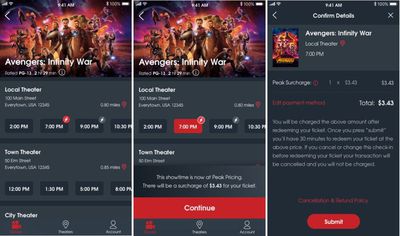
MoviePass' Peak Pricing
The information comes courtesy of an employee who shared the news with Business Insider, and it comes just after MoviePass prevented many of its subscribers from seeing "Mission Impossible: Fallout," the major movie release last weekend.
In addition to informing employees that subscribers will not be able to see "Christopher Robin" and "The Meg," on opening weekend Business Insider says that Lowe also "implied that the practice of not offering tickets to major movies would continue for the foreseeable future." Lowe's announcement echoed a statement MoviePass released over the weekend suggesting that "certain movies may not always be available in every theater on our platform."
"Christopher Robin" is set to be released this weekend, while "The Meg" comes out on August 10.
MoviePass has been forced to restrict access to popular movies due to financing issues, with reports indicating the service was down last week after parent company Helios & Matheson ran out of money, only restoring the service after securing a loan for millions.
To prevent another shutdown, customers in many markets were not permitted to see "Mission Impossible: Fallout," and MoviePass has also implemented surge pricing for popular titles that customers have complained are affecting nearly every movie even at non-peak times.
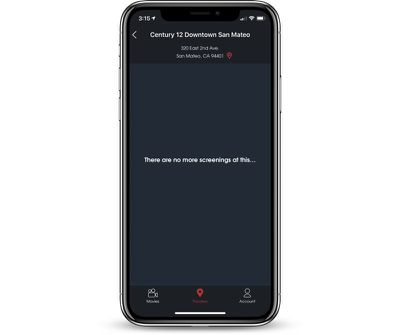
At the time of this article, MoviePass appears to be down once again, with subscribers seeing a blank screen instead of movie options. MoviePass has not yet commented on today's outage, but the MoviePass website continues to allow new subscribers to sign up.
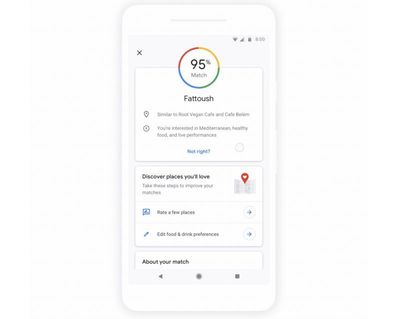
Google Maps was today updated with a new "Match" feature that's designed to offer up personalized restaurant recommendations based on a user's customized tastes.
The Match option allows users to tap on a food or drink spot to see if they're likely to enjoy a new spot based on past restaurant visiting history. The update also includes a list of how many restaurants have been visited in the Explore tabs trending feature.
Thanks for using Google Maps!
- Our new "match" feature will help you find your one true love. And by love, we mean your next favorite cheeseburger. Tap on a food or drink spot to see how likely you are to enjoy it based on your unique preferences - so you can spend more time eating and less time searching for places to go.
- When viewing trending lists in the Explore tab, you can now see how many restaurants you've been to. Keep discovering and going to new places to complete a list!
Google's Match feature was first outlined in May at Google I/O, and it rolled out for Android users in June before expanding to iOS users today.
Recommendations will take into account food and drink preferences selected in Google Maps, places you've been to, and places you've rated or added to a list. Scores for restaurants will get smarter over time with usage.
Google Maps can be downloaded from the iOS App Store for free. [Direct Link]
Apple recently hired Sterling Crispin, a new virtual reality hire who developed a painting app for mobile VR headsets, reports Variety.
Called "Cyber Paint," Crispin's app is designed to allow VR headset wearers to create 2D and 360-degree pictures. Cyber Paint is available for Oculus Go, Daydream, GearVR, and Vive Focus.
According to his LinkedIn page, Crispin joined Apple in May 2018 as a "prototyping researcher," an interesting title given Apple's rumored interest in virtual reality.
Apple is said to have a secret research unit composed of hundreds of employees who are working on AR and VR and exploring the ways the two emerging technologies can be used in future Apple products.
Rumors have suggested Apple is developing multiple AR/VR headset prototypes, including a headset that would feature an 8K display for each eye and would work with both virtual and augmented reality applications. This device is not tied to a mobile device and reportedly works with a dedicated box using high-speed short-range wireless technology.
There have also been multiple reports of Apple's work on augmented reality smart glasses with a dedicated display, a built-in processor, and an "rOS" or reality operating system based on iOS.
Prior to developing his Cyber Paint app, Crispin served as a lead UX designer at DAQRI, where he worked on software developed for augmented reality and head mounted displays, and before that, he was a freelance VR developer, so he has both AR and VR experience.
Apple has made several AR/VR-related hires and acquisitions in recent years, all of which are outlined in our dedicated AR/VR roundup. Acquisitions include Vrvana, a company that developed a mixed reality headset called Totem.
It's not entirely clear when we might see an AR or VR headset from Apple, but multiple rumors have suggested Apple is aiming for a 2019 to 2020 launch date for such a device.
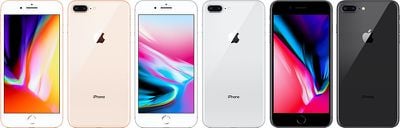
Sprint today announced a new promotion for customers adding a new line of service over the next few days, this time focusing on the iPhone 8. Under the new offer, new and existing customers who add a new line can get the 64GB iPhone 8 for $8 per month with Sprint Flex.
Note: MacRumors is an affiliate partner with some of these vendors. When you click a link and make a purchase, we may receive a small payment, which helps us keep the site running.
The flash sale will kick off tomorrow, July 31, and run through Thursday, August 9, available on Sprint's website and through over-the-phone orders. Sprint's announcement also follows the reveal of its new "Unlimited Plus" and "Unlimited Basic" smartphone plans earlier in the month.
"Sprint’s Flash Sale is delivering a fast, simple and convenient online shopping experience, something we know consumers crave," said Dow Draper, Sprint chief commercial officer. "This is the first time Sprint has offered iPhone 8 at the unbelievably low price of only $8 a month with Sprint Flex. Now is the perfect time to become a customer because Sprint has the network built for unlimited at the best price. Don’t wait; iPhone 8 for $8 a month will only be available until Aug. 9."
There are a few other deals going on today, starting off with savings on App Store and iTunes gift cards exclusively for Costco members. Those with a member account can get the $100 iTunes e-gift card for $84.49 and the $25 iTunes e-gift card for $21.49, coming just under the usual 15 percent discounts the cards see at other retailers.
On eBay, customers have the chance to save 10 percent on back-to-school shopping with the company's latest coupon. This one isn't a sitewide code, but instead focuses on items including backpacks, laptops, cameras, dorm essentials, and more sold by select sellers (you can find the full list at the bottom of this landing page). Once you find eligible items worth $25 or more, enter the code PUMPED10 at checkout to get 10 percent off your order through 11:59 p.m. PT on August 3.
At Rakuten, third-party seller BuyDig has again discounted the Beats Studio3 Wireless Headphones (Black) to their all-time-low price of $181.90 with code BYD37, down from $219.00 and coming about $50 under the current $240 price tag at Walmart and Amazon. Rakuten has also kicked off a new 15 percent off sitewide sale, giving customers the chance to save on a variety of products using promo code SAVE15.
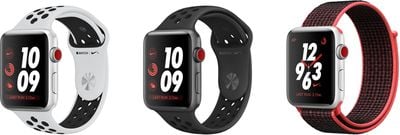
Another notable sale this week is Nike's 20 percent off promo code HOT20, which you can apply to Apple Watch and band accessories found on this page. With this sale, the most expensive Aluminum Apple Watch Series 3 model (GPS + Cellular, 42mm) is marked down to $343.20, down from $429.99. Likewise, Nike's Sport Bands and a few Sport Loops are available for $39.20, down from $49.99.
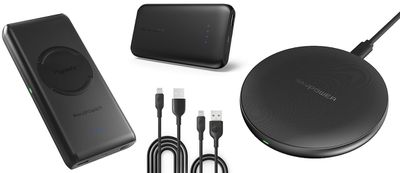
Finishing off today's deals is a list of accessories sold on Amazon from companies including Anker, RAVPower, and Choetech, many of which will be expiring as July comes to a close this week so consider this your last-call warning for these discounts:
Last Call: MacRumors + RAVPower Exclusive Codes, expiring July 31 at 11:59 p.m. PT
Apple today seeded the fifth beta of an upcoming iOS 12 update to developers for testing purposes, two weeks after seeding the fourth beta and more than a month after introducing the new software at the Worldwide Developers Conference.
Registered developers can download the new iOS 12 beta from Apple's Developer Center or over-the-air after installing the proper certificate.
iOS 12 introduces major updates to iOS, with Apple revamping the operating system from top to bottom to make iPhones and iPads, especially older models, faster and more responsive.
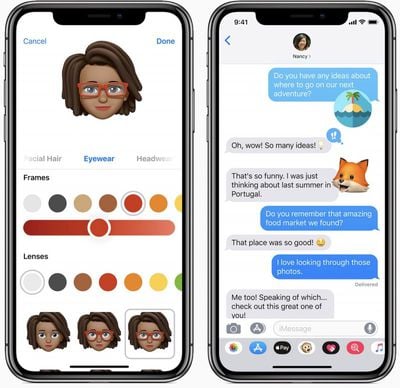
On the iPhone X, there are new Animoji characters along with "Memoji," which are customizable, personalized Animoji that can be used both in Messages and in FaceTime. Messages and FaceTime have also gained fun new camera effects, and Group FaceTime support allows for audio/video calls with up to 32 people.
Siri is smarter in iOS 12 with a new Shortcuts feature that lets you create multi-step custom automations using first and third-party apps that can be activated with Siri. Shortcuts can be created through the Shortcuts app, available as a beta from Apple's Developer Center.
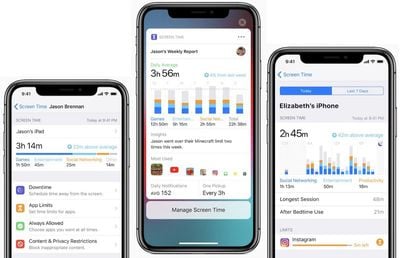
Apple built comprehensive time management and monitoring tools into iOS 12 with Screen Time, allowing you to keep track of just how much time you're spending on your iPhone and iPad. App limits can help you cut back on iOS device usage, and robust parental controls are included for families.
Group Notifications make incoming notifications easier to view and manage, while a new Instant Tuning feature lets you tweak your notification settings right on the Lock screeen on a notification-by-notification basis.
Apple News has a new Browse feature, the Stocks app has been redesigned, iBooks has been overhauled with a new look and a new name -- Apple Books -- and Voice Memos has been revamped with iCloud support and an iPad app.
ARKit 2.0 introduces new capabilities like shared experiences that let two people see the same AR environment on separate devices, and persistence, which allows AR experiences to be saved across multiple sessions. There's also a new Measure app for measuring objects using AR capabilities.
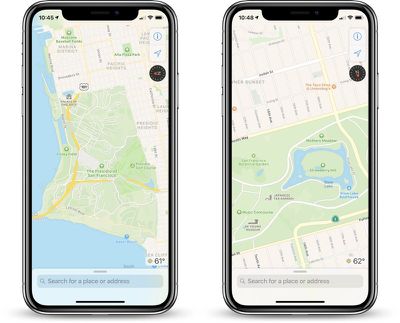
iOS 12 includes a revamped and rebuilt Maps app that uses a new Apple-designed Maps engine that will display foliage, pools, buildings, pedestrian pathways, and other map elements more accurately. The new Maps also includes significant improvements to traffic, real-time road conditions, construction, and more, plus it will enable Apple to push out changes and fixes more quickly.
The revamped Maps app is available in the Northern California area during beta testing. After iOS 12 launches, Apple will continue rolling out the new maps to additional U.S. locations across late 2018 and 2019.
Tons of other small tweaks and features have been added to iOS 12, so make sure to check out our dedicated roundup for additional detail on what's new in iOS 12.
Early betas of new operating system updates always introduce tweaked features and new functionality, and we'll be outlining what's new in the fourth beta below. We also rounded up all of the changes that were introduced in the previous betas, beta 2 and beta 3, and beta 4.
iOS 12 is available for developers and public beta testers, with a public launch planned for the fall alongside new iPhones.
What's new in iOS 12 beta 5: According to Apple's release notes, the fifth beta of iOS 12 introduces some new bugs.
- After restarting a device, paired Bluetooth accessories might not function correctly or might be displayed using the device's address instead of name.
- Using Apple Pay Cash to send or request money via Siri might result in an error.
- When using CarPlay, Siri can't open an app by name. Shortcuts that involve opening an app won't work, and Shortcuts that require confirmation might not work.
- Some Shortcuts requests might not work.
- When multiple ride-sharing apps are installed, Siri might open an app instead of providing an ETA or location when asked. Apple suggests asking again as a fix.
- Users might not see custom UI when using Siri Suggestions Shortcuts with built-in intents.
Several bugs have been addressed, including error messages in the App Store when attempting to install an app, an inaccurate cellular signal bar on iPhone X while on Lock screen or Home screen, a bug that caused Wallet to crash on launch, and a failure for Screen Time usage and data settings to sync between devices. Shortcuts will also mostly work in CarPlay now, and will be restored from iCloud backups.
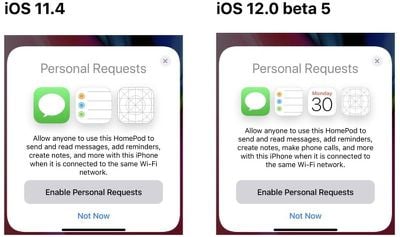
HomePod data found in iOS 12 seemingly confirms recent rumors that a HomePod software update set to be released alongside iOS 12 will allow the device to be used to make phone calls.
As shared by 9to5Mac, a HomePod personal requests image says the HomePod can be used to send and read messages, add reminders, create notes, make phone calls, and more, with the portion about phone calls being new.
Right now, you can make a phone call on the iPhone and transfer it to the HomePod to use the HomePod as a speakerphone, but you can't use the HomePod to place calls, something that appears to be changing following the update. Apple is testing new HomePod software internally, but it is not available for developers or public beta testers.
Other changes in iOS 12 beta 5: Screen Time in the Settings app no longer lists family members who aren't children, and it needs to be reenabled after updating to the new beta.
Apple today seeded the fifth beta of an upcoming watchOS 5 update to developers, two weeks after releasing the fourth beta and more than a month after introducing the software at the Worldwide Developers Conference.
To install the beta, you'll need the proper configuration profile, which can be obtained through the Apple Developer Center. Once the profile is in place, the watchOS 5 beta can be downloaded using the dedicated Apple Watch app on the iPhone by going to General --> Software Update.
To update, the Apple Watch needs to have 50 percent battery, it must be placed on an Apple Watch charger, and it has to be in range of the iPhone. It's best to install the beta on a secondary device instead of a primary device as betas often still have bugs to be worked out.
watchOS 5 is a significant update to the watchOS operating system, introducing Activity Competitions so you can compete on workouts with friends, Walkie-Talkie with push-to-talk functionality for quickly communicating with the people you talk to most, and auto workout detection to make it easier to start and stop workouts if you forget.
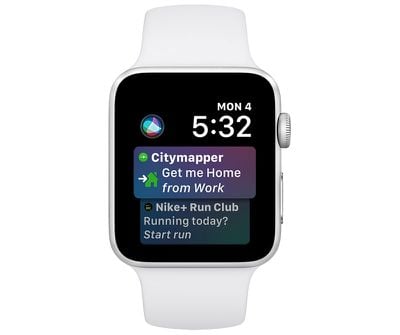
Other new features include an improved Siri watch face with support for third-party apps through Siri Shortcuts, a dedicated Apple Podcasts app, new Workout types that include Yoga and Hiking, new features for runners, WebKit support for viewing some web content on Apple Watch, and enhanced notifications, which will make notifications on the Apple Watch interactive.
watchOS 5 is only available to developers and will not be provided to public beta testers (because there's no way to downgrade Apple Watch software), so non-developers will need to wait until the software is officially released in the fall to try it out.
The watchOS 5 update runs on all Series 1, Series 2, and Series 3 Apple Watch models, but it is not available for the first-generation "Series 0" Apple Watch models.
Apple today seeded the fifth beta of a new tvOS 12 operating system to developers for testing purposes, two weeks after releasing the fourth beta and more than a month after introducing the new software at the 2018 Worldwide Developers Conference.
Designed for the fourth and fifth-generation Apple TV, the tvOS 12 developer beta can be downloaded onto the Apple TV using a profile that's installed through the Xcode software. Subsequent betas can be downloaded via the software update mechanism on the Apple TV.
tvOS 12 introduces support for Dolby Atmos sound, which was activated in the second beta. Apple says that iTunes will be home to the largest collection of Dolby Atmos-supported movies anywhere this fall. Customers that have previously purchased movies that gain Dolby Atmos support will see free upgrades to their titles, much like the rollout of 4K support.
Building on single sign-on, a new zero sign-on feature will further simplify the cable authentication process. With zero sign-on, the Apple TV can detect a user's broadband network and automatically sign them into supported apps they receive through their accompanying cable subscription.
Zero sign-on will be available for Charter Communications customers this fall and will expand to additional cable providers in the future.
Aerial screensavers now include location information and there are new screensavers captured in collaboration with the International Space Station.
Other improvements tvOS-related improvements include AutoFill passwords from iPhone, an Apple TV Remote automatically added to Control Center on the iPhone or iPad, and Apple TV support on Home control systems like Control4, Crestron, and Savant.
tvOS 12 is available for developers and public beta testers to work out bugs and other issues ahead of a fall public launch.
Apple today seeded the fifth beta of an upcoming macOS Mojave update to developers for testing purposes, two weeks after releasing the fourth beta and more than a month after introducing the software at the Worldwide Developers Conference.
macOS Mojave introduces a new method of installing software updates, so after you've installed the first beta using the appropriate profile from the Developer Center, additional betas can be downloaded clicking on the Apple in the menu bar, choosing "About This Mac" and clicking "Software Update." Alternatively, open System Preferences and choose the "Software Update" icon.
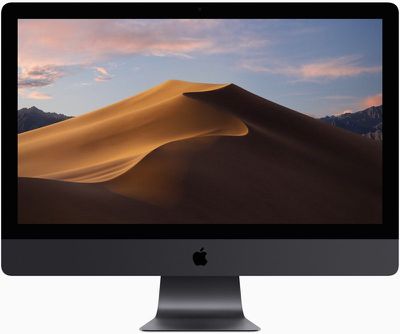
Apple's macOS Mojave update introduces a systemwide Dark Mode, with Mojave users able to choose between a light theme or the new dark theme, which changes the color of the dock, menu bar, apps, and other elements. Dark Mode is accompanied by Dynamic Desktops, aka wallpapers that subtly change throughout the day. Additional wallpapers were introduced in the fourth beta.
Stacks, a new desktop organization system, keeps all of your desktop files neat and organized, while Finder has been enhanced with a Gallery View, a Sidebar, a revamped Quick Look option and Quick Actions, so you can do more in the Finder window than ever before.
Screenshots can now be edited using Markup tools and a new management options that also allow for easy screen recording, while Continuity camera, a new feature, allows you to import photos and document scans directly from an iPhone or iPad to the Mac.
The Apple News, Stocks, Home, and Voice Memos apps have been ported from iOS to macOS as part of a multiyear project Apple is working on to make it easier to bring iOS apps to Macs, and Apple has introduced several new privacy protections to keep your data safer than ever.
Apple is also making it harder for websites to track you with a range of new Safari tools, and it's also easier to make and store secure, hard-to-guess passwords for each and every website.
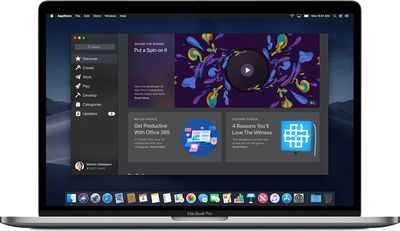
Apple has added an entirely revamped Mac App Store to macOS Mojave that makes it easier to discover apps with a featured section and specific categories for games, creative apps, productivity apps, apps for developers, and more.
macOS Mojave is available to developers and public beta testers to work out bugs and other issues ahead of an upcoming fall public release.
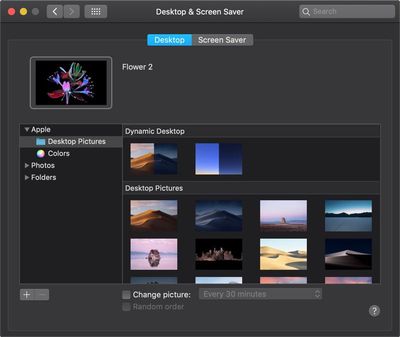
What's New in Beta 5: macOS Mojave beta 5 introduces several new wallpapers appropriate for use with Dark Mode. There are several wallpapers that feature images of the Mojave desert, along with new abstract oil slick-style wallpapers, new dark flower wallpapers, images that have been used to promote recent Mac refreshes, and more.
You can get to the new wallpapers by opening up System Preferences, choosing the Desktop & Screensaver option, and selecting Desktop Pictures.
Dropbox today announced that it is increasing the amount of storage space available to many of its paid subscribers for no additional charge.
Starting today, Dropbox Professional accounts get 2TB of storage space, while Business Standard teams have access to 3TB of shared storage space.
According to Dropbox, its new storage limits give customers more freedom to free up phone and hard drive space, share large files, and work with Dropbox's Smart Syncing features.
All new Professional and Business Standard accounts include the upgraded storage today, while storage for existing accounts will be upgraded in the coming weeks.
Dropbox is not increasing storage space available for free tiers or its Plus accounts. Free storage space remains limited to 2GB, while Plus subscribers will continue to have 1TB of storage space.
Dropbox Professional is priced at $19.99 per month or $16.58 when paying yearly. Dropbox Business is priced at $15 per month per user with a minimum of three users, but pricing drops to $12.50 per user when billed yearly.
Apple Music has scored yet another exclusive documentary, this time chronicling the creation of Kesha's 2017 album "Rainbow," the service announced today on Twitter.
"Rainbow" was Kesha's third major album, following "Warrior" in 2012 and "Animal" in 2010. The album focuses on themes of letting go, forgiveness, self-worth, and self-love, and it came following Kesha's struggles with an eating disorder, emotional issues, and alleged abuse at the hands of her producer, Dr. Luke.
In a statement, Kesha said that creating "Rainbow" was "such a therapeutic process" and that she hopes the film highlighting the development process will inspire others.
"Making Rainbow the album was such a therapeutic process and given the opportunity to turn it into a three-dimensional piece of art has helped me find even deeper healing and catharsis.
I hope this film inspires others to never give up even if you feel full of hurt or lost, because after the storm comes a rainbow. Depression, anxiety and mental illness are things we all need to talk about more, and there is no shame in asking for help. Making the decision to work on yourself is the bravest thing you can do. I hope this film helps bring light and love to everyone."
The documentary will feature never-before-seen footage of some of Kesha's performances, and according to Billboard, it will use "psychedelic vignettes" to convey Kesha's struggles and how she overcame them. The film was directed by Kesha, her brother Lagan Sebert, and Kevin Hayden.
Apple plans to release the documentary exclusively on Apple Music on August 10.
Apple has been working with schools and colleges around the world to provide Swift curriculum to students under its "Everyone Can Code" initiative, learning Apple's App Development with Swift curriculum.
To allow colleges and employers to confirm those skills, Certiport, a company that develops exam certifications, has worked with Apple to create an "App Development with Swift" academic certification program.
The new global certification system is available for secondary schools and higher education, and it has been built on Apple's Everyone Can Code program, with a specific focus on the year-long App Development with Swift course developed by engineers.
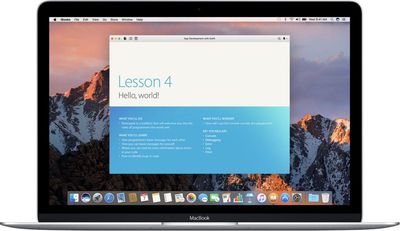
The App Development with Swift course is designed to allow students who have zero programming experience to build their own apps, and with the new certification program, instructors have a third-party validation tool and a "measurable outcome" for Swift programming classes.
"Earning an App Development with Swift certification will give students the confidence they need to further their programming education or move on to a career in programming," said Ray Murray, Vice President, Business Development, Pearson VUE. "Earning a certification endorsed by Apple shows that they have a solid grasp on the language and can apply it - today - to create innovative iOS applications. We expect this new certification to gain widespread adoption due to the popularity of the Swift programming language."
Students will be tested on their foundational skills with Swift, Xcode, Simulator, Interface Builder, Playgrounds, and other app development tools, and students who pass will earn a digital badge that can be added to a resume or portfolio.
Certiport plans to launch the App Development with Swift Certification exam in the fall of 2018 to allow the first students to obtain Swift certification.
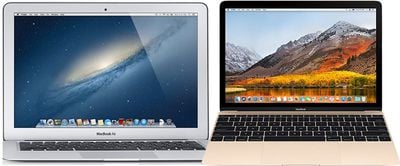
Apple is widely expected to launch a new lower-priced notebook later this year, likely with a 13-inch Retina display and a starting price below $1,000. It's unclear if it will be branded as a MacBook, MacBook Air, or otherwise, but it'll be a new lower-cost, lower-spec option below the MacBook Pro.
According to a translated report from Taiwanese publication Economic Daily News, the notebook will be powered by Intel's eighth-generation Kaby Lake Refresh processors, released in the second half of 2017.
The translated report suggests that Apple's decision to use the Kaby Lake Refresh processors, manufactured based on a 14nm process, is due to repeated delays with Intel's transition to Cannon Lake chips, based on a 10nm process. The latest word is that Cannon Lake won't be ready until the end of 2019.
The Kaby Lake Refresh lineup includes quad-core Core i5 and Core i7 processors with base clock speeds between 1.6GHz and 1.9GHz, and max Turbo Boost speeds between 3.4GHz and 4.2GHz. The 15W chips feature integrated Intel UHD Graphics 620, with support for up to 32GB of DDR4 or LPDDR3 RAM.
This means Apple's lower-priced notebook would be significantly faster than the latest MacBook Air models, which is unsurprising, given they use Intel's fifth-generation, dual-core Core i5 and Core i7 processors released in 2015. It'd also be much faster than the 12-inch MacBook, which uses ultra-low-power chips.
Kaby Lake Refresh chips are already nearly one year old, and Intel will be releasing faster Whiskey Lake processors suitable for Apple's notebook in the second half of 2018, but they might not be ready in time, as manufacturing needs to begin over the summer for the notebook to launch in the fall.
It appears Apple will have a jam-packed September event, with a trio of new iPhones, Apple Watch Series 4 models, new AirPods, and AirPower, so the Mac and iPad Pro could see some attention at an October event.
It's not entirely clear how Apple will shake up its notebook lineup below the MacBook Pro. The new notebook could be the first MacBook Air with a Retina display, or replace the MacBook Air entirely, or slot into the MacBook family, with price adjustments across the line, but it all remains to be seen.
Apple's plans for the notebook have been detailed by reliable Apple sources Ming-Chi Kuo and Mark Gurman in recent months.
Beyond the mid-range notebook, an October event could see refreshes to the 12-inch MacBook lineup with Intel's upcoming low-power Amber Lake chips, a refreshed Mac mini with Kaby Lake Refresh chips, and new standard iMac models with faster processors and a significant display-related upgrade.
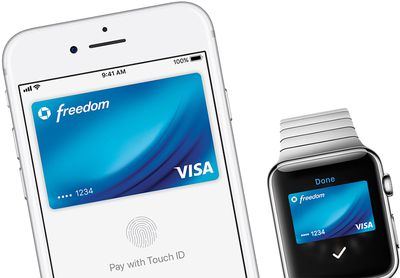
Juniper Research today published new data outlining predictions for mobile payments processing over the next five years, placing Apple Pay at the forefront in the market ahead of rivals like Samsung and Google. The study looked at Apple Pay, Samsung Pay, Google Pay, and other "OEM Pay" (official equipment manufacturer) wallets.
In total, OEM Pay users will reach 450 million globally by 2020, and the researchers predict that Apple Pay will account for 1 in 2 of these OEM Pay users at that time. This growth will cause OEM Pay wallets to reach $300 billion in transactions by 2020, representing 15 percent of total contactless in-store transactions within two years.
While Juniper Research included newcomers to the mobile payments market like Fitbit Pay and Huawei Pay, they admit that these will likely not grow much and mobile wallets will continue to see leaders in Apple, Samsung, and Google.
Research author Nitin Bhas explained: “We believe that growth over the next 5 years will continue to be dominated by offerings from the major OEM players. Additionally, we now have the likes of Huawei Pay and Fitbit Pay launching in several markets; this is now included in Juniper’s contactless forecasts”.
Although mobile wallets will continue to grow, the research shared today also looked at the overall market of contactless payments, which will still see dominance from contactless card payments made using physical credit and debit cards. In-store contactless payments will reach $2 trillion by 2020, making up 15 percent of the total point of sale transactions and driven by "strong adoption" in Europe and countries in the Asia Pacific region.
Sooner than 2020, contactless payments are already set to exceed the $1 trillion mark for the first time in 2018, one year earlier than Juniper Research previously predicted. These NFC-enabled credit cards began growing in popularity in recent years, arriving at a time when major credit card companies are aiming to simplify the checkout process for customers using both physical and digital cards.
In another Apple Pay-related research note shared earlier this year, Loup Ventures estimated that Apple Pay was being used on 16 percent of active iPhones worldwide. Looking to the future, Loup Ventures also predicted that Apple's mobile wallet will "gain widespread adoption" over the next three to five years, despite a slow few years of growth that began when Apple Pay launched in 2014.



 Note: MacRumors is an affiliate partner with some of these vendors. When you click a link and make a purchase, we may receive a small payment, which helps us keep the site running.