Apple reimbursed Samsung 800 billion won ($683 million) to cover the cost of OLED panels after Apple missed a sales target both companies had agreed upon.
Apple originally said it would buy a certain number of the display panels from the South Korean company, but disappointing iPhone sales meant it was unable to live up to the agreement. The payment was made in the second quarter of this year.
The figure, quoted by Reuters, came as Samsung on Friday forecast a plunge in its second-quarter operating profits, but one-off gains like the payment from Apple helped it beat analyst expectations.
Samsung's April-June operating profit likely fell 56 percent to 6.5 trillion won ($5.6 billion), the company revealed in a regulatory filing ahead of the release of its detailed earnings figures in late July. Revenue probably fell 4.2 percent from a year earlier to 56 trillion won ($48 billion).
Samsung is on track to post year-on-year profit declines for a third consecutive quarter, mainly due to a combination of falling chip prices because of a supply glut and U.S. sanctions on Chinese telecom equipment maker Huawei, which has become a key Samsung client.
The U.S.-China trade war is also impacting global chip and smartphone markets, with rising tariffs hitting demand for electronics. In a striking example of the ongoing feud between the two countries, Seoul also cut its annual economic growth target to a seven-year low as exports continued to slump.
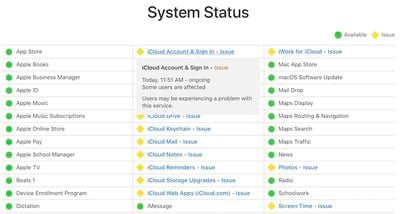
Apple today is experiencing problems with a host of iCloud-related services, as outlined on the company's system status page. Affected services include all of the basic iCloud services, as well as services like Find My Friends, Find My iPhone, Game Center, Photos, and Screen Time.
The company says only that "some" users are affected, but social media reports suggest the outage is fairly widespread.
Apple is also having problems with its retail store systems, with a number of users reporting that employees are unable to complete customer purchases or support requests.
The awkward moment you go into the Apple store and they say every store in the world right now can’t sell anything.
Systems down and they don’t know how long for. #FirstWorldProblems#Apple
— Elliott Cantor (@ElliottCantor) July 4, 2019
Systems are down completely @apple store international plaza Tampa, Fl. Can’t even get my watch fixed
— wakaidev (@wakaidev) July 4, 2019
Update: Apple Cash, Apple Pay card management, and Mail Drop are now also affected.
Update 2: According to Apple's system status page, all issues have been resolved.
Today is Independence Day in the United States, and as people around the country celebrate the holiday, many retailers have kicked off notable sales that can help those shopping around today save some money.
Note: MacRumors is an affiliate partner with some of these vendors. When you click a link and make a purchase, we may receive a small payment, which helps us keep the site running.
In this article we've highlighted some of the best sales for Apple products and compatible accessories, offered by companies like Speck, Twelve South, JBL, Anker, CalDigit, OWC, and many more.
iPad Pro Deals
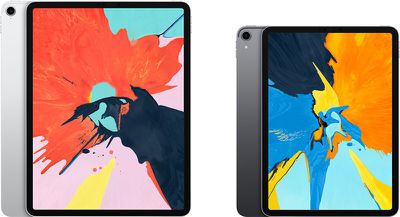
Amazon has introduced a series of notable discounts on Apple's 11-inch iPad Pro from 2018, including a few new all-time-low prices on the tablet. Discounts include both Wi-Fi and cellular models, and reach to as much as $250 off original prices.
Amazon is also continuing sales on the 12.9-inch iPad Pro models this week, offering up to $250 off the larger-screen devices. iPad Pros that are seeing lowest-ever prices have been marked in the lists below.
11-Inch
Wi-Fi, 512 GB - $949.00, down from $1,149.00 ($200 off, lowest ever)
Wi-Fi, 1 TB - $1,299.00, down from $1,549.00 ($250 off)
Cellular, 512 GB - $1,099.00, down from $1,299.00 ($200 off, lowest ever)
Cellular, 1 TB - $1,449.00, down from $1,699.00 ($250 off, lowest ever)
12.9-Inch
Wi-Fi, 512 GB - $1,149.00, down from $1,349.00 ($200 off, lowest ever)
Wi-Fi, 1 TB - $1,499.00, down from $1,749.00 ($250 off)
Cellular, 64 GB - $949.99, down from $1,149.00 ($199 off, lowest ever)
Cellular, 512 GB - $1,299.00, down from $1,499.00 ($200 off, lowest ever)
Anker
Anker typically has sales running on its accessories, and today is no different. With these discounts, you can save on portable battery packs, a power strip, Lightning cables, Bluetooth speakers, wireless chargers, wireless earphones, and more.
All of the sales listed below will expire on July 10, and none of them require a promo code. Be sure to head to Amazon and place your order soon if you're interested.
Today is the last day that you can get 25 percent off sitewide on Speck's website. With this sale, you can save on iPhone cases, iPad cases, and other accessories.
Head to SpeckProducts.com, add a product to your cart, and enter the code JULY4TH during checkout to get 25 percent off. Exclusions to the sitewide sale include MacBook covers, accessories for the Google Pixel 3a and 3a XL, and previously marked down products.
Twelve South
Popular Apple accessory maker Twelve South is offering up to 60 percent off its devices through July 5 at 12:01 p.m. ET. During the "Tent Sale," you can save on items like the BackPack for iMac, Journal for iPhone, Fermata stand, PlugBug World, and many more.
We've highlighted a few notable accessories on sale in the list below, but be sure to head to TwelveSouth.com for the full collection.
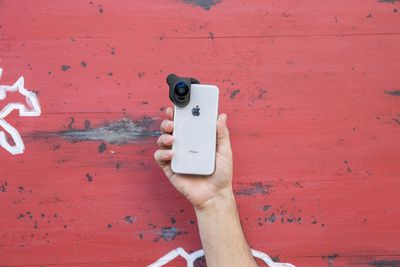
Accessory maker Olloclip is offering a discount on a variety of its iPhone camera accessories. You can get a few of the Olloclip iPhone cases for $19.99 ($10 off), Ultra-Wide and Super-Wide lenses for $35.99 ($9 off), and the Filmer's Kit for $219.99 ($20 off).
There are also various clips, bundles, and standalone lenses on sale, so be sure to visit Olloclip.com to browse the full sale.
You can get a HomePod for $228.88, discounted power adapters for the MacBook, Thunderbolt 3 docks, and more during the sale.
CalDigit
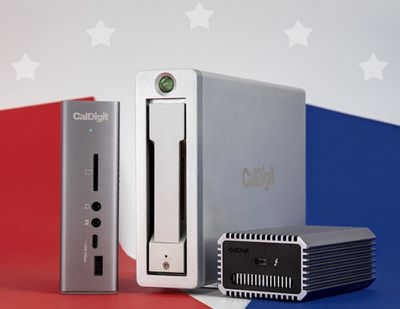
CalDigit is providing 15 percent off your entire order from the CalDigit Online Store with the coupon code HAPPY4TH. This promotion is only valid in the United States and United Kingdom, and will end on July 7.
CalDigit is a great place to purchase storage devices for Mac that use Thunderbolt and USB-C, but the company also sells accessories like USB-C adapters and docking stations.
Other Sales
JBL - Save up to 60 percent on portable speakers, headphones, and more
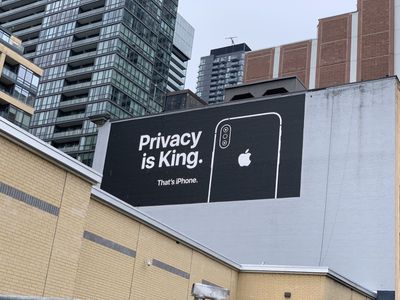
Apple has debuted two new billboards in Canada that underline the company's privacy stance, following a similar privacy-focused marketing campaign in Las Vegas during the Consumer Electronics Show back in January.
New Apple billboard outside Sidewalk Toronto HQ: “We’re in the business of staying out of yours.” pic.twitter.com/I24iAxkXzZ
— Matt Elliott (@GraphicMatt) 3 July 2019
The new billboards were spotted in Toronto and shared on Twitter by Matt Elliot and Josh McConnell. The first one has been put up right outside of Sidewalk Labs – a Google-owned company – and includes a slogan which reads: "We're in the business of staying out of your business."
The second billboard located in King Street simply reads "Privacy is King."
This year, Apple has been heavily promoting its privacy focus compared to other tech companies like Google. Apple's Las Vegas billboard, put up ahead of CES 2019, played on the well-known tourism saying: "What happens in Vegas, stays in Vegas." The sign read, "What happens on your iPhone, stays on your iPhone." Apple was reminding the tech industry of its heavy emphasis on privacy, with the billboard offering up a link to Apple's dedicated privacy website.
Apple has also made privacy-focused iPhone ads that have been aired on various TV markets globally. For example, one ad starts with the tagline "privacy matters" and then shows a variety of humorous if not slightly awkward situations where people would want their privacy protected in everyday life.
Apple has long said it believes privacy is a "fundamental human right," and as part of that, it aims to minimize its collection of customer data and disassociate it from an individual user when it does.
Samsung is in hot water with Australia's consumer watchdog for allegedly misleading consumers about the level of water resistance its Galaxy smartphones offer.
Samsung Galaxy advertisement
Reuters reports that the Australian Competition and Consumer Commission (ACCC) is suing the South Korean firm for falsely representing its Galaxy phones as suitable for use underwater, following ads that show the devices being submerged in swimming pools and used in ocean water.
Samsung did not know or sufficiently test the effects of pool or saltwater exposure on its phones when ads showed them fully submerged, claims the ACCC lawsuit.
"The ACCC alleges Samsung's advertisements falsely and misleadingly represented Galaxy phones would be suitable for use in, or for exposure to, all types of water, including in ocean water and swimming pools, and would not be affected by such exposure to water for the life of the phone, when this was not the case," ACCC Chairman Rod Sims said in a statement.
Samsung Galaxy phones are marketed as having IP68 water resistance, defined as resistant to water 1.5 meters deep for 30 minutes. The ACCC's point is the IP68 rating doesn't cover all types of water. However, Samsung told Reuters it stood by its advertising, complied with Australian law, and would defend the case.
The smartphone maker has invested heavily in advertising to rebuild its reputation in the public eye, following its 2016 global recall of fire-prone Galaxy Note 7 devices.
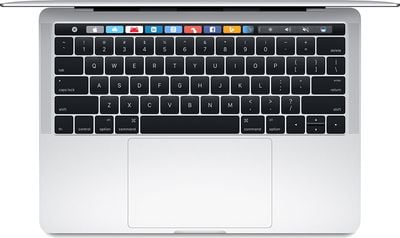
Apple analyst Ming-Chi Kuo believes Apple will do away with its controversial butterfly mechanism keyboard in future MacBooks, beginning with a refreshed MacBook Air later this year.
In a report obtained by MacRumors, Kuo says Apple will instead use a new keyboard design based on scissor switches, which should provide better key travel and durability than the more failure-prone butterfly keyboard.
There have been successful developments in the new scissor keyboard. The new keyboard could improve the typing experience by offering longer key travel and durability by adopting glass fiber to reinforce the keys' structure.
Kuo believes a new scissor switch keyboard will also be used in the MacBook Pro, but not until 2020. Perhaps tellingly, Kuo made no mention of the 16-inch MacBook Pro he has previously suggested Apple will launch later this year.
We believe the partially refreshed MacBook Pro models will also adopt a new scissor keyboard in 2020; shipments of MacBook models equipped with a new scissor keyboard will grow 500–700% YoY in 2020. Though the butterfly keyboard is still thinner than the new scissor keyboard, we think most users can't tell the difference. Furthermore, the new scissor keyboard could offer a better user experience and benefit Apple's profits; therefore, we predict that the butterfly keyboard may finally disappear in the long term.
Apple's butterfly keyboards are highly controversial and have been called out as one of the company's worst design decisions due to their penchant for failure due to small particulates like crumbs or heat issues.
Following years of anecdotal complaints from customers, and a few class action lawsuits, Apple initiated a worldwide service program, offering free repairs of 2015-and-later MacBook and 2016 and 2017 MacBook Pro keyboards, which are equipped with low-profile butterfly switch mechanisms.
Apple in 2018 debuted MacBook Air and MacBook Pro models that use an updated third-generation butterfly keyboard. The third-generation keyboard has a thin silicone barrier behind each key, which was put in place as an ingress-proofing measure to prevent dust from getting in the keys.
Clearly the hope was that the updated keyboard would cut down on failures, but the 2018 MacBook Pro is still prone to keyboard issues, and Apple acknowledged as much in March.
Kuo says the new replacement keyboard will be supplied solely by specialist laptop keyboard maker Sunrex rather than Wistron, which currently makes the butterfly keyboards for Apple. The analyst expects the new Sunrex keyboard will go to mass production in 2020 and will make the Taiwan-based firm Apple's most important keyboard supplier.
Apple today seeded the second beta of an upcoming macOS Catalina update to its public beta testing group, one week after seeding the first public beta and a day after seeding the third developer beta.
Beta testers who have signed up for Apple's beta testing program will be able to download the macOS Catalina beta through the Software Update mechanism in System Preferences after installing the proper profile. Those who want to be a part of Apple's beta testing program can sign up to participate through the beta testing website, which gives users access to iOS, macOS, and tvOS betas.
Potential beta testers should make a full Time Machine backup before installing macOS Catalina, and it may not be wise to install it on a primary machine because betas can be unstable and often have many bugs.
macOS Catalina eliminates the iTunes app, which has been a key Mac feature since 2001. In Catalina, iTunes has been replaced by Music, Podcasts, and TV apps. The new apps can do everything that iTunes can do, so Mac users aren't going to be losing any functionality, and device management capabilities are now handled by the Finder app.
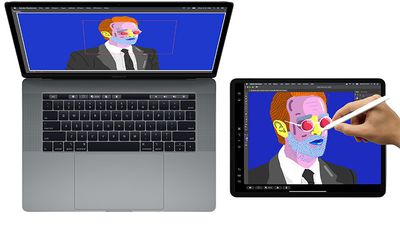
macOS Catalina has a useful new Sidecar feature, designed to turn the iPad into a secondary display for the Mac. It can work as a traditional second display or with a mirroring feature. Apple Pencil support works with Sidecar, so you can turn your iPad into a drawing tablet using apps like Photoshop.
For those with an Apple Watch set up to unlock the Mac, there's now an option to approve security prompts in Catalina by tapping on the side button of the watch. Macs with a T2 chip in them also support Activation Lock, making them useless to thieves much as it does on the iPhone.
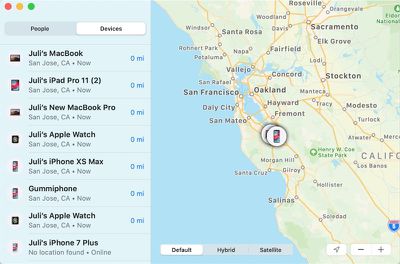
There's a new Find My app that lets you track your lost devices, and previously, this functionality was only available via iCloud on the Mac. There's even a new option to find your devices even when they're offline by leveraging Bluetooth connections to other nearby devices, something that's particularly handy on the Mac because it doesn't have a cellular connection.
Apple is expanding Screen Time to the Mac in Catalina, letting Apple users track their device usage across Mac, iOS, and iPad for a better overall picture of time spent using electronics.
For developers, a "Project Catalyst" feature lets apps designed for the iPad be ported over to the Mac with just a few clicks in Xcode and some minor tweaks. Apple's ultimate goal with Project Catalyst is to bring more apps to the Mac.
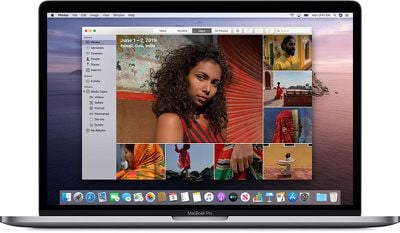
Photos features an updated interface that better highlights your best pictures, Safari includes a new start page with Siri Suggestions, Mail has a new feature for blocking emails and another new option for muting threads, and the Reminders app has been overhauled and is now more useful.
Before installing macOS Catalina, be aware that it does away with 32-bit app support, so some older apps that have not been updated in some time may stop working. For more on macOS Catalina, make sure to check out our macOS Catalina roundup.
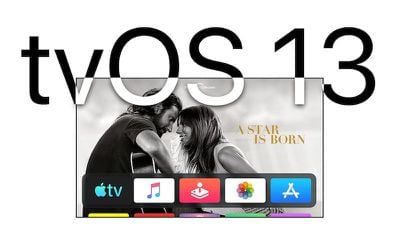
Apple today seeded the second beta of an upcoming tvOS 13 update to its public beta testing group, one week after seeding the first public beta and a day after seeding the third developer beta.
Public beta testers can download the new update by going to the Settings app on the Apple TV and navigating to the Software Updates section under "System." "Get Public Beta Updates" will need to be toggled on, and once it is, the Apple TV will download the beta software.
tvOS 13 includes a new Home screen that's aimed at making it easier to find new content, with support for autoplaying videos to show off new TV shows, movies, and apps, similar to Netflix.
Multi-user support is new in tvOS 13, letting each member of the family have their own customized Apple TV interface with separate recommendations, music playlists, and Watch Now lists. A new Control Center lets you swap between profiles.
tvOS 13 gets the Apple TV ready for Apple Arcade, Apple's new gaming service that's coming to the Apple TV, iOS, iPadOS, and macOS later this year. Apple Arcade will offer unlimited access to more than 100 new and exclusive games, for one subscription fee.
Apple Arcade preparations include support for the Xbox Wireless Bluetooth Controller and the PlayStation DualShock 4 Controller, both of which can be connected to an Apple TV over Bluetooth.
Apple is also adding new under-the-sea themed screensavers made in partnership with the BBC Natural History unit, also known for "Blue Planet," and the new software brings support for a picture-in-picture mode that lets you watch TV while doing other things on the Apple TV.
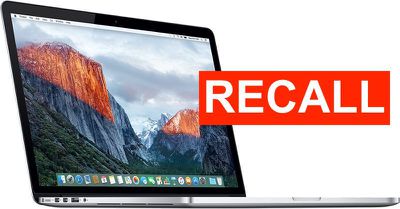
Apple in June launched a voluntary recall and replacement program for 15-inch MacBook Pro models with Retina display sold between September 2015 and February 2017, citing defective batteries that could overheat and pose a fire safety risk.
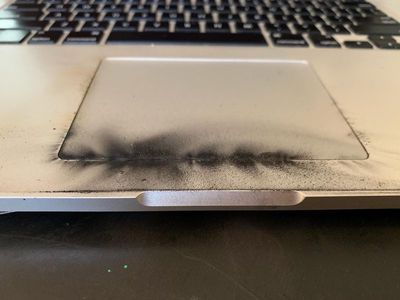
Right after the replacement program was announced, designer Steven Gagne shared some images of a MacBook Pro that caught fire, and those images were today surfaced by PetaPixel, giving us a look at why 2015 MacBook Pro owners should take this recall seriously.
Gagne said that the battery in his MacBook Pro exploded, causing a small fire and filling his house with smoke. He heard the sound of the battery popping, and then smelled a strong chemical scent. The MacBook Pro wasn't plugged in and it was in sleep mode.
He was able to get to it quickly enough to extinguish the fire before it did real damage, but the seriousness of the damage to the MacBook Pro emphasizes that this could have been far worse.
Apple has asked customers with a 15-inch MacBook Pro from 2015 to stop using it until the battery inside can be replaced. Apple has a website outlining the recall program, with MacBook Pro able to enter a serial number to see if they need a battery replacement.
The recall affects the 15-inch MacBook Pro from 2015 and does not impact later models released in 2016 and beyond. Those with 15-inch 2015 machines will need to visit an Apple retail location, an Apple Authorized Service Provider, or contact Apple support to arrange a mail-in repair.
You can determine which Mac you have by clicking on the Apple logo in the menu bar and selecting "About This Mac." The year of the machine is listed in parentheses, and affected machines will say "15-inch, Mid 2015."
According to the U.S. Consumer Product Safety Commission, Apple has received a total of 26 reports of batteries overheating, including five reports of minor burns and 17 reports of minor damage to nearby personal property.
Apple sold approximately 432,000 affected MacBook Pro units in the United States and 26,000 in Canada.
The most recent beta of iOS 13 was released yesterday, and it brought an interesting new "FaceTime Attention Correction" feature that changes the way that FaceTime works.
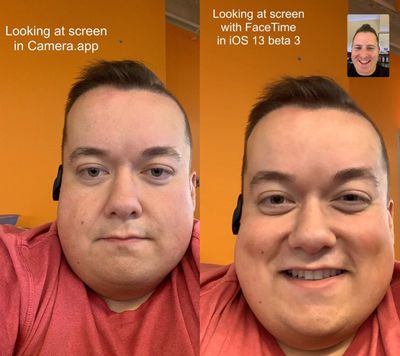
FaceTime Attention Correction, when enabled, adjusts the set of your eyes so that it looks like you're making eye contact with the person you're FaceTiming even when you're looking at the iPhone's screen rather than the camera itself. It's a little difficult to explain, so we've made a hands-on video to demo how it works.
When you're using FaceTime, you naturally want to look at the display to see the other person you're talking to rather than the camera, which has the effect of making you look like you're not maintaining eye contact.
As can be seen in the video, iOS 13 corrects this and makes it so that when you're looking at the iPhone's screen, your gaze appears to be on the camera, allowing eye contact to maintained be maintained while still letting you keep your gaze on the friend or family member you're FaceTiming with.
In iOS 12 and with FaceTime Attention Correction disabled, FaceTime looks like it always does - with no direct eye contact.
FaceTime Attention Correction appears to use an ARKit depth map captured through the front-facing TrueDepth camera to adjust where your eyes are looking for a more personal and natural connection with the person that you're talking to.
Twitter users have discovered the slight eye warping that Apple is using to enable the feature, which can be seen when an object like the arm of a pair of glasses is placed over the eyes.
You can access FaceTime Attention Correction on iPhone XS, iPhone XS Max, iPhone XR, and 2018 iPad Pro models running the third developer beta of iOS 13. It's a setting that's available in the FaceTime section of the Settings app.
Popular photography app Pro Camera from Moment is getting a major new feature today that's going to make it easier to capture long exposure shots.
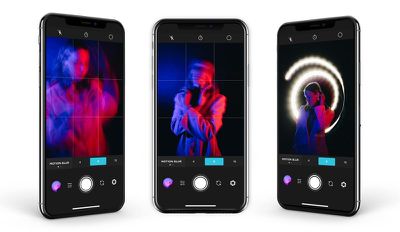
The new Slow Shutter shooting mode provides manual long exposure controls for blurring parts of images, such as rushing water or cars driving by on a road. It can also be used to create an image without people, if, for example, you're taking a photo in an area that's often crowded but where people pass by frequently.
There's a simple interface that's designed to let you select the motion and the time, and there are options for motion blur or light trails. You can select a pre-determined time or use the Bulb setting to leave the shutter open as long as desired.
The Slow Shutter feature takes images in the background and then blends them together, and all photos are saved as Live Photos so you can use them as photos or short videos.
Moment is the company behind the popular Moment lenses that attach to an iPhone. The app is designed to be used with the Moment lenses, but it also works without them, serving as a standalone photography app with manual controls.
To celebrate the launch of the new feature, Moment is providing anyone who downloads the app with a 15 percent off code to be used in the Moment store.
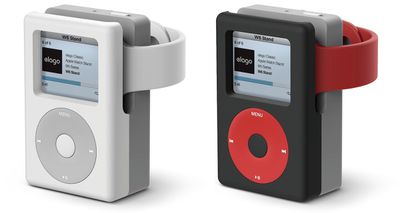
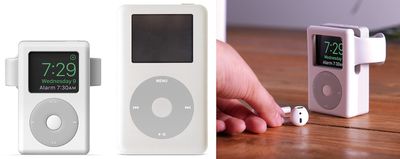
Elago is known for selling Apple Watch stands that house Apple's wearable device inside cute replicas of older tech, like a classic Macintosh or an original Nintendo Game Boy. The company is back this week with its latest product, the W6 Stand, which is designed to look like an iPod Classic.
The W6 Stand works with all Apple Watch models and is compatible with Nightstand Mode. The accessory is made of a scratch-free silicone that protects the Apple Watch when it's sitting inside the stand. To use it, users simply place the Apple Watch's inductive charging puck into the stand's cutout and slide their Apple Watch into the opening for the iPod's "display."
Elago is selling the W6 Stand in White and Black on its own website and on Amazon. The accessory is cheaper on Amazon, where it's priced at $12.99 for the white color option, while on Elago's website it's running for $14.99 for both colors.
Besides the previous W3 Stand for Apple Watch, Elago has also released the M4 Stand for iPhone, which turned an iPhone 7, 6s, or 6 into a classic Mac.
Note: MacRumors is an affiliate partner with Amazon. When you click a link and make a purchase, we may receive a small payment, which helps us keep the site running.
A new feature in the latest iOS 13 beta makes users appear as if they're looking directly at the camera to make eye contact during FaceTime calls, when actually they're looking away from the camera at the image of the other person on their screen.
The FaceTime Correction Feature as demoed by Will Sigmon (@Wsig)
The new "FaceTime Attention Correction" feature, first spotted by Mike Rundle on Twitter, can be turned on and off in the FaceTime section of the Settings app, although it only appears to work on iPhone XS and XS Max devices in the third iOS 13 beta sent out to developers on Tuesday.
Why the feature is limited to these devices right now remains unknown. It clearly relies on some form of image manipulation to achieve its results, so maybe the software algorithms require the more advanced processing power of Apple's latest devices.
Rundle predicted in 2017 that FaceTime attention correction would be introduced by Apple in "years to come," but its apparent inclusion in iOS 13, due to be released this fall, has surprised and impressed him.
For more details on the many features coming to iPhones with iOS 13, be sure to check out our comprehensive MacRumors roundup.
Update: As demonstrated by Dave Schukin, the feature uses ARKit depth maps to adjust eye position to make it appear the user is looking at the camera.
How iOS 13 FaceTime Attention Correction works: it simply uses ARKit to grab a depth map/position of your face, and adjusts the eyes accordingly.
Notice the warping of the line across both the eyes and nose. pic.twitter.com/U7PMa4oNGN
— Dave Schukin 🤘 (@schukin) July 3, 2019
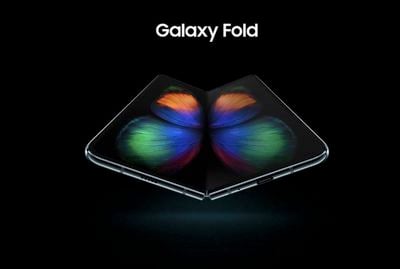
Samsung has completed its redesign of the Galaxy Fold to resolve the multiple display failures that led to its delay, Bloomberg reported on Tuesday.
According to the publication, the smartphone maker is now in the "final stages" of producing a version that's ready for the consumer market, but it's still unable to give a firm launch date.
The South Korean company originally planned to roll out its $1,980 foldable phone on April 26, but was forced to delay the launch after several units sent out to reviewers broke during testing.
All of the issues were related to the device's screen, which was later shown to be vulnerable to debris ingress, thanks to an iFixit teardown that was later removed at Samsung's request.
The company has reportedly fixed these problems, according to people familiar with the matter who spoke to Bloomberg.
It has now stretched the protective film to wrap around the entire screen and flow into the outer bezels so it would be impossible to peel off by hand, said the people, who have seen the latest versions. It re-engineered the hinge, pushing it slightly upward from the screen (it’s now flush with the display) to help stretch the film further when the phone opens.
That tension makes the film feel harder and more a natural part of the device rather than a detachable accessory, they added. The consequent protrusion, almost imperceptible to the naked eye, may help reduce the chance of a crease developing in the middle of the screen over time, one of the people said.
Samsung on Monday announced plans to hold an event on Wednesday, August 7 in New York City, where it will unveil its next-generation Galaxy Note device.
Samsung may also use the August event to provide more detail on when we can expect the delayed Galaxy Fold to launch.
Changes found in the latest iOS 13 beta, released to developers on Tuesday, suggest users may be able to transfer data between two devices over a direct wired connection when setting up a new device or restoring one from a backup.
New graphic found in latest iOS 13 beta (Image via 9to5Mac)
As things stand, iOS users have two restore options in any device setup process. One requires them to download and install a backup stored on a computer via iTunes. The other involves using iCloud and wirelessly transferring data from an old device nearby to a new one logged into the same Apple ID.
However, new assets in the iOS 13 beta spotted by 9to5Mac's Guilherme Rambo include an icon that appears to resemble an iPhone with Face ID connected to an iPhone with Touch ID using a cable, indicating a direct wired transfer option will be available when setting up devices.
In addition, a related code snippet uncovered in the beta includes the user request, "Keep your other iPhone connected to this iPhone and connected to power until the transfer is complete," which perhaps refers to the use of a wireless charging mat during the direct transfer process.
It's unclear how any direct wired connection would work between two iPhones, since Apple doesn't sell a Lightning to Lightning cable that would enable such a physical link. Perhaps Apple intends to make such a cable available when iOS 13 is launched to the public in the fall.
Another possibility is that devices in Apple's new iPhone line-up, expected in September, will replace the iPhone Lightning port with a USB-C port. Apple already offers Lightning-to-USB-C cables for connecting iPhones to newer Macs.
According to Bloomberg, Apple is testing some versions of the 2019 iPhone lineup that include a USB-C connector instead of a Lightning port. It's not known if the company's final plans will include a transition to USB-C, but Apple analyst Ming-Chi Kuo believes Apple is going to stick with Lightning for the 2019 iPhone lineup.
Apple today released its newest transparency report, which outlines the government data requests that the company received during the second half of 2018. The PDF can be read in its entirety on Apple's website for full details, but there are a few notable highlights worth pulling out.
As TechCrunch points out, the newest report includes a section covering the number requests its received from governments asking to have an app removed from the App Store.
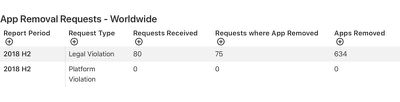
Apple received a total of 80 requests from 11 countries to remove 634 apps from various App Stores in different countries. While Apple did not provide specific details on which apps it was asked to pull, requests from China made up the bulk of total takedown requests.
China asked Apple to remove 626 apps, and Apple ultimately pulled 526 of those. Apple also pulled a smaller number of apps at the request of Vietnam, Austria, Kuwait, Lebanon, the Netherlands, Norway, Russia, Saudi Arabia, Switzerland, and Turkey.
According to Apple, the vast majority of the apps pulled in China related to either illegal gambling or pornography. Other reasons apps were pulled in various countries include violations of privacy law, pornography, unlicensed gaming, copyright infringement, and violations of local transportation law.
Apple in the second half of 2019 received 29,183 worldwide government requests for data from 213,737 devices and provided data in 22,691 of cases (78 percent). Apple says that in the U.S., the high number of devices specified in requests for data were due to stolen device and fraud investigations. Apple has similar notices for Germany, Poland, Russia, and South Korea.
There were also a higher number of government financial identifier requests in Canada, Germany, Spain, and the U.S. due to iTunes gift card and credit card fraud investigations.
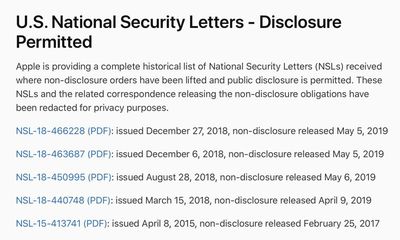
In the United States, Apple received between 3 and 499 National Security Letters (Apple is required to report a range) for between 1,505 and 1,999 accounts.
Three of the National Security Letters received are no longer subject to non-disclosure orders and have been published by Apple for the first time. Apple also published two other NSLs that were issued earlier in 2018 and in 2015. National Security Letters are issued by the FBI and Apple is forbidden from disclosing them for a set period of time.
Apple says that in its next report, it plans to begin reporting on appeals received pursuant to government requests to remove apps from the App Store. The full transparency report is available from Apple's website for those interested, along with breakdowns by country.
Note: Due to the political nature of the discussion regarding this topic, the discussion thread is located in our Politics, Religion, Social Issues forum. All forum members and site visitors are welcome to read and follow the thread, but posting is limited to forum members with at least 100 posts.
Apps designed for the Mac often don't receive as much attention as apps made for iOS devices, so we have a series here at MacRumors that's designed to highlight useful and interesting Mac apps that are worth checking out and potentially investing in.
This month's picks include apps for making your Touch Bar more functional, adding quick switches to the Menu bar, creating to-do lists, replacing the dashboard that's now defunct in macOS Catalina, and easily accessing Spotify and iTunes controls.
- Pock (Free) - Pock is a simple little Mac app that's designed to make your Touch Bar more useful by adding your dock to your Touch Bar so you can quickly access your apps and even files within folders. The Pock options are customizable, so you can choose what you need most, adding options like a now playing widget for controlling music, a status widget for getting info like WiFi connection of battery level, and more.
- One Switch ($4.99) - One Switch is a nifty Mac menu bar app that adds various switches to the Mac's menu bar. You can add toggles that will do things like hide desktop options, activate dark mode, keep the Mac awake, connect to headphones, toggle on Do Not Disturb, activate Night Shift, bring up the Screen Saver, and more. Options are customizable so you can make your One Switch menu do just want you need.
- Microsoft To-Do (Free) - Microsoft earlier this month brought its popular Microsoft To-Do app to the Mac, making it more functional than ever because it's now available across all of your devices. Mac users no longer have to rely on the web app, and can access features like task syncing between devices, file attachments, list sharing, color coding, and reminders for due dates, among other options.
- Flotato (Free) - Flotato is designed to create web apps from your favorite website, so you can get quick access to the web services that you use most often. Flotato web apps can be dragged right into the dock, so you can set up quick access for things like Google Docs, Facebook Messenger, Netflix on the web, favorite news sites, and more.
- Spotmenu (Free) - Spotmenu is another Mac app that's super simple but super useful, especially for Spotify and iTunes users. Spotmenu lets you access Spotify and iTunes content from your menu bar, allowing you to see what song is playing, pause music, play music, and skip tracks.
If you have a favorite must-have Mac app that we haven't highlighted yet, let us know in the comments, and we might feature it in a future video. For more of our Mac app picks, make sure to check out our Mac app archives.
Regal Cinemas will soon launch an unlimited movie ticket subscription service in the United States, according to a new report from Deadline.
The service is set to launch in late July, and while the details are still being ironed out, it is expected to have three pricing tiers: $18, $21, and $24 per month. Each pricing tier will provide unlimited ticket subscriptions, and the pricing options are going to vary based on location. Regal has more than 500 theaters across the United States.
Those purchasing a top-priced tier will have access to any Regal Cinema (i.e., from Valencia, CA to 42nd Street in NYC), while the lowest tier gets access to about half of the chain's national footprint. If someone purchased a subscription at a low tier and ventures to an out-of-network Regal in a higher tier (like a major city), there's apt to be a surcharge (not final, but around $2-$3) on a gratis ticket.
Each tier also includes 10 percent off concessions and Regal may offer discounted pricing when purchasing a subscription for an entire year. What's not known is whether premium options like IMAX, Dolby 3D and others will be included in the monthly subscription price.
Regal's upcoming movie ticket subscription service will compete with AMC's Stubs A-List program, which costs between $19.95 and $23.95 per month depending on the state and provides access to three movies per week.
Movie ticket subscription options became popular when MoviePass launched its $9.95 per month unlimited ticket program, but that ultimately failed due to the low pricing. MoviePass is still around, but charges $20 per month and restricts access to some movies.


 Note: MacRumors is an affiliate partner with some of these vendors. When you click a link and make a purchase, we may receive a small payment, which helps us keep the site running.