Alongside iOS and iPadOS 13.3, Apple has released new 13.3 software for the HomePod, with some bug fixes and performance improvements that build upon HomePod features introduced in earlier iOS 13 software releases.
Today's update improves the ability of HomePod to recognize the voice profile of family members, it allows individual family members to enable or disable personal requests, and it fixes an issue that could prevent music playback from resuming on a stereo pair following a call.
The new HomePod software will be installed automatically on the HomePod, but you can also manually update and check your software version by following the instructions in our HomePod software how to.
Given the prices of both the Mac Pro and the Pro Display XDR, adding AppleCare coverage seems well worth it.
The $299 price point for AppleCare+ for the Mac Pro is the same regardless of whether the Mac Pro costs $6,000 or upwards of $52,000 with upgrade options.
AppleCare+ for Mac Pro and for Pro Display XDR extends coverage to three years from the date of purchase, and adds coverage for two incidents of accidental damage. There's a $99 deductible for enclosure damage or screen damage and a $299 deductible for other damage.
24/7 access to Apple's support staff by chat or phone is also included, as are onsite repair options, mail-in repairs, carry-in repairs, and global repair coverage.
AppleCare+ for Mac Pro is the same as the AppleCare+ plan that Apple offers for all of its Mac products. It covers the Mac Pro and its accessories.
AppleCare+ for Displays covers the Pro Display XDR, the power cord, one Apple-branded display stand, and one Apple-branded mount purchased at the same time.
The AppleCare+ protection policies for Apple's new hardware can be purchased when checking out. For the Mac Pro, Apple says AppleCare+ can be added within 60 days of a purchase, but there is no similar wording on the AppleCare+ for Display pages.
Apple today released macOS Catalina 10.15.2, the second update to the macOS Catalina operating system that was originally released in October. macOS Catalina 10.15.2 comes over a month after the release of macOS Catalina 10.15.1.
macOS Catalina can be downloaded from the Mac App Store for free using the Update feature in the System Preferences app, and it is available to anyone who has a compatible Mac.
There were no major new features found in macOS Catalina 10.15.2 during the beta testing period, but according to Apple's release notes, the update includes a new layout for Apple News+ new stories, introduces Stocks improvements, includes Music bug fixes, adds support for using an iPhone to remotely control the Music and TV apps on a Mac, includes Photos and Mail bug fixes, and more.
The macOS Catalina 10.15.2 update improves the stability, reliability and performance of your Mac and is recommended for all users. This update adds the following features:
Apple News - New layout for Apple News+ stories from The Wall Street Journal and other leading newspapers
Stocks - Get links to related stories or more stories from the same publication at the end of an article - “Breaking” and “Developing” labels for Top Stories - Stories from Apple News are now available in Canada in English and French - This update also includes the following bug fixes and improvements:
Music - Restores the column browser view for managing the music library - Resolves an issue that may prevent album artwork from appearing - Fixes an issue that may reset music equalizer settings during playback
iTunes Remote - Adds support for using an iPhone or iPad to remotely control the Music and TV apps on a Mac
Photos - Resolves an issue that may cause some .AVI and .MP4 files to appear as unsupported - Fixes an issue that prevents newly created folders from appearing in Albums view - Addresses an issue where manually sorted images in an album may be printed or exported out of order - Fixes an issue that prevents the zoom-to-crop tool from working in a print preview
Mail - Addresses an issue that may cause Mail Preferences to open with a blank window - Resolves an issue that may prevent using undo from retrieving deleted mail
Other - Improves the reliability of syncing books and audiobooks to your iPad or iPhone through Finder - Fixes an issue where reminders may be out of order in the Today smart list in the Reminders app - Resolves an issue that may cause slow typing performance in the Notes app
Apple today released watchOS 6.1.1, the third update to the watchOS 6 operating system that's designed to run on modern Apple Watch models. watchOS 6.1.1 comes over a month after the launch of watchOS 6.1.
watchOS 6.1.1 can be downloaded for free through the dedicated Apple Watch app on the iPhone by going to General > Software Update.
To install the new software, the Apple Watch needs to have at least 50 percent battery, it needs to be placed on a charger, and it needs to be in range of the iPhone. Apple has also released a watchOS 5.3.4 update for those who have Apple Watch models not able to be upgraded to watchOS 6.
We didn't find any significant changes during the watchOS 6.1.1 beta testing period, and Apple doesn't have specific release notes available. The update "provides important security updates and is recommended for all users."
For more detail on the features included in the overall watchOS 6 software release, make sure to check out our watchOS 6 roundup.
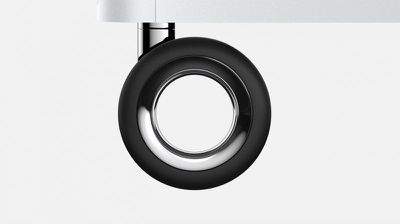
Apple's new Mac Pro is now available to order, with the base model priced at $5,999 in the United States. If you would prefer wheels on the computer to roll it around, though, that will cost you an extra $400.
"Customize your Mac Pro to have a stainless steel frame with wheels, which is ideal for moving your Mac Pro quickly and easily without having to lift it," says Apple. "Configuring your Mac Pro with wheels makes it about an inch taller than the frame with feet."
Apple has updated the pricing for the Mac Pro to include the optional $2,000 Afterburner card and $400 wheels. Yes, the wheels are $400. Top price is now $52,599. https://t.co/XJH27segBG
— Jeremy Horwitz (@horwitz) December 10, 2019
The new Mac Pro is the fastest Mac ever, with up to 28-core Intel Xeon processors, up to 1.5TB of ECC RAM, up to 8TB of SSD storage, and up to AMD Radeon Pro Vega II Duo graphics with 64GB of HBM2 memory. The computer also has eight PCIe expansion slots for maximum performance, expansion, and configurability.
With maxed out tech specs and all available accessories selected, including the $400 wheels, the new Mac Pro costs over $52,000 in the United States.
Apple today released tvOS 13.3, the second major update to the tvOS 13 operating system that runs on the fourth and fifth-generation Apple TV models. tvOS 13.3 comes over a month after the launch of the tvOS 13.2 update.
tvOS 13.3, which is a free update, can be downloaded over the air through the Settings app on the Apple TV by going to System -> Software Update. Apple TV owners who have automatic software updates turned on will be upgraded to tvOS 13.3 automatically.
tvOS 13.3 adds a useful new setting that's designed to let you change the main banner interface in the Apple TV app from What to Watch to Up Next, which displays content from shows that you're already watching rather than show suggestions.
The option can be accessed by going to the Settings app, choosing Apps, and selecting the TV app. From there, select Home Screen and choose "Up Next" in the "Top Shelf" section.
We didn't find any additional new features in tvOS 13.3 during the beta testing period, making it unclear what else might be included, but it likely focuses on bug fixes and performance improvements.
Apple today released iOS 13.3, the third major update to the iOS and iPadOS 13 operating systems. The new software updates come two weeks after the release of iOS/iPadOS 13.2.3 and more than a month after the launch of iOS 13.2, which brought new emoji.
The iOS and iPadOS 13.3 updates are available on all eligible devices over-the-air in the Settings app. To access the updates, go to Settings > General > Software Update. Apple has also released an iOS 12.4.4 update for older devices that aren't able to run iOS 13.
iOS 13.3 continues to add features that were originally promised for iOS 13 but were ultimately eliminated during the beta testing process, with the update introducing Communication Limits for Screen Time.
Communication Limits let parents control who their children are able to contact, with the feature covering FaceTime, Phone, Messages, and iCloud Contacts.
Calls to emergency numbers are always allowed and when placed, will turn off communication limits for 24 hours to make sure children are safe and not restricted from communicating with people in the event of an emergency.
The iOS 13.3 and iPadOS 13.3 updates bring support for NFC, USB, and Lightning FIDO2-compliant security keys in Safari. That means physical security keys like the Lightning-equipped YubiKey can be used for more secure two-factor authentication in place of a software-based two-factor authentication option.
In the Keyboards section of the Settings app (under General), there's a new toggle that prevents Animoji and Memoji stickers from being displayed as an option on the Emoji Keyboard for those who prefer not to see Animoji and Memoji sticker options.
When editing a video, there's a new feature that lets you save the edited version as a new clip rather than replacing the original, and Apple has also tweaked the Apple Watch app icon, changing the color of the Digital Crown from black to gray.
Apple's full release notes for the iOS 13.3 update are below:
iOS 13.3 includes improvements, bug fixes and additional parental controls for Screen Time.
Screen Time - New parental controls provide more communication limits over who their children can call, FaceTime, or Message - Contact list for children lets parents manage the contacts that appear on their children’s devices
Apple News - New layout for Apple News+ stories from The Wall Street Journal and other leading newspapers - Easily like or dislike stories with a tap
Stocks - Stories from Apple News are now available in Canada in English and French - Continue reading with links to related stories or more stories from the same publication - “Breaking” and “Developing” labels for Top Stories
This update also includes bug fixes and other improvements. This update: - Enables the creation of a new video clip when trimming a video in Photos - Adds support for NFC, USB, and Lightning FIDO2-compliant security keys in Safari - Fixes issues in Mail that may prevent downloading new messages - Addresses an issue that prevented deleting messages in Gmail accounts - Resolves issues that could cause incorrect characters to display in messages and duplication of sent messages in Exchange accounts - Fixes an issue where the cursor may not move after long pressing on the space bar - Addresses an issue that may cause screenshots to appear blurry when sent via Messages - Resolves an issue where cropping or using Markup on screenshots may not save to Photos - Fixes an issue where Voice Memos recordings may not be able to be shared with other audio apps - Addresses an issue where the missed call badge on the Phone app may not clear - Resolves an issue where the Cellular Data setting may incorrectly show as off - Fixes an issue that prevented turning off Dark Mode when Smart Invert was enabled - Addresses an issue where some wireless chargers may charge more slowly than expected
For more on the new features that Apple added to iOS with the launch of iOS 13, make sure to check out our iOS 13 roundup.
With Mac Pro orders now live, pricing for all of the build to order options for the machine are available, giving us an idea of what it's going to cost to get the top of the line upgrades.
Apple lets Mac Pro buyers upgrade the processor, RAM, GPU, and SSD, as well as add an Apple Afterburner card, wheels, and accessories, all of which add to the cost.
Starting with the base Mac Pro with a 3.5GHz Xeon W processor, 32GB RAM, a Radeon Pro 580X with 8GB memory, and 256GB SSD, choosing all available internal hardware upgrades will net you a price of $52,199.
Add to that the $400 wheels, and the price goes up to $52,599. From there, if you tack on the Magic Mouse 2 and Magic Trackpad 2 combo, you can get a maximum price of $52,748.
If you want a maxed out rack mounted Mac Pro, expect to pay an additional $500 when that option becomes available, for a total price of $52,848.
If you want to add a Pro Display XDR to your Mac Pro, expect to pay $4,999 for the display itself, plus an additional $999 for the stand. Add on an extra $1,000 if you want Apple's special nano-texture glass, for a total display price of $6,998. You can, however, save some cash if you go with a VESA mount, which is priced at just $200.
That means a maxed out Mac Pro with Apple's top of the line specs (minus the rack mount, since that's a niche option) and the best Pro Display XDR will cost just shy of $60,000 at $59,748.
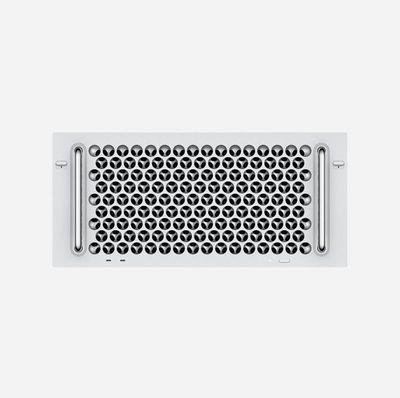
Apple's new Mac Pro is now available to order, but the rack-mounted version of the computer remains listed as "coming soon" on Apple's online store, with pricing set to start at $6,499 in the United States.
The rack-mounted Mac Pro has repositioned handles and carries a $500 premium compared to the regular new Mac Pro tower, which starts at $5,999. As the description implies, this version of the Mac Pro is designed for rack deployment in edit bays, machine rooms, and other professional settings.
In a press release, Apple previously said the rack-mounted Mac Pro would be available this fall, which ends December 21. However, given the ambiguity of "coming soon," it is unknown if Apple will still meet that timeframe.
Apple's new Mac Pro became available for purchase today, giving us our first look at all of the available upgrade options and pricing tiers.
The entry-level Mac Pro with an 8-core Xeon processor is priced at $5,999, but the GPU, processor, RAM, and storage space can all be upgraded for additional money.
Below, we've listed the available upgrade options from the base machine, which is equipped with a 3.5GHz 8-core Intel Xeon W processor, 32GB RAM, Radeon Pro 580X, 256GB SSD, no Apple Afterburner, and no wheeled frame.
Processor Options
3.3GHz 12‑core Intel Xeon W, Turbo Boost up to 4.4GHz - +$1,000
3.2GHz 16‑core Intel Xeon W, Turbo Boost up to 4.4GHz - +$2,000
2.7GHz 24‑core Intel Xeon W, Turbo Boost up to 4.4GHz - +$6,000
2.5GHz 28‑core Intel Xeon W, Turbo Boost up to 4.4GHz - +$7,000
RAM Options
48GB (6x8GB) of DDR4 ECC memory - +$300
96GB (6x16GB) of DDR4 ECC memory - +$1,000
192GB (6x32GB) of DDR4 ECC memory - +$3,000
384GB (6x64GB) of DDR4 ECC memory - +$6,000
768GB (6x128GB) of DDR4 ECC memory - $14,000
768GB (12x64GB) of DDR4 ECC memory - $10,000
1.5TB (12x128GB) of DDR4 ECC memory - +$25,000
GPU Options
Radeon Pro Vega II with 32GB of HBM2 memory - +$2,400
Two Radeon Pro Vega II with 32GB of HBM2 memory each - +$5,200
Radeon Pro Vega II Duo with 2x32GB of HBM2 memory - +$5,200
Two Radeon Pro Vega II Duo with 2x32GB of HBM2 memory each - +$10,800
Apple will soon add a Radeon Pro W5700X with 16GB GDDR6 memory and an option for two Radeon Pro W5700X.
Storage Options
1TB SSD storage - +$400
2TB SSD storage - +$800
4TB SSD storage - +$1,400
Apple will soon add an additional 8TB SSD storage option, but it is not available at this time.
Apple Afterburner
Adding an Apple Afterburner card to the Mac Pro will cost an additional $2,000. The Apple Afterburner is a PCIe accelerator card that offloads the decoding of ProRes and ProRes RAW video codecs in apps like Final Cut Pro X.
Other Upgrade Options
Adding a stainless steel frame with wheels to the Mac Pro will cost $400, as a frame with feet is the standard option.
The Mac Pro comes with a Magic Mouse 2, but can be upgraded to a Magic Trackpad 2 for an additional $50. Mac Pro buyers can get both the mouse and the trackpad for $149.
A rack mount option for the Mac Pro will cost an additional $500, starting at $6,499, and is not yet available with Apple labeling it "Coming soon."
How to Buy
The Mac Pro is available for purchase starting today, and orders placed now will begin delivering between December 19 and December 27. A machine with all possible upgrades will cost upwards of $50,000, close to 10 times the base cost of the Mac Pro.
More than two years after Apple promised a new modular high-end desktop machine for its professional users, the new Mac Pro is now available for purchase, as is its companion display, the Pro Display XDR.
Apple is accepting orders for the Mac Pro and the Pro Display XDR, with Mac Pro delivery estimates at one to two weeks after an order is placed.
First unveiled in June, the 2019 Mac Pro is the first new Mac Pro that Apple has released since the 2013 "trash can" Mac Pro that ultimately failed due to its focus on dual GPUs and thermal limitations.
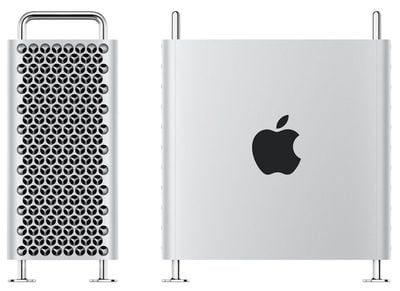
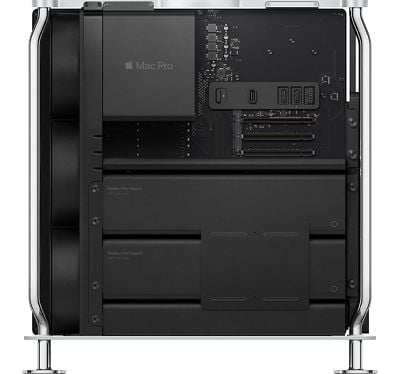
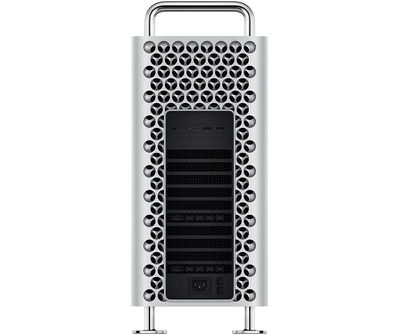
The updated Mac Pro is a high-end high-throughput machine designed for professional users, and this new model has a heavy focus on upgradeability and expansion. The Mac Pro has a traditional PC shape, but with an Apple-esque stainless steel frame that features a lattice design to maximize airflow and allow for quiet performance.
Priced starting at $5,999, the Mac Pro is equipped with workstation-class Xeon processors with up to 28 cores with 64 PCI Express lanes, up to 1.5TB RAM, eight PCIe expansion slots, and an option for dual Radeon Pro Vega II Duo GPUs housed in two Apple MPX modules.
The Mac Pro supports up to 4TB of SSD storage, has multiple ports, features Apple's T2 security chip, and is equipped with an Apple-designed ProRes and ProRes RAW accelerator card called the Apple Afterburner.
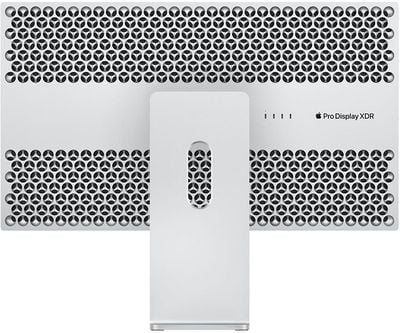
Apple is selling the Mac Pro alongside the Apple Pro Display XDR, a 6K 32-inch display with a resolution of 6016 x 3384. The Pro Display XDR shares design elements with the Mac Pro, featuring a lattice pattern that doubles as a thermal system and edge-to-edge glass with a 9mm border.
Apple is selling the Pro Display XDR for $4,999, with a stand for the display priced at $999.
Apple Card has a new Monthly Installments financing option that allows customers to purchase an iPhone with the Apple Card and pay for it over two years with no interest or fees in the United States.
Apple has shared a new support document explaining how the monthly installment plan works, which we've detailed below.
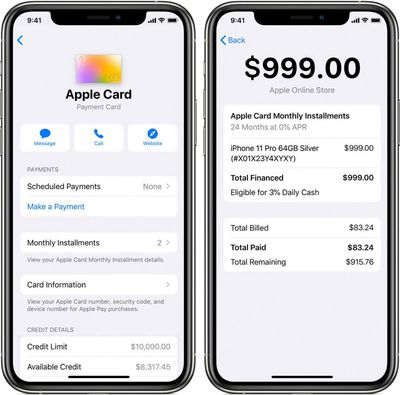
When using Monthly Installments, the cost of your new iPhone is divided into 24, interest-free monthly installments. Each installment is included in your Apple Card minimum payment and is due every month for 24 months. Monthly Installments are billed to your Apple Card statement on the last day of the month.
You can use Apple Card Monthly Installments to buy more than one iPhone. The number of iPhones you can buy is only limited by your available credit.
For each iPhone purchased with the Apple Card, you will receive 3% Daily Cash. If the iPhone is purchased between December 10 and December 31, it is eligible for a doubled 6% Daily Cash as part of a holiday promotion.
AppleCare+ can be bundled with the iPhone as part of the monthly installments.
How to View and Pay Apple Card Monthly Installments
Paying for an Apple Card Monthly Installment is as simple as paying off your minimum payment or higher each month.
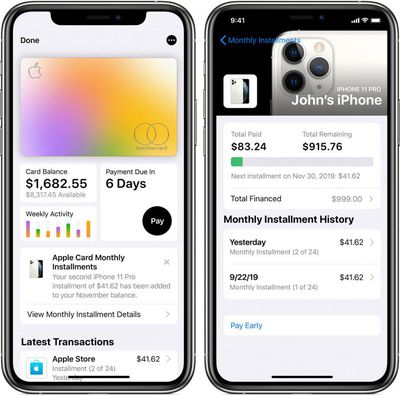
To see and manage your Apple Card Monthly Installments, update to iOS 13.2 or later. Then, open the Wallet app, tap on your Apple Card, tap the button with three-dots in the top-right corner, and tap Installments.
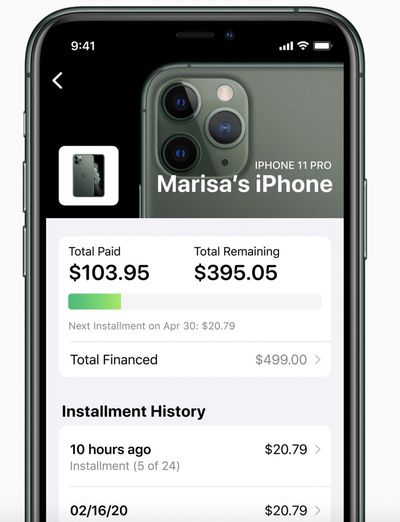
The installments screen shows the total amount paid off so far, the remaining balance, the due date and amount of your next monthly installment, and a history of your monthly payments. There is also a Pay Early option that can reduce the number of payments, but this requires paying off your entire Apple Card balance first.
If you tap Total Financed, you can review other details like a description of the iPhone you purchased and how much Daily Cash you received.
As a shortcut, when you purchase an iPhone with Apple Card Monthly Installments, you will receive a notification on the iPhone or iPad you use to manage your Apple Card that can be tapped to view installment details.
Apple Card Monthly Installments are available for purchases made at Apple Stores, Apple.com, and through the Apple Store app.
Apple already offered interest-free iPhone financing through its iPhone Upgrade Program, but the Apple Card plan has a few advantages, including cash back, managing payments in the Wallet app, and no late fees.
Satechi has a new holiday sale that's discounting many of its best accessories by as much as 50 percent, including wireless chargers, USB-C hubs, and MacBook carrying cases. You'll be able to find all of the discounts on Satechi's website, but we've highlighted the best deals in the lists below.
Note: MacRumors is an affiliate partner with Satechi. When you click a link and make a purchase, we may receive a small payment, which helps us keep the site running.
This sale will last through December 17, so be sure to browse the items being marked down below before all of the best offers expire.
The plan allows customers to purchase a new iPhone with the Apple Card and pay for it over 24 months with no interest. Customers will continue to get 3% Daily Cash back for the iPhone purchase as well, or an increased 6% Daily Cash until December 31 as part of a holiday promotion announced today.
When paying for an iPhone with Apple Card Monthly Installments, each month's installment is included in your minimum payment amount. And unlike other purchases with the Apple Card, the installments are not subject to interest unless there is an outstanding balance beyond the 24-month grace period.
Apple Card Monthly Installments are available for purchases made at Apple Stores, Apple.com, and through the Apple Store app.
Apple already offered iPhone financing through its iPhone Upgrade Program, but the Apple Card plan has a few advantages, including cash back, managing payments in the Wallet app, and no late fees.
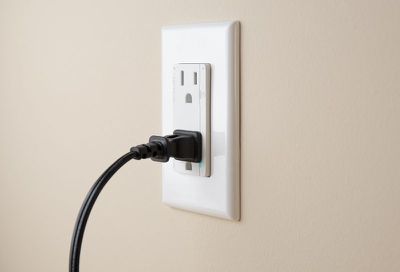
ConnectSense, known for its line of HomeKit-enabled home automation products, today announced the launch of its new Smart In-Wall Outlet.
The Smart In-Wall Outlet is HomeKit-compatible and allows accessories that are plugged in to it to be controlled with Siri voice commands and the Home app. Precise power monitoring is also included, so you can see how much power an electronic or an appliance is using with real-time voltage data available.
Each outlet can be controlled individually and remotely, which means power can be shut off when a device isn't in use to save energy.
ConnectSense's Smart In-Wall Outlet connects to a home's WiFi setup, and it has built-in capacitive touch buttons. Built-in plug detection senses when an item is plugged in, and the buttons can be locked when the outlet isn't in use, for childproofing purposes.
There are 15 Amp and 20 Amp options, and ConnectSense says that the Smart In-Wall Outlet is easy to install and operate both in homes and in professional environments like office buildings and airports.
The ConnectSense Smart In-Wall Outlet is priced at $79 and $99 for the 15A and 20A options, respectively, and can be purchased starting today from the ConnectSense website.
Adobe today announced that the Lightroom photo editing app for iOS devices is gaining a new feature that allows for direct photo imports.
With today's update, when you connect a Lightning to SD adapter or Lightning to USB 3.0 adapter to iPhone or a USB-C card reader to iPad, you can directly import RAW files into Lightroom without the need to make an extra copy in the built-in iOS camera roll.
Adobe says that imports happen faster and won't take up extra device space because there's no need for duplicate copies.
With the direct import feature, full resolution RAW photos can be edited in Lightroom for iOS using all of the editing capabilities that are also found on the desktop version of Lightroom. Photo edits are synced via Creative Cloud and accessible on all devices connected to the same account.
Lightroom for iOS is also gaining expanded exporting features and improvements to shared albums. With the advanced exporting options, it's now possible to select file type, pixel dimensions, compression, watermark, file name, output sharpening, and color space when exporting, and there's an option to export multiple files in their original file type.
Through the new Shared Albums feature, anyone can now add photos to a shared album that they have access to directly from their device, even with no paid membership.
Adobe Lightroom for iOS can be downloaded from the App Store for free. [Direct Link]
Apple's Twitter account for the Apple Card today announced that customers can get six percent Daily Cash back on most Apple products purchased through December 31.
The six percent savings will be delivered as Daily Cash in Apple's Wallet app, transferred to the Apple Cash card. Apple highlights products like the iPhone 11, Apple Watch, MacBook Pro, and AirPods Pro as part of the promotion.
Save 6% on gifts at Apple this holiday season. 🎁
Through December 31, get 6% Daily Cash back on iPhone, AirPods Pro, MacBook Pro, and more. Apply now.
— Apple Card (@AppleCard) December 10, 2019
However, it excludes purchases made on iTunes, AppleCare+, and payments made to Apple's iPhone Upgrade Program. Users have until December 31 to take advantage of the offer.
Outside of the holidays, Apple offers three percent Daily Cash back for Apple product purchases. Partners like Uber, Uber Eats, Walgreens, Duane Reade, T-Mobile, and Nike also now support three percent Daily Cash back. Apple says additional partners will be added over time, while all other purchases made with the Apple Card via Apple Pay will continue to receive two percent Daily Cash.
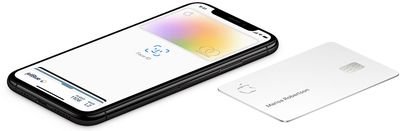
To apply for an Apple Card, simply open the Wallet app on an iPhone running iOS 12.4 or later, tap the plus button in the top-right corner, and follow the on-screen steps. The process takes just a few minutes, and if approved, your digital Apple Card will be ready for purchases immediately. Daily Cash is unlimited and paid out daily to your Apple Cash account. For more details, make sure to check out our Apple Card guide.
Apple Pay came to two additional big banks in Germany today, bringing the digital payment platform to millions more people in the country just over a year since it launched there.
As of this morning, customers of both Sparkasse and Commerzbank can add their Visa and Mastercard credit cards to the Wallet app. The Sparkassen-Karte Basis debit card is also compatible, but support for the Sparkasse giro card is coming later, sometime in 2020.
Apple's mobile payment system allows users to make contactless payments for goods and services in retail stores using their iPhone or Apple Watch.
Apple Pay made its long-awaited debut in Germany back in December 2018 with multiple partners immediately jumping on board, but support from Sparkasse and Commerzebank was conspicuously absent on rollout day. The two banks previously said in June 2019 that Apple Pay support was coming later in the year.
Apple CEO Tim Cook said in March that Apple Pay would be available in more than 40 countries and regions by the end of 2019. Apple Pay first launched in the United States in October 2014. You can view the full list of Apple Pay countries and regions on Apple's website.









 Note: MacRumors is an affiliate partner with Satechi. When you click a link and make a purchase, we may receive a small payment, which helps us keep the site running.