MacRumors

Earlier in June we kicked off a 30% sitewide sale in partnership with Zagg, and now that promotion is set to end next week on Tuesday, June 30. This includes sitewide discounts across Zagg, Mophie, Braven, Invisible Shield, iFrogz, Gear4, and Halo.

Zagg 2020 Sitewide Deals 4 PurpleNote: MacRumors is an affiliate partner with Zagg. When you click a link and make a purchase, we may receive a small payment, which helps us keep the site running.


To get the discount, head to Zagg's website, browse for an item, add it to your cart, and when you do you'll notice a pop-up on the right where you can view your cart. Here you can enter the promo code MACRUMORS30 and click apply to see the 30 percent discount taken off the item in your cart. This coupon code will not work on items that have already been discounted, and can only be applied to regularly priced products.

Mophie and the rest of Zagg's brands have a wide variety of useful accessories for Apple products, including battery cases, Lightning and USB-C cables, Bluetooth headphones and speakers, and screen protectors. We've rounded up a few examples of the deals you can find on Mophie, Braven, Invisible Shield, and more in the list below.

Zagg Brands 30% Sale

Keep up with all of this week's best discounts on Apple products and related accessories in our dedicated Apple Deals roundup.

Related Roundup: Apple Deals
Tag: Mophie

Apple today announced that it will co-produce neo-noir psychological thriller "Losing Alice" from creator, writer, and director Sigal Avin. The series will debut on Apple TV+, but a release date has yet to be provided.

losing alice apple tv
Apple describes "Losing Alice" as a "thrilling cinematic journey that uses flashbacks and flash-forwards in a satisfyingly complex narrative that takes the viewer through the conscious and subconscious of its protagonist's mind." The series will follow Alice, a 48-year-old female film director who "feels irrelevant since raising her family."

After a brief encounter on the train, she becomes obsessed with a 24-year-old screenwriter femme fatale, Sophie (played by Lihi Kornowski), and eventually surrenders her moral integrity in order to achieve power, relevance and success.

Through the prism of this female Faust, the series explores issues such as jealousy, guilt, fear of aging, and the complex relationships women have among themselves and each other. But above all, "Losing Alice" is a love letter for the still-too-rare female director.

Alice will be played by Ayelet Zurer.

Woot today is offering a refurbished model of Apple's 13-inch MacBook Pro from 2019 (128GB) for $889.99, down from an original price of $1,299.00. Sales on this notebook have previously reached down to around $1,049.00 for a new model, making Woot's refurbished sale notable for anyone willing to invest in a previous generation MacBook Pro.

13 inch macbook pro sale image Ryantime compressedNote: MacRumors is an affiliate partner with Woot. When you click a link and make a purchase, we may receive a small payment, which helps us keep the site running.

You can also get the 256GB model for $999.99 on Woot today, and both of these are the MacBook Pro models with a butterfly keyboard. Woot notes that these MacBook models have been refurbished by Apple, but they don't include an Apple warranty. Instead, buyers will get a one year Woot warranty. Additionally, the MacBook Pros are packaged in a generic white box.

Woot's sale will last today only, and Amazon Prime members can get free shipping when purchasing a MacBook Pro. You can find even more discounts on other MacBooks by visiting our Best Deals guide for MacBook Pro and MacBook Air. In this guide we track the steepest discounts for the newest MacBook models every week, so be sure to bookmark it and check back often if you're shopping for a new Apple notebook.

Related Roundup: Apple Deals

Microsoft today announced that it is permanently closing its physical stores worldwide. The company's retail employees will continue to serve customers through Microsoft's corporate offices and remotely, providing sales, training, and support.

microsoft store
Microsoft will continue to operate its online storefront, and it also has plans for reimagined "Experience Centers" for customers in New York City, London, Sydney, and at its headquarters in Redmond, Washington.

"Our sales have grown online as our product portfolio has evolved to largely digital offerings, and our talented team has proven success serving customers beyond any physical location," said Microsoft Corporate Vice President David Porter. "We are grateful to our Microsoft Store customers and we look forward to continuing to serve them online and with our retail sales team at Microsoft corporate locations."

Microsoft opened its first store in Scottsdale, Arizona in October 2009, eight years after Apple's first stores opened in Glendale, California and the Washington, D.C. area.

Apple's upcoming "iPhone 12 Pro" and "iPhone 12 Pro Max" will feature displays capable of up to 120Hz refresh rates, allowing for a smoother on-screen experience, according to a reliable mobile leaker.

2020 iphones pro motion


"A reliable source, if there is no accident, ‌iPhone‌ 12 Pro and ‌iPhone 12 Pro Max‌ have basically determined the maximum 120Hz refresh rate," tweeted Ice Universe this morning.

The leaker, who goes by the Twitter handle @UniverseIce, doesn't usually comment on Apple's plans, but is a well-regarded source of Samsung rumors. Samsung has supplied Apple with OLED panels for the ‌‌iPhone‌‌ X, ‌iPhone‌ XS, and the most recent ‌iPhone‌ 11 series.

On a related note, some users of the iOS 14 developer beta are seeing an accessibility setting that limits the frame rate of the device to 60 frames per second. The setting, which does not appear for all beta users, suggests that future iPhones could be capable of higher frame rates. Current iPhones have a maximum refresh rate of 60Hz.

Apple already uses variable refresh rate technology in its iPad Pro models, but they still use LCD panels rather than OLED. Bringing it to a new breed of OLED iPhones would raise the smartphone performance bar even higher.

Apple markets the iPad Pro-exclusive tech under the moniker "ProMotion," which it says dynamically adjusts the display to the movement of content for fluid scrolling, greater responsiveness, and smoother motion. It does all this on the fly, which means it also conserves battery life.

Apple's adaptive ProMotion IAPs also reduce Apple Pencil latency, and reliable Apple analyst Ming-Chi Kuo has said that ‌‌Apple Pencil‌‌ support is a possibility for a future ‌‌iPhone‌‌.

Leaker Max Weinbach has also suggested that the ‌iPhone‌ 12 Pro, rumored to come in 6.1-inch and 6.7-inch sizes, will feature a high refresh-rate 120Hz ProMotion display.

Apple is expected to release four iPhones this fall. Rumors suggest the 6.7-inch ‌iPhone‌ and one 6.1-inch model will be higher-end OLED devices with triple-lens cameras, while a 5.4-inch model and another 6.1-inch model will be lower-end iPhones with dual-lens cameras and a more affordable price tag.

Related Forum: iPhone

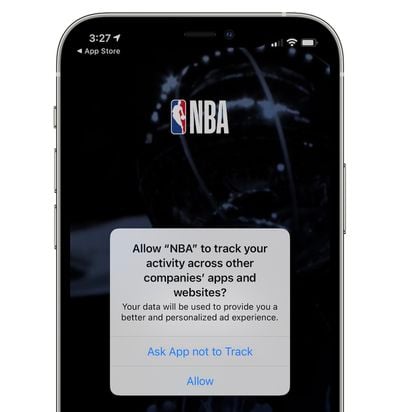
A new feature in iOS 14 alerts users when apps read the clipboard, and it turns out some apps have been reading clipboard data excessively.

tiktokclipboard

Image via Jeremy Burge

TikTok users who upgraded to iOS 14, for example, quickly noticed constant alerts warning them that TikTok was accessing the clipboard every few seconds. After being caught, TikTok now says that it's removing the feature.


In a statement to The Telegraph, TikTok said that it accessed the clipboard to identify spammy behavior.

"Following the beta release of iOS 14 on June 22, users saw notifications while using a number of popular apps.

"For TikTok, this was triggered by a feature designed to identify repetitive, spammy behavior. We have already submitted an updated version of the app to the App Store removing the anti-spam feature to eliminate any potential confusion.

"TikTok is committed to protecting users' privacy and being transparent about how our app works."

An update to remove the feature has already been submitted to the App Store, and a download of the new update confirms that TikTok no longer appears to be accessing the clipboard.

TikTok did not say whether the feature would be removed from Android devices, nor whether clipboard data was ever stored or moved from user devices. Other apps have also been called out for reading the clipboard, including Starbucks, Overstock, AccuWeather, several news apps, and more.


Prior to when iOS 14 was released, a pair of developers sounded an alarm letting users and Apple know that iPhone and iPad apps were quietly accessing the clipboard. Apple's new iOS 14 feature appears to have been added in response, and apps are no longer able to read the clipboard without users knowing exactly what's going on.

iOS 14 is limited to developers at the current time, but Apple plans to release a public beta version next month ahead of the software's fall launch. Clipboard reporting is just one of the many new privacy features in iOS 14, with a full list available in our iOS 14 roundup.

Related Forum: iOS 14

Apple's upcoming iPadOS 14 update has many of the same features that are available in iOS 14, but there are a handful of functions that are designed specifically for the larger display and the Apple Pencil, such as Scribble.


Scribble is one of the most notable new features in iPadOS 14, and we checked it out in our latest YouTube video. With Scribble, you can use an ‌Apple Pencil‌ to write in any text field on the iPad, with the written text then converted to typed text.

The functionality lets you use the ‌Apple Pencil‌ throughout the operating system without having to swap over to a keyboard when you need to compose an email, write a Calendar event, visit a URL, send an iMessage, or conduct a search. You can, for example, go to Safari and write in MacRumors.com, and it'll convert to the proper URL so you can get to the site.

Scribble is decent at recognizing all kinds of handwriting, even when it's messy, but it does not work well with cursive. It interprets capitals and proper spacing, so once you get the hang of handwriting in text fields, it's a fairly seamless experience.

If you make a mistake when you're writing something, you can just scribble it out with the ‌Apple Pencil‌ and it deletes, which is a handy feature. If you need to select text, you can just circle it.

Scribble works in any text field as mentioned, but it's also been built into the Notes app. Just tap on the toolbar and select the pen that has the little "A" on it. This tool will convert all your handwritten text in notes to typed text.

To go along with Scribble, there are a few other useful tools. Smart Selection lets you select all of your handwritten text as if it was typed text, and if you copy it and paste it into an app that doesn't support handwriting, it will be converted into typed text.

You can also select handwritten text and paste it into other notes, or make changes to the style and the color of the written text. Handwritten phone numbers, links, addresses, and more also turn into clickable links like they do when typed. So if you write out a phone number, you can tap it to call it because the ‌iPad‌ is able to detect the numbers and convert them on the fly.

With a Shape Recognition tool, if you clumsily draw a standard shape like a circle or a star, iPadOS 14 will recognize the shape you're trying to make and convert it into a perfect version, which is useful for note taking and diagrams.

With iPadOS 14, the ‌iPad‌ can be used almost entirely with touch and tools, and there's little need to type. If you're someone who prefers writing by hand, iPadOS 14 introduces tools that enhance the experience.

What do you think of Scribble and the other features in iPadOS 14? Let us know in the comments, and for more on iPadOS 14, make sure to check out our roundup.

Related Forum: iOS 14

Apple hosts a Swift Student Challenge ahead of WWDC each year, tasking students with creating an innovative Swift Playgrounds project. Apple has been highlighting Swift Student Challenge winners in 2020, and today shared some of the projects students created on the Apple Developer site.

wwdc2020challengewinners
Brazilian student Henrique Conto, for example, created a three-minute Touch Bar game where players help a young developer escape from a cave.

French student Louise Pieri designed Meep, a two-level game where one level is normal and the second level is upside-down, and 18-year-old Devin Green created an AI bot named Stanny.

More about the projects of some of the Swift Student Challenge winners can be found on Apple's developer site, on Apple Newsroom, and in the App Store.

Apple chose 350 winners in 2020, and each winner received an exclusive WWDC20 jacket and pin set. In past years, winning the challenge has been more valuable as it included a $1,599 ticket to Apple's physical WWDC event. WWDC 2020 was, however, a digital-only event that was free for everyone.

Apple is continuing with store closures in areas that are experiencing significant spikes in coronavirus infections, and tomorrow, 14 retail locations in Florida will be shut down.

floridaapplestores
The Galleria, The Falls, Aventura, Lincoln Road, Dadeland, Brickell City Centre, Wellington Green, Boca Raton, The Gardens Mall, Millenia, Florida Mall, Altamonte, International Plaza, and Brandon will close tomorrow, and customers with devices being repaired at those locations should initiate pickups today.

Apple today closed seven retail stores located in the Houston, Texas area, where coronavirus cases are surging. Highland Village, First Colony Mall, Houston Galleria, Memorial City, Willowbrook Mall, Baybrook, and the Woodlands in Texas are now closed with no planned reopening date.

Last week, Apple shuttered stores in Florida, Arizona, North Carolina, and South Carolina, even as it worked to reopen stores in other locations across the United States. With the additional store closures in Florida, just two stores in the state will remain open -- St. Johns Town Center in Jacksonville and University Town Center in Sarasota.

U.S. Apple Stores began reopening in May, and ahead of when store closures restarted last week, more than 150 of the 271 stores in the United States had reopened. When stores started opening again, Apple's retail store chief Deirdre O'Brien made it clear that Apple would not hesitate to close stores again if additional outbreaks demanded it.

"These are not decisions we rush into - and a store opening in no way means that we won't take the preventative step of closing it again should local conditions warrant," O'Brien said.

Apple's decisions on store closures and store openings are based on data evaluation, such as local cases, near and long-term trends, and guidance from national and local health officials. Apple is continuing with store reopenings in areas where Covid-19 infections are dropping. In the Greater Toronto Area, for example, Apple retail stores are opening up on Monday, June 29, which will mean all stores in Canada will be up and running.

In stores that have reopened, Apple is implementing safety measures that include mandatory masks, social distancing, frequent cleaning, temperature checks, and more. In some locations, stores are open only for repairs and curb-side pickup, while others are open but with a limited number of people allowed in at one time.

safaripreviewiconApple today released a new update for Safari Technology Preview, the experimental browser Apple first introduced four years ago in March 2016. Apple designed the ‌Safari Technology Preview‌ to test features that may be introduced into future release versions of Safari.

‌Safari Technology Preview‌ release 109 is the first version built on the new Safari 14 update included in macOS Big Sur. It supports Safari Web Extensions imported from Chrome, Firefox, and Edge and converted using Xcode 12, plus it adds the Privacy Report feature that shows the trackers that Intelligent Tracking Prevention is blocking.

Tab previews are available so you can preview tabs to find the one you're looking for, and tabs also support favicons by default. In Safari 14, Adobe Flash is no longer supported.

‌Safari Technology Preview‌ will also now notify users when a saved password in iCloud Keychain has been in a data breach, and Web Authentication using Touch ID has been implemented, as has support for PIN entry and account selection on external FIDO2 security keys.

Along with these major new features, the update introduces bug fixes and feature improvements for Web API, CSS, Web Animations, SVG, IndexedDB, Scrolling, Layout, Media, WebRTC, Back-forward Cache, JavaScript, Editing, Accessibility, Apple Pay, Web Inspector, and Web Driver.

The new ‌Safari Technology Preview‌ update is available for macOS Catalina and macOS Big Sur, the newest version of the Mac operating system that's set to be released this fall.

The ‌Safari Technology Preview‌ update is available through the Software Update mechanism in System Preferences to anyone who has downloaded the browser. Full release notes for the update are available on the Safari Technology Preview website.

Apple's aim with ‌Safari Technology Preview‌ is to gather feedback from developers and users on its browser development process. ‌Safari Technology Preview‌ can run side-by-side with the existing Safari browser and while designed for developers, it does not require a developer account to download.

OWC today introduced the Envoy Express, which it describes as the first Thunderbolt 3 certified bus-powered storage enclosure for Macs and PCs.

owc envoy express lifestyle
Designed to support any 2280 M.2 NVMe SSD, the key benefit of the Envoy Express is that users can install their own drive in it, including OWC's Aura SSDs with up to 4TB of storage or larger-capacity options in the future.

The Envoy Express supports sustained data transfer rates of up to 1553 MB/s and has an integrated 10.2-inch Thunderbolt 3 cable.

The Envoy Express can be pre-ordered on OWC's website now for $68.

Note: MacRumors is an affiliate partner with OWC. When you click a link and make a purchase, we may receive a small payment, which helps us keep the site running.


Daring Fireball's John Gruber typically hosts a live episode of his The Talk Show podcast during the week of WWDC, featuring high-level Apple executives to dig further into some of the details on Apple's major announcements, and while the all-online format of this year's conference changed things up a bit, Gruber was still able to get Craig Federighi and Greg Joswiak to participate in a video podcast.


The 90-minute discussion touched on a number of topics, including a brief statement from Joswiak on Apple's relationship with developers in light of recent concerns sparked by the "Hey" email app controversy, a thorough dive into Apple's perspectives on macOS Big Sur and the Apple Silicon transition, and briefer tidbits on iPadOS and Apple Pencil, iOS 14, and privacy.

Some of the more interesting bits of the discussion include thoughts on all of the different ways Apple has now for developers to build Mac apps, including Catalyst, UIKit, AppKit, and SwiftUI, as well as Apple's emphasis on virtualization with Boot Camp going away for Apple Silicon-based Macs.

While avoiding direct mention of Windows, Federighi acknowledges that you won't be able to boot directly into x86 operating systems on these Macs. As it stands, Windows can't be directly supported on the Arm-based chips of ‌Apple Silicon‌ via virtualization, but Federighi made clear that Apple is well aware of the situation, without tipping his hand on what developments may appear on that front in the coming months.

Apple is widely expected to release four new iPhone 12 models later this year, and ahead of time, analysts at British bank Barclays have outlined their expectations for the devices based on discussions with multiple Apple suppliers.

Barclays iP12 remove charger earpods
In a research note obtained by MacRumors, the Barclays analysts said that iPhone 12 models will not come with EarPods in the box, in line with a prediction shared by Ming-Chi Kuo last month. Oddly enough, the analysts also heard that iPhone 12 models might not ship with a power adapter of any kind, leaving only a USB-C to Lightning cable in the box.

While there would certainly be environmental benefits to Apple not including a power adapter with the hundreds of millions of iPhones it sells each year, such a move would obviously be inconvenient for customers without a spare USB-C charger. Apple's basic 5W power adapter can be purchased separately for $19, while the 18W power adapter included with iPhone 11 Pro models can be purchased for $29.

Earlier this week, the anonymous Twitter user Mr. White shared photos of a 20W power adapter that he suggested will be included with iPhone 12 models, which clearly contradicts with what Barclays analysts are hearing.

Barclays estimates that mass production of iPhone 12 models is four to six weeks behind schedule compared to a usual year. The analysts believe that Apple will still announce the new lineup in September, but at least some models might not be available to order until October or November, as was the case with the iPhone X and iPhone XR in recent years.

The analysts expect the two higher-end iPhone 12 Pro models to feature a triple-lens camera system with a LiDAR Scanner, first introduced on the iPad Pro. This would pave the way for new augmented reality experiences.

Barclays also said that it has heard about a potential iPad Pro refresh later this year, but it has no further details right now.

Last, the analysts expect third-generation AirPods to launch in early 2021.

Barclays analysts have a mixed track record in relation to Apple rumors. Their accurate predictions have included True Tone coming to the iPhone 8 and iPhone X, the removal of the headphone jack adapter with iPhone XS and iPhone XR models, and the removal of 3D Touch on all iPhone 11 models, while they were incorrect about the iPhone XS possibly having a smaller notch and the base iPhone 11 having 4x4 MIMO.

Related Forum: iPhone

OWC is back this week with a new discount on Apple's HomePod, offering the White version of the smart speaker for $197.60, down from an original price of $299.00. OWC's price on the HomePod is typically at $208.00, but you'll see an instant rebate of $10.40 after you place the device in your cart.

HomePod on shelfNote: MacRumors is an affiliate partner with OWC. When you click a link and make a purchase, we may receive a small payment, which helps us keep the site running.
Likewise, the Space Gray HomePod is available for $198.80, down from $299.00. Similar to previous HomePod sales at OWC, these devices are brand-new, but they come in non-retail packaging.

This means that you'll receive a new HomePod in a nondescript box, not in Apple's own packaging. Additionally, these HomePods are covered under one year of OWC's Fulfilled Limited Warranty instead of Apple's warranty coverage.

In terms of a new version of Apple's smart speaker, these prices are some of the lowest that we've ever tracked. In recent weeks, the best sale was at Best Buy, where a HomePod was priced at $199.99.

To keep track of ongoing discounts, we track the best deals on HomePod every week, so be sure to bookmark our guide if you're on the hunt for solid HomePod discounts.

Related Roundup: Apple Deals

Apple's WWDC developer sessions continue to trickle out more details about new features in its latest operating systems for mobile and desktop, including new gamepad support in iOS 14.

During its keynote on Monday, Apple said support for Xbox's Elite Wireless Controller Series 2 and Adaptive Controller were coming in tvOS 14, and a WWDC session on Wednesday has confirmed that this support extends to iOS 14 and iPadOS 14.

gaming motion sensor support ipados 12
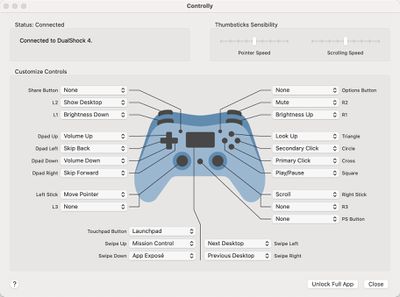
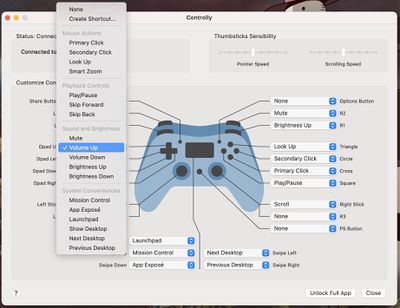
The session covers support for the Dual Shock's touchpad and lightbar, the Xbox Elite's paddles, zone-based rumble haptics, and motion sensors. In addition, game developers will be able to take advantage of OS-level controller button remapping, as well as readymade button glyphs for use in game interfaces.

Let's rumble! Discover how you can bring third-party game controllers and custom haptics into your games on iPhone, iPad, Mac, and Apple TV. We'll show you how to add support for the latest controllers — including Xbox's Elite Wireless Controller Series 2 and Adaptive Controller — and map your game's controls accordingly. Learn how you can use the Game Controller framework in tandem with Core Haptics to enable rumble feedback. And find out how you can take your gaming experience to the next level with custom button mapping, nonstandard inputs, and control over specialty features like motion sensors, lights, and battery level.

ios 14 controller support

Another exciting highlight for game developers is keyboard and mouse support for gaming on iPadOS. Apple is letting developers finally add keyboard, mouse, and trackpad control options. While touch is obviously preferred for most iOS games, it opens the door for games like Civilization VI to add support for this in future updates.

And with future Macs powered by Apple Silicon able to run iPhone and iPad apps natively, we could see mobile games fully prepped for desktop peripheral use in macOS Big Sur.

Related Forum: iOS 14

At this week's WWDC, Apple confirmed its plan to switch from Intel to custom processors for its Macs over a two-year transition period. Apple said that the switch is all about platform consolidation and performance advantages, but at least one former Intel insider claims that quality control issues with Skylake chips was the reason Apple finally decided to to ditch Intel.

16 inch macbook pro intel 10th gen

"The quality assurance of Skylake was more than a problem," said former Intel engineer François Piednoël, speaking to PC Gamer. "It was abnormally bad. We were getting way too much citing for little things inside Skylake. Basically our buddies at Apple became the number one filer of problems in the architecture. And that went really, really bad.

"When your customer starts finding almost as much bugs as you found yourself, you're not leading into the right place."

"For me this is the inflection point," said Piednoël. "This is where the Apple guys who were always contemplating to switch, they went and looked at it and said: 'Well, we've probably got to do it.' Basically the bad quality assurance of Skylake is responsible for them to actually go away from the platform."

There have been rumors suggesting Apple has an interest in Arm-based Macs for years now, but it was only on Monday that Apple confirmed the plan, satying it expects its first Mac with custom silicon to launch by the end of 2020.

Apple analyst Ming-Chi Kuo believes that a redesigned iMac due in the fourth quarter of 2020 will be one of Apple's first two Mac models with a custom Arm-based processor, with the other being a future 13-inch MacBook Pro.

Following Apple's announcement about its switch to custom silicon, Intel said it will continue supporting the Mac through its transition, but insisted that its processors are still the best option for developers.

Apple Silicon Macs will introduce a new system for accessing macOS recovery and security options at startup, Apple explained at a WWDC session on Wednesday.

apple silicon mac startup recovery screen

The new Startup UI on ‌Apple Silicon‌ powered Macs

Existing Macs include a number of macOS Recovery options at boot-up that are accessed using key combinations. For example, Command-R boots Macs in Recovery mode, and Command-Option-P-R resets the NVRAM. On ‌Apple Silicon‌ Macs, these key combinations are being replaced by an on-screen Startup Manager interface.

In the new system architecture, users can hold down the power button on their Mac to access the new startup screen, which features recovery options for reinstalling macOS, as well as options to boot as normal, shut down, and restart.

Apple is also replacing Target Disk Mode, which is used to transfer data between two Macs, with what's called Mac Sharing Mode. Mac Sharing Mode turns the system into an SMB file sharing server, providing another Mac with file-level access to user data. User authentication is required to access the service.

apple silicon mac startup security screen

The security modes on ‌Apple Silicon‌ powered Macs

In addition, Startup Disk is a new feature that enables user to select different security modes for startup volumes. Full security, enabled by default, provides the same best-in-class security as enjoyed by Apple's iOS devices and let users boot from an external disk without reducing the security of the system.

Meanwhile, Reduced security mode provides more flexibility by allowing users to disable System Integrity Protection and run any version of macOS, including those that are no longer signed by Apple.

Lastly, ‌Apple Silicon‌ Macs run separate security policies for each OS installation, whereas Intel-based Macs operate on a less flexible system-wide security policy. For more details on this and the other new startup features, check out the full WWDC session on the Apple developer website.

Apple on Monday unveiled macOS Big Sur, the newest version of macOS that's going to be released in the fall. Named after Big Sur, California, renown for its scenery, the new update features a fresh, clean design along with some useful new features.


We went hands-on with macOS Big Sur in our latest YouTube video, giving MacRumors readers a first look at what the new software looks like.

macOS hasn't had a major interface overhaul for some time now, and macOS Big Sur is a welcome change, refining and improving on the existing design for a new look that's both fresh and familiar.

macosbigsurcontrolcenter
The menu bar is now more translucent and better blends with the wallpaper, and it's more customizable. There's a dedicated Control Center that provides access to WiFi, Bluetooth, AirDrop, Do Not Disturb, display brightness, volume level, and more, and you can customize it to your liking.

The Control Center is a major quality of life improvement in macOS, putting most of the settings and controls that you need just a click away while also streamlining the menu bar. Also new to the menu bar is a revamped battery icon that brings back the reading of how much time remaining you have on a battery charge, something that was removed way back in macOS Sierra.

macosbigsurnotifications
Apple also added a whole new battery usage section to System Preferences so you can see how your battery has drained over the last 24 hours or the last 10 days.

macosbigsurbattery
Next to the Control Center, there's an upgraded Notification Center with new widgets that can be accessed by clicking on the right side of the menu bar. The new widgets look similar to the widgets in iOS 14, and are now available in multiple sizes and with a fresh design. Widgets are now grouped by app, which makes incoming notifications much easier to parse.

macosbigsurwidgets
Throughout the operating system, Apple has added more rounded and refined corners, full-height translucent sidebars for apps, and redesigned icons. Icons for Apple apps are all now rounded square-shapes, for a neater Dock, and buttons and controls for apps appear when needed and disappear when not needed to put more focus on content.

macosbigsurdockandicons
Nothing in macOS Big Sur looks wildly different and there's nothing to relearn, but it does offer up a clean design that's a refreshing change of pace. Notably, a lot of the sounds in macOS have been refreshed, and Apple even brought back the startup chime that many Mac users have missed.

macosbigsursidebar
Safari received a major overhaul with a new customizable start page. You can choose your own wallpaper and choose what's displayed on the page, picking from options like frequently visited sites, Siri Suggestions, Reading List, iCloud Tabs, and more.

macosbigsursafari
Apple is adding better support for extensions, which can be downloaded from a dedicated section of the Mac App Store. Extensions can be installed for every site, a single site, or a single site for a limited amount of time, giving you more control than ever over what extensions can do and see.

macosbigsursafariprivacy
Privacy was a major focus in macOS Big Sur, as usual. Along with the deeper controls over extensions, Apple has added a Privacy Report and Privacy button that provide details on the trackers that different websites are serving up so you can see the data a website is attempting to learn about you.

Safari has a built-in translation feature that can automatically translate entire websites written in seven different languages, which is a handy option that will let people abandon add-on translators. Safari is also faster than ever, with Apple adding performance and efficiency improvements.

Messages for Mac is now a Catalyst app, which means that it adopts many of the features available in the iOS version of Messages. It supports all of the new iOS 14 Messages features like pinned conversations, mentions, and inline replies.

It also now works with some older functions like Message Effects, and there's a new Memoji creator so you can create Memoji and share Memoji stickers through the Mac Messages app. An all new search interface also makes it easier to find links, photos, and text from older conversations.

macosbigsurpinnedmessages
Like Messages, Maps has been updated to bring its functionality more in line with Maps for iOS. Cycling directions and routes with EV vehicles are available, as are Guides, a new feature for finding awesome spots to visit around you.

Maps now supports Look Around, it works with indoor maps for the first time, and Maps for Mac can be used to view shared ETAs so you can keep track of when friends and family will arrive at a location from the desktop.

macosbigsurlookaround
The Photos app has new editing capabilities like a new Retouch tool, Home app improvements allow for face recognition for cameras, AirPods feature faster and more efficient automatic device switching, ‌Siri‌ can answer a wider range of questions, and there are some improvements coming to the ‌Mac App Store‌ that will make it easier to view and understand privacy policies.

There are tons of other smaller changes in macOS Big Sur, and we'll cover those in future videos and in our macOS Big Sur roundup, which will be updated with a full feature list later this week.

Big Sur is available for developers at the current time, but Apple also plans to make a beta available for public beta testers in July. macOS Big Sur will see a fall release alongside iOS 14, iPadOS 14, tvOS 14, and watchOS 7.