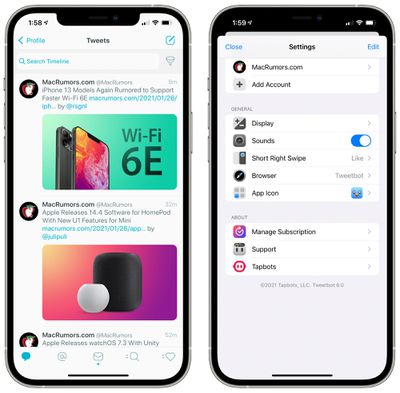
Tapbots today launched the newest version of the Tweetbot Twitter client, introducing a subscription-based payment requirement and a few new design tweaks and features.
The update adds support for Twitter's V2 API, adding interface options for polls and cards for the first time, and it tweaks the timeline view and adds support for more tweet data. There are new "@" and "#" buttons when composing a tweet, plus there are new app icon options and more UI themes.
With the API changes, there are no longer options for URL shortening and image/video upload options, and Chrome and Firefox are browser options when opening links. Going forward, Tweetbot will be able to adopt all of the features that Twitter makes available with its V2 API, so it should no longer lag as far behind the official Twitter app when it comes to functionality.
Tweetbot 6 is now a subscription-based app and will require a $0.99 per month or $5.99 per year subscription fee to unlock the app's full functionality. Multiple accounts, advanced filtering options, and push notifications are premium features that will be available with a subscription. The free version of the app is read-only and will not support tweeting.
Tweetbot 6 can be downloaded from the App Store for free, but an in-app subscription will be necessary to access full functionality. [Direct Link]
Apple plans to release its first iPhones with Wi-Fi 6E support in 2021, according to Barclays analysts Blayne Curtis and Thomas O'Malley.
In a research note shared with MacRumors today, the analysts wrote that investor sentiment surrounding Apple supplier Skyworks has become "too negative" given that the semiconductor company will apparently be supplying various components for this year's "iPhone 13" models, including Wi-Fi 6E power amplifiers.
The analysts said chipmaker Broadcom also stands to benefit from both Apple and Samsung adopting Wi-Fi 6E this year. Earlier this month, Samsung introduced its new Galaxy S21 Ultra smartphone with Wi-Fi 6E support based on a Broadcom chip.
This more concrete information comes after the Barclays analysts said iPhone 13 models "may" support Wi-Fi 6E last month.
Wi-Fi 6E offers the features and capabilities of Wi-Fi 6, including higher performance, lower latency, and faster data rates, extended into the 6 GHz band. The additional spectrum will provide a lot more airspace beyond existing 2.4GHz and 5GHz Wi-Fi, resulting in increased bandwidth and less interference for devices that support Wi-Fi 6E.
Earlier this year, the FCC adopted rules that make 1,200 MHz of spectrum in the 6 GHz band available for unlicensed use in the United States, paving the way for the rollout of devices supporting Wi-Fi 6E in the country.
Both the iPhone 11 and iPhone 12 lineups support the standard, non-6 GHz version of Wi-Fi 6, as does the second-generation iPhone SE.
Apple is expected to unveil its iPhone 13 lineup in September.
Apple today released a new 14.4 software update for the HomePod, with the update coming over a month after the 14.3 software release that brought performance improvements and bug fixes.
Today's update introduces new U1 Ultra Wide band functionality between the HomePod mini and devices that have a U1 chip like the iPhone 11 and iPhone 12 models.
Software version 14.4 includes bug fixes and the following new features with an Ultra Wideband (U1) equipped iPhone. - Hand off music with visual, audible, and haptic effects from iPhone to HomePod mini - Get personalized listening suggestions on iPhone when it is next to HomePod mini - Media controls automatically appear without having to unlock iPhone when it is close to HomePod mini
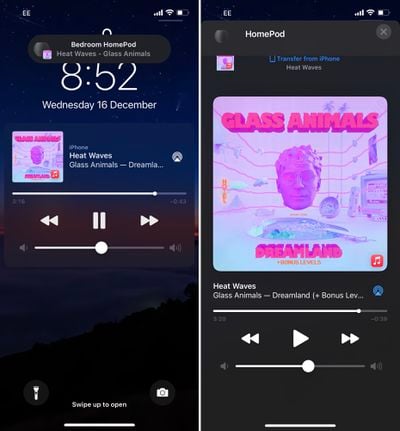
The update adds visual, audio, and haptic effects when songs are transferred from a HomePod mini to a U1-enabled iPhone 11 or iPhone 12. When an iPhone is near the HomePod mini it begins a soft haptic touch rhythm that gets faster and faster as the iPhone gets closer until the interface to transfer a song between the HomePod mini and the iPhone opens.
This functionality will make handoff quicker and more reliable on a HomePod mini and an iPhone 11 or iPhone 12, all of which are equipped with U1 chips that let the devices better understand where they are in relation to one another.
The update also adds personalized listening suggestions on iPhone when it is next to the HomePod mini and it causes media controls to automatically appear without having to unlock the iPhone when it is nearby the HomePod mini.
U1 chip functionality is unique to the HomePod mini and is not available on the standard HomePod because the HomePod does not have a U1 chip inside.
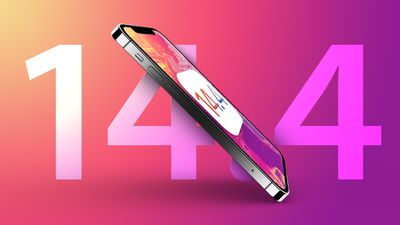
Apple today released iOS and iPadOS 14.4, the fourth major updates to the iOS 14 operating system that was initially released in September. iOS and iPadOS 14.4 come more than a month after the release of iOS and iPadOS 14.3, updates that brought new emojis, Intercom support, and more.
The iOS and iPadOS 14.4 updates can be downloaded for free and the software is available on all eligible devices over-the-air in the Settings app. To access the new software, go to Settings > General > Software Update.
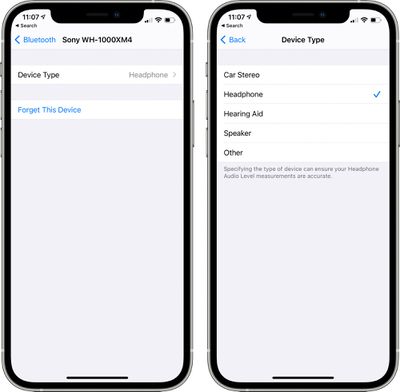
iOS 14.4 allows the camera to recognize smaller QR codes, and there's a feature for specifying a device type for third-party Bluetooth-connected audio devices so that Headphone Audio Level measurements can be taken correctly.
The update also provides notifications for when the camera on an iPhone is unable to be verified as a new, genuine Apple camera in the iPhone 12 models, which would be applicable only to repairs.
There are several bug fixes for issues that include image artifacts appearing in HDR photos taken with iPhone 12 Pro, problems with the Fitness widget not updating correctly, and a bug that could cause typing to be delayed and word suggestions not to appear when using the keyboard.
Apple's full release notes for the update are below:
iOS 14.4 includes the following improvements for your iPhone: - Smaller QR codes can be recognized by Camera - Option to classify Bluetooth device type in Settings for correct identification of headphones for audio notifications - Notifications for when the camera on your iPhone is unable to be verified as a new, genuine Apple camera in iPhone 12, iPhone 12 mini, iPhone 12 Pro and iPhone 12 Pro Max
This release also fixes the following issues: - Image artifacts could appear in HDR photos taken with iPhone 12 Pro - Fitness widget may not display updated Activity data - Typing may be delayed and word suggestions may not appear in the keyboard - The keyboard may not come up in the correct language in Messages - Audio stories from the News app in CarPlay may not resume after being paused for spoken directions or Siri - Enabling Switch Control in Accessibility may prevent phone calls from being answered from the Lock Screen
Though not mentioned in the release notes, there's a "Time to Walk" feature for Apple Fitness+ users on Apple Watch, which lets them listen to inspiring stories while out for a walk.
When paired with a HomePod mini and the HomePod 14.4 software update, iOS 14.4 introduces new U1 Ultra Wideband functionality between the HomePod mini and the iPhone 11 and 12 models with a U1 chip. The U1 chip improves handoff with visual, audible, and haptic effects when transferring songs from the iPhone to the HomePod mini.
The iPhone will provide personalized listening suggestions when next to a HomePod mini, and media controls for the HomePod mini will automatically appear without having to unlock the iPhone. These features are limited to the HomePod mini as the HomePod does not have a U1 chip, and an iPhone 11 or 12 is required.
For more on the iOS 14 operating system, we have a complete iOS 14 roundup that goes through all of the features that Apple has introduced since iOS 13.
Apple today released watchOS 7.3, the third major update to the watchOS 7 operating system that was released in September. watchOS 7.3 comes more than a month after watchOS 7.2, an update that brought support for Apple Fitness+
The watchOS 7.3 update can be downloaded for free through the dedicated Apple Watch app on the iPhone by going to General > Software Update. To install the new software, the Apple Watch needs to have at least 50 percent battery, it needs to be placed on a charger, and it needs to be in range of the iPhone.
watchOS 7.3 adds a "Time to Walk" feature for Apple Fitness+ subscribers, adding an audio experience in the Workout app where those who are doing a walking workout can listen to inspiring stories during their walks. Time to Walk offers stories from music artists, athletes, and other influential people that Apple Watch owners and Apple Fitness+ subscribers can listen to while walking.
Each episode is 25 to 40 minutes in length and features guests like country music star Dolly Parton, musician Shawn Mendes, actress Uzo Aduba, and NBA player Draymond Green. Speakers share "lessons learned, meaningful memories, thoughts on purpose and gratitude, moments of levity, and other thought-provoking topics." Time to Walk is available to Apple Fitness+ subscribers. Apple technically released Time to Walk ahead of watchOS 7.3, but it is listed in the release notes for the update and is considered a watchOS 7.3 addition.
With the watchOS 7.3 update, ECG functionality is expanding to Japan, Mayotte, Philippines, and Thailand, while irregular heart rhythm notifications are coming to Japan, Mayotte, Philippines, Taiwan, and Thailand.
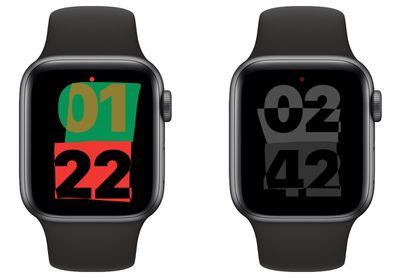
The update adds a new Unity Watch Face inspired by the colors of the Pan-African flag (black, red, and green), with shapes that change throughout the day with movement. The face also features black, red, green, and yellow color options along with a black/gray color option.
watchOS 7.3 also includes a bug fix for an issue that could cause the Control Center and Notification Center to become unresponsive when Zoom is enabled, with full release notes below:
watchOS 7.3 includes new features, improvements, and bug fixes, including:
- Unity watch face--inspired by the colors of the Pan-African Flag, the shapes change throughout the day as you move creating a face that's unique to you - Time to Walk for Apple Fitness+ subscribers--an audio experience in the Workout app where guests share inspiring stories as you walk - ECG app on Apple Watch Series 4 or later in Japan, Mayotte, Philippines, and Thailand - Irregular heart rhythm notifications in Japan, Mayotte, Philippines, Taiwan, and Thailand - Fix for an issue where Control Center and Notification Center may be unresponsive when Zoom is enabled
For more on everything that's included in the watchOS 7 operating system, we have a dedicated watchOS 7 roundup.
Apple today released tvOS 14.4, the fifth update to the tvOS 14 operating system that was initially released back in September. tvOS 14.4 comes more than a month after the release of tvOS 14.3.
tvOS 14.4, which is a free update, can be downloaded over the air through the Settings app on the Apple TV by going to System > Software Update. Apple TV owners who have automatic software updates enabled will be upgraded to tvOS 14.4 automatically.
There were no new tvOS features discovered during the tvOS 14.4 beta testing process, so it is not clear what's new in the update.
Apple's tvOS updates are often minor in scale, focusing on under-the-hood bug fixes and improvements rather than major outward-facing changes, and Apple does not offer detailed release notes. Apple does, however, provide some tvOS details through a tvOS support document, but information is often limited.
The main tvOS 14 update released in September introduced Picture-in-Picture outside of the Apple TV app, introduced audio sharing features for connecting two sets of AirPods or Beats, added new HomeKit capabilities, and expanded game controller support and multiuser gaming options. More on tvOS 14 can be found in our tvOS 14 roundup.
Apple has renewed Israeli espionage thriller drama "Tehran" for a second season, according to Deadline, four months after the first season started streaming on Apple TV+. There is no release date yet for the second season.
"Tehran" tells the "thrilling story of a Mossad agent who goes deep undercover on a dangerous mission in Tehran that places her and everyone around her in dire jeopardy," according to Apple. The series comes from Moshe Zonder, the creator of the successful Israeli television series "Fauda," available on Netflix.
"Tehran" is one of many Apple TV+ series to have been renewed, alongside "The Morning Show," "Ted Lasso," "Dickinson," "Servant," and others.
Apple's streaming service is priced at $4.99 per month or $49.99 per year in the United States, but Apple continues to offer a free one-year subscription to customers who purchase a new iPhone, iPad, iPod touch, Apple TV, or Mac, and Apple recently extended the free trial period for existing subscribers until July.
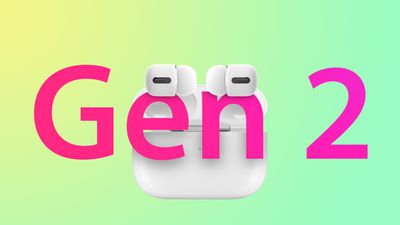
Apple plans to release second-generation AirPods Pro within the first half of 2021, according to unnamed industry sources cited by Taiwanese publication DigiTimes in a report focused on flash memory supplier Winbond.
From the report:
Winbond is also expected to be among the NOR flash suppliers for Apple's next-generation AirPods Pro slated for launch later in the first half of this year, the sources indicated. The Taiwan-based chipmaker will be running its NOR flash production lines at nearly full capacity utilization during the six-month period.
This follows a report from Japanese blog Mac Otakara that claimed the new AirPods Pro will be released in April alongside a third-generation iPhone SE. That report did not offer any details about the new AirPods Pro beyond claiming that the wireless charging case will have slightly tweaked dimensions compared to the original.
Bloomberg's Mark Gurman has previously reported that Apple is aiming to make the AirPods Pro more compact by eliminating the stem that sticks out from the bottom of the earphones, but it's unclear if Apple will achieve this feat. Gurman said Apple had a design in testing with a rounder shape that fills more of the ear, similar to Google's Pixel Buds or Samsung's Galaxy Buds. That report likewise mentioned a 2021 release date.
Introduced in November 2019, the current AirPods Pro feature an in-ear design with three sizes of soft, flexible silicone tips included in the box, along with shorter stems below the ear. AirPods Pro have several upgraded features over regular AirPods, including active noise cancellation, improved sound quality, and water and sweat resistance.
Previous rumors have suggested that Apple also plans to update the standard AirPods in the first half of 2021 with a similar design as the AirPods Pro, but without active noise cancellation, allowing for a lower price point. The current lineup includes the standard AirPods with either a wired charging case for $159 or a wireless charging case for $199, and the AirPods Pro with a wireless charging case for $249.
CPDP is a Brussels-based non-profit platform founded in 2007 by a group of European universities. The conference offers an insight into legal, regulatory, academic, and technological development in privacy and data protection, and seeks to discuss emerging issues and trends. This year, the conference has moved online and is being sponsored by Apple.
Cook's speech is reportedly set to focus on "enforcement of rights in a changing world," as part of the topic "a way to strengthen user selection and strengthen user trust in advertising." Apple's Senior Director for Privacy, Jane Horvath, is also due to speak.
Other guests include New Zealand Privacy Commissioner John Edwards, Vice President of the European Parliament Marcel Kolaja, Policy Director of Privacy International Lucy Purdon, and Mozilla's Chief Security Officer, Marshall Erwin.
The conference takes place on Thursday, January 28. Cook's speech will be streamed live on the CPDP Conferences YouTube channel and is due to start at 5:15 p.m. CET (11:15 a.m. ET and 8:15 a.m. PT).
In Amazon's Gold Box sale today you have a chance to save up to 36 percent on a collection of Anker accessories. These deals have been automatically applied and do not require any promotional codes to get the savings.
Note: MacRumors is an affiliate partner with Amazon. When you click a link and make a purchase, we may receive a small payment, which helps us keep the site running.
In the sale, you'll find discounts on Anker's wireless chargers, portable batteries, wall chargers, and more. You can get the PowerCore Essential 20,000 mAh portable battery for $41.99 (30 percent off), as well as multiple sales on USB-A and USB-C wall chargers.
In its Black History Month announcement this morning, Apple has confirmed that iOS 14.4 and watchOS 7.3 will be released later today.
watchOS 7.3 expands the ECG app on the Apple Watch Series 4 and newer to Japan, Mayotte, Thailand, and the Philippines, while iOS 14.4 introduces a notification on iPhone 12 models with non-genuine cameras. Both software updates also add support for a new "Unity" watch face based on the Pan-African flag and contain several bug fixes.
iOS 14.4 includes the following improvements for your iPhone: - Smaller QR codes can be recognized by Camera - Option to classify Bluetooth device type in Settings for correct identification of headphones for audio notifications - Notifications for when the camera on your iPhone is unable to be verified as a new, genuine Apple camera in iPhone 12, iPhone 12 mini, iPhone 12 Pro and iPhone 12 Pro Max
This release also fixes the following issues: - Image artifacts could appear in HDR photos taken with iPhone 12 Pro - Fitness widget may not display updated Activity data - Typing may be delayed and word suggestions may not appear in the keyboard - The keyboard may not come up in the correct language in Messages - Audio stories from the News app in CarPlay may not resume after being paused for spoken directions or Siri - Enabling Switch Control in Accessibility may prevent phone calls from being answered from the Lock Screen
watchOS 7.3 includes new features, improvements, and bug fixes, including: - Unity watch face—inspired by the colors of the Pan-African Flag, the shapes change throughout the day as you move creating a face that's unique to you - Time to Walk for Apple Fitness+ subscribers—an audio experience in the Workout app where guests share inspiring stories as you walk - ECG app on Apple Watch Series 4 or later in Japan, Mayotte, Philippines, and Thailand - Irregular heart rhythm notifications in Japan, Mayotte, Philippines, Taiwan, and Thailand - Fix for an issue where Control Center and Notification Center may be unresponsive when Zoom is enabled
iPadOS 14.4 should be released later today as well. Apple typically releases software updates around 10 a.m. Pacific Time / 1 p.m. Eastern Time.
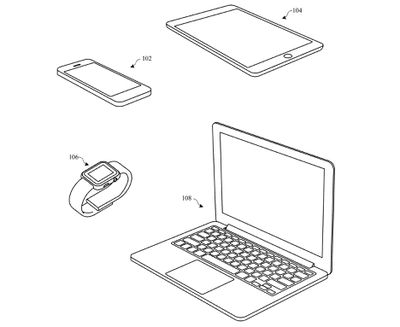
Apple is researching the use of processed titanium with unique properties for future MacBooks, iPads, and iPhones, according to a newly-granted patent application.
In a filing titled "Titanium parts having a blasted surface texture," granted by the U.S. Patent and Trademark Office and spotted by Patently Apple, Apple explains how various devices could adopt titanium casings with a distinctive textured finish.
The patent explains that anodized aluminum, used on current MacBooks and iPads, is not as hard or durable as titanium. However, the hardness of titanium makes it "very difficult to etch," meaning that it can be "aesthetically unattractive." The patent seeks to present a solution to this problem by outlining a blasting, etching, and chemical process to give a titanium enclosure a more attractive appearance.
Apple describes the textured surface as including "peaks separated by valleys," with specific micrometer measurements and gloss units. The process involves various techniques to impart "the blasted and etched titanium part with a fine-scale roughness," which allows it to retain "a high-gloss surface finish."
The "distinctive surface finish" is described as one "that both diffusely and specularly reflects visible light," and this is said to be structurally and aesthetically unlike any other conventional titanium part.
The patent also notes that this textured titanium casing would be appropriate for MacBooks, iPads, iPhones, and Apple Watches. Apple has used titanium cases for a small number of products, such as the PowerBook G4 that was available from 2001 to 2003. Apple's first foray into titanium casings was hampered by issues such as brittleness resulting in breakages, as well as paint that easily flaked off.
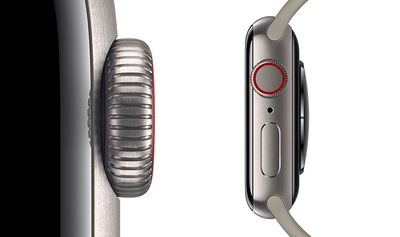
Today, the only Apple product to use a titanium casing is the Apple Watch Edition, which appears to be much closer to the unique finish described by the patent than the titanium PowerBook G4.
Devices with titanium enclosures would be considerably more durable, but potentially also lighter if the weight of the metal could be offset by manufacturing stronger, thinner parts.
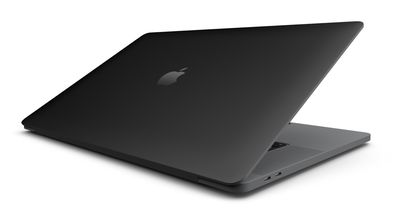
Last month, Apple was granted a patent for a matte black MacBook Pro finish, as the company continues to research ways to move beyond standard anodized aluminum casings.
Patent applications cannot be taken as proof of what Apple is intending to bring to market and many patented concepts never reach consumer products. Nonetheless, they provide an interesting insight into what Apple is researching and developing behind the scene, and hint at what we could see in the future.
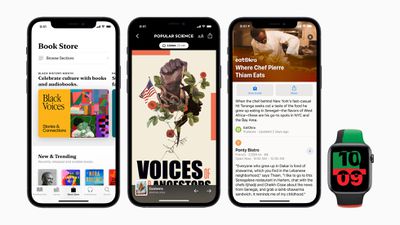
Apple today announced that it will be celebrating Black History Month with curated content that highlights and amplifies Black creators, artists, developers, and businesses across the App Store, Apple Music, the Apple TV app, Apple Books, Apple Podcasts, and more. The content will be featured throughout the month of February.
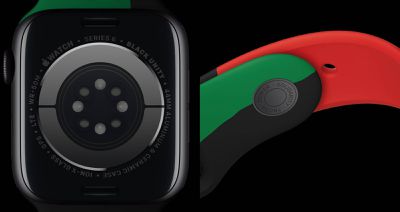
Black Unity Sport Band has "Truth. Power. Solidarity." laser-engraved onto the stainless steel fastening pin
Apple also introduced a limited-edition Apple Watch Series 6 inscribed with "Black Unity" and a "Black Unity" Sport Band, both of which will be available online and in store from Apple and Target beginning February 1 in the United States and 38 other countries. Apple says the Watch will be available in February, with pricing starting at $399, while the Sport Band will be priced at $49 and will remain available throughout the year.
The limited-edition Apple Watch is complemented by the new "Unity" watch face in watchOS 7.3, which Apple confirmed will be released later today. Both the Black Unity Sport Band and Unity watch face are based on the colors of the Pan-African flag.
An overview of some of Apple's other plans:
App Store: A new Black History Month Hub will spotlight Black-owned businesses and Black developers. Apple will also feature stories with Black developers discussing the importance of representation in apps and games.
Apple Music: Apple will feature curated playlists, essays, original videos, and more from Black influencers, musicians, authors, and directors.
Apple Maps: Apple will feature curated Apple Maps Guides created in collaboration with EatOkra, a Black-owned business directory app based in Brooklyn.
Apple TV app: This month's theme for "Essential Stories" on the Apple TV app will "spotlight the multidimensionality of the Black family and its representation onscreen," according to Apple. There will also be new content from Oprah Winfrey.
Apple News: Apple will feature curated topic groups that highlight the "best journalism around race in America," while Apple News+ will offer audio articles that celebrate the Black experience.
Apple's press release provides a detailed look at what is in store across Apple's products and services throughout February.
Note: Due to the political or social nature of the discussion regarding this topic, the discussion thread is located in our Political News forum. All forum members and site visitors are welcome to read and follow the thread, but posting is limited to forum members with at least 100 posts.
MacPaw, the developers behind the Setapp store, have released a major update to their award-winning duplicate finder app, Gemini 2, in the form of a real-time duplicates monitor.
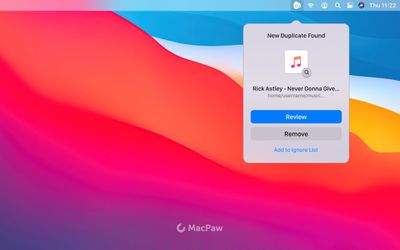
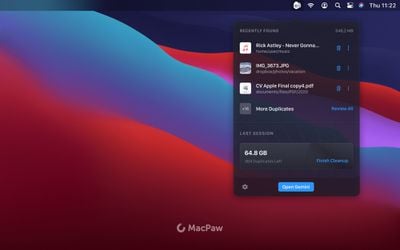
The Duplicates Monitor, which appears as a menu bar item and runs in the background, identifies identical files as they're added to macOS, including pictures, videos, documents, and audio files.
When a duplicate is recognized, Duplicates Monitor immediately notifies users about the new unwanted copy, presenting them with an option to remove the duplicate files, before they start cluttering Mac disk space.
If the user skips the alert, they still have the opportunity to go back to the last three instances when the duplicates were created via the Gemini 2 app, since the Duplicates Monitor only watches for unwanted copies in the locations that have been cleaned with Gemini 2.
"Duplicate files not only occupy valuable disk space but also make the system slow. For large amounts of duplicates, the scanning process can be time-consuming and resource-demanding," says Oleksandr Kosovan, CEO of MacPaw. "With the Duplicates Monitor, users will now be able to keep the duplicate files to a minimum, making their Macs faster and more organized and sparing disk space for things that really matter."
The Duplicates Monitor is a free update for existing Gemini 2 users and will be available starting today. Gemini 2 is available on the Mac App Store and the MacPaw website, and is also available in Setapp, the subscription-based service for macOS applications, which has plans starting at $9.99 a month.
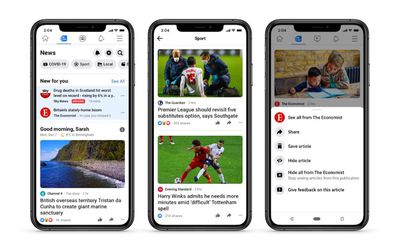
Facebook News today launched in the United Kingdom, the first country outside of the U.S. to receive the curated news portal.
Accessed via a dedicated tab in the mobile Facebook app, the portal features licensed content from hundreds of local and national media organizations including The Guardian, The Economist, The Independent, Channel 4 News, Sky News, Daily Mail Group, and Financial Times, amongst others.
Facebook confirmed to TechCrunch that it will be working with a service called Upday to curate the stories that appear on News:
"The product is a mix of curated, top stories and personalized links chosen by algorithm," a spokesperson said. Upday appears to be a joint collaboration between German publisher Axel Springer and Samsung, which also runs a news service on its phones powered by it.
It is not clear what the financial terms of the deal is between Facebook and Upday, but reportedly, the licensing deals Facebook is cutting with publishers to place their content in News collectively run into the tens of millions of pounds, with the biggest publishers making millions a year from the the agreements. While those figures might pale to what Facebook makes in ad revenues globally — that reaches into the tens of billions of dollars quarterly — they represent significant sums for the beleaguered U.K. media industry.
Like the U.S. version, Facebook News works by combining editorially curated stories and articles based on what users read, share, and follow on the social network. Users will also get controls that allow them to hide topics or publishers from their feed, according to Facebook.
The company says it is currently negotiating with partners to launch the feature in France and Germany, with Brazil and India also in its sights.
Spotify has started releasing audiobook recordings on its streaming platform, indicating the company's intention to further broaden its library of non-music content (via The Hollywood Reporter).
The collection of nine audiobooks are in the public domain, but are original recordings that are exclusive to Spotify. The titles include Mary Shelley's Frankenstein, narrated by David Dobrik, Narrative of the Life of Frederick Douglass, an American Slave, read by Forest Whitaker, and Kate Chopin's The Awakening, read by Hilary Swank, amongst other classics. From the report:
The other titles that Spotify is releasing as part of the collection are Jean Toomer's Cane, narrated by Audra McDonald; Charles Dickens' Great Expectations, narrated by James Langton; Charlotte Bronte's Jane Eyre, narrated by Sarah Coombs; Nella Larsen's Passing, narrated by Bahni Turpin; and Stephen Crane's Red Badge of Courage, narrated by Santino Fontana.
To accompany the audiobooks, Spotify has commissioned series Sitting with the Classics on Spotify, in which Harvard professor Glenda Carpio offers a deep-dive on each book, exploring the history and breaking down the narratives and themes for a modern audience.
The classic audiobooks will be available for free globally but promoted only to English-speaking markets including the United States, the United Kingdom, Canada, Australia and Germany.
Spotify says the collection is a test to see if the audiobooks gain traction on its streaming service, but if it takes off like podcasts have done on the platform, the company's dive into audiobooks could see it take on rivals like Amazon's Audible and Apple Books in a market that was valued at nearly $2.7 billion in 2019, according to a report from Grand View Research.
Over the past few years Spotify has spent $800 million buying podcasting companies like Gimlet Media and The Ringer, as well as acquiring the rights to popular podcasts like The Joe Rogan Experience. According to today's report, Spotify now has 1.9 million podcasts on its platform and says 22 percent of its 320 million monthly active users engaged with that content during the third quarter of 2020.
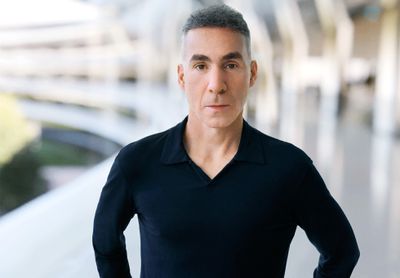
Apple today announced that current Apple hardware engineering SVP Dan Riccio is transitioning to a new role where he will focus on an unspecified project, with John Ternus set to take over as Apple's senior vice president of hardware engineering.
In a statement, Apple CEO Tim Cook said that Riccio made Apple a better and more innovative company, and that Ternus will bring a deep expertise and breadth of experience to the Hardware Engineering teams.
"Every innovation Dan has helped Apple bring to life has made us a better and more innovative company, and we're thrilled that he'll continue to be part of the team," said Tim Cook, Apple's CEO. "John's deep expertise and wide breadth of experience make him a bold and visionary leader of our Hardware Engineering teams. I want to congratulate them both on these exciting new steps, and I'm looking forward to many more innovations they'll help bring to the world."
There is no word on what project Riccio will be working on, but Apple has an Apple Car and various augmented reality and virtual reality devices in the works. The Apple Car project was recently taken over by Apple AI chief John Giannandrea, so Riccio's role is a mystery.
Going forward, Riccio will be a vice president of engineering, which seems to be a title downgrade, so it's possible that he is aiming to take a step back from Apple. Riccio has been with Apple since 1998, when he joined the product design team.
Riccio became vice president of iPad Hardware Engineering in 2010, and in 2012, took over the Hardware Engineering team. Apple says that Riccio will "continue to play an instrumental role in shaping the future of Apple's products."
In a statement, Riccio said that working at Apple has been "the opportunity of a lifetime" and that it is now the right time for a change.
"Working at Apple has been the opportunity of a lifetime, spent making the world's best products with the most talented people you could imagine," said Riccio. "After 23 years of leading our Product Design or Hardware Engineering teams -- culminating with our biggest and most ambitious product year ever -- it's the right time for a change. Next up, I'm looking forward to doing what I love most -- focusing all my time and energy at Apple on creating something new and wonderful that I couldn't be more excited about."
John Ternus initially joined Apple as part of the Product Design team in 2001, and in 2013 took on a role as vice president of Hardware Engineering. He has overseen the launch of products that include the first-generation AirPods, every iPad, and the iPhone 12 and 12 Pro.
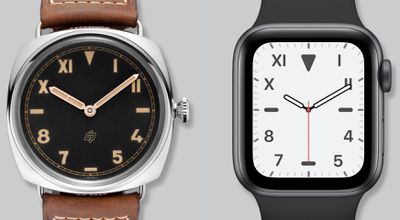
Designer Arun Venkatesan today shared an interesting deep dive into some of the classic watch designs that inspired various watch faces for the Apple Watch, detailing how Apple took design cues from well-known watches from companies like Rolex, Breitling, Heuer, and others.
Venkatesan delves into the California watch face, the Chronograph and Chronograph Pro watch faces, the Count Up watch face, and the GMT watch face.
The California watch face, for example, was inspired by a dial design that originated in World War II. The mix of Roman and Arabic numerals was thought to make the watch face more readable in low visibility.
Originally called the "error proof" or "high visibility" dial, it adorned the fronts of "bubble back" Rolexes -- so-called because of the bubble-shaped back that gave the watches a thin appearance. Strikingly, the indices are set both in Roman and Arabic numerals where other watches would stick to one or the other. It's thought that mixing numerals aids both the wearer and his brothers-in-arms in reading the watch in low visibility conditions.
The GMT watch face, meanwhile, was based on classic watches able to track two time zones at one time, while Count Up is based on classic dive watches.
Unlike the previous faces, the name Count Up, refers to a type of bezel, not a dial or complication. Also known as the diving bezel, this rotating bezel, when coupled with the minute hand, helps measure elapsed time in minutes.
The count up bezel can be traced back to a monumental year in the history of the dive watch -- 1953.
Apple's Chronograph watch faces are built on a long history of chronograph watches that date back to the early 1800s and have become some of the most popular watch face types. Venkatesan says that his research led him to be impressed with Apple's dedication to design, as it's clear that Apple took the time to study the history of many of the classic watch faces that are available in a digital format on the Apple Watch.
As I researched and wrote this essay, my respect only increased. With the watch faces, Apple could have taken the easy way out by merely mimicking existing watch archetypes at a surface level. Instead, they intensely studied each one's history. When designing each face, they took into account that history and the constraints and opportunities afforded by modern technology.
For those interested in the history of the Apple Watch and those who want to know more about the classic watches that have inspired Apple's designers, Venkatesan's article is well worth reading through.




 Note: MacRumors is an affiliate partner with Amazon. When you click a link and make a purchase, we may receive a small payment, which helps us keep the site running.