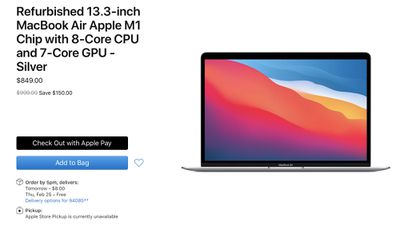
Apple today began offering refurbished versions of the M1 MacBook Air that was first released in November 2020. Pricing on refurbished MacBook Air models starts at $849, which is $150 cheaper than the standard $999 starting price for a new model.
Apple has gold, silver, and space gray M1 MacBook Air models with an 8-core CPU, 7-core GPU, and 8GB RAM available to purchase, along with one higher-priced $1,019 model that has 16GB RAM.
Pricing is approximately 15 percent less than retail, which is standard for refurbished devices. Apple yesterday also began selling refurbished M1 MacBook Pro models for the first time.
Apple has limited stock available and the contents of the refurbished store fluctuate based on what people have sent in for repair and replacement. Additional higher-end models may be added in the future, so those looking for a specific M1 MacBook Air configuration should check back regularly.
All of Apple's refurbished Macs are sold with the same one-year warranty that's provided with a brand new device, along with all manuals and accessories, including a USB-C power adapter and USB-C cable. Refurbished devices go through a rigorous testing, repair, repackaging, and cleaning process and are identical to new devices.
Apple's annual shareholders meeting took place this morning in a virtual format, allowing shareholders to vote on proposals and submit questions to Apple executives. Apple does not typically reveal product info in shareholder meetings, and 2021 was no exception. Much of what was said was a recap of the Q1 earnings results and a reiteration of Apple's policies on privacy, the environment, and other core values.
Apple CEO Tim Cook told shareholders that 2020 was a period of prolific innovation. "Apple makes the best, most useful, most innovative, most trusted products out there, and this year, we took that mission to another level," said Cook.
Cook declined to provide specific details on any upcoming products, but said there are "exciting things ahead for the iPhone" and "great things ahead for computing." Apple is working on new iPhone 13 models that will follow the iPhone 12 lineup, plus there are rumors of revamped and redesigned iMacs and MacBook Pro models that will feature even more powerful Apple silicon chips.
The AirPods Max are "hugely popular with reviewers and users alike," and the HomePod mini was described as "another hit" during the holiday season.
Cook said that Apple has acquired close to 100 companies over the course of the last six years. "We're not afraid to look at acquisitions of any size," said Cook. "Focus is on small, innovative companies that complement our products and help push them forward."
On the topic of the environment, Cook said that Apple is on track to meet its "most ambitious goal yet," which is to be carbon neutral across its entire supply chain by 2030. Meeting this goal is a companywide effort and that Apple's innovations and breakthroughs are setting it apart. "We firmly believe that all companies -- if they hope to be competitive in the future -- have to begin with leadership in this area," said Cook. Apple is also aiming to make all of its products without extracting anything from the earth in the future, and the "moonshot nature" of this goal has "created enormous energy internally" to make big changes. Apple in 2020 eliminated power adapters and headphones from iPhone packaging, which the company said was done to further environmental goals and reduce waste.
"I've always believed that the time to speak out is the time when you've got something to say," said Cook on a question asking why Apple was speaking out on privacy at this time. Cook said that he hopes Apple's efforts to improve privacy both in the App Store and in apps with App Privacy labels and App Transparency requirements will be a "ripple in the pond" moving the whole industry forward. Apple continues to support a comprehensive federal privacy law in the United States and worldwide laws and international agreements to protect the "fundamental rights of privacy everywhere."
On navigating the challenges of the pandemic, Cook said that Apple is still learning new things, but the "remarkable run of innovation and creativity" is a testament to employee resilience during a trying time. Apple employees adapted and collaborated better, but Cook said there is "no substitute for meeting face to face" and that most Apple employees "can't wait" to gather in the office again.
Cook also spoke on diversity and inclusion, pay equity at Apple, Apple TV+, App Store regulation, Apple's education goals, and, interestingly, Apple's identity.
In so many ways, the world has changed, but in fundamental ways, Apple has not. Apple is made up of people who want to spend their lives making things that enrich the lives of others, making them more fulfilled, more creative, and more human. We're comfortable saying no to a lot of things and laser focused on the areas where we can have the greatest impact, innovating relentlessly. Technology made by people, for people, and with people's well being in mind. At its best and most hopeful, technology should help us leave the world better than we found it.
Looking forward to the future, Cook said that he doesn't see challenges in 2021, but opportunities that will need to be managed "creatively, intelligently, and diligently." Cook said that across the current iPhone, Mac, and Apple Watch product lineups, there's never been a set of products with a "greater degree of future potential."
Cook said that there's never been a more challenging environment that Apple has operated in than this year's pandemic, but he is optimistic about the future and Apple is always thinking about how to help communities emerge stronger, fair and equitable recovery, and "how all of that can be helped by world class technology that puts humanity at its heart."
The Paley Center for Media today announced the full lineup of programming for its virtual PaleyFest LA 2021 television festival next month, including the Golden Globe-nominated Apple TV+ comedy series "Ted Lasso."
PaleyFest is described as featuring "conversations with the cast and creative teams from television's most acclaimed and most popular shows, providing fans with exclusive behind-the-scenes scoops and breaking news stories."
"I get to speak for the whole Ted Lasso team when I say thanks for including us at this year's PaleyFest," said Bill Lawrence, creator and executive producer of Ted Lasso. "We're so grateful to anyone who gave our show any of their time this year - it's cool to have the opportunity to let fans know that in person."
The initial slate of programming will be available to the public starting on March 30, with additional releases on March 31 and April 1 on the Paley Center's dedicated channel on Yahoo Entertainment. Citi cardmembers and The Paley Center for Media members will have early access to the programming starting March 26.
Ted Lasso's panel discussion will be released on April 1 at 7 a.m. Pacific Time, and will feature creator Bill Lawrence, lead actor Jason Sudeikis, and other cast members from the hit show, such as Hannah Waddingham, Jeremy Swift, Brendan Hunt, Juno Temple, Nick Mohammed, Brett Goldstein, and Phil Dunster.
Sudeikis plays the title character Ted Lasso, a small-time college football coach from Kansas hired to coach a professional soccer team in England, despite having no experience coaching soccer. The show has received positive reviews, with many viewers finding solace in Lasso's unrelenting positivity amid the trying times of late.
Nomad today launched a new set of cases for the 2020 iPad Air, including a Rugged Case, Rugged Folio, and lower-cost Performance PU Rugged Case and Folio for anyone who prefers a case that isn't made of leather.
Note: MacRumors is an affiliate partner with Nomad. When you click a link and make a purchase, we may receive a small payment, which helps us keep the site running.
To celebrate the launch of the new iPad Air cases, our readers can save 10 percent on each accessory by entering the code MACRUMORS10 at the checkout screen. This code starts today and will last through February 26 at 11:59 p.m., and it only applies to iPad Air cases.
The Rugged Case costs $89.95 with our code (regular $99.95), and it's a minimalist case that offers sturdy protection in a sleek design. The Rugged Folio costs $134.96 (regular $149.95) with a similar construction to the Rugged Case, with the addition of a folio kickstand.
Both of those cases are made of leather, and come in Rustic Brown or Black (only the Rustic Brown option is live now). For a non-leather option, the Performance PU Rugged Case and Folio feature a polycarbonate body, protective bumper, and soft-touch Deep Gray finish.
The Performance PU Rugged Case costs $62.96 (regular $69.95) and the Performance PU Rugged Folio costs $71.96 (regular $79.95). All of Nomad's new cases are compatible with Apple Pencil 2 and they have a cutout to support the iPad Air's Touch ID fingerprint button.
Remember to use the code MACRUMORS10 to get 10 percent off any of the new cases before it expires on February 26. Keep up with all of this week's best discounts on Apple products and related accessories in our dedicated Apple Deals roundup.
Apple is researching how it can reduce the appearance of fingerprints and smudges on the metal surfaces of its products and has hinted yet again at the use of titanium for future Apple devices, according to newly-granted patent filings.
The patent, filed with the U.S. Patent and Trademark Office and spotted by Patently Apple, is titled "Oxide coatings for metal surfaces" and explains in detail how a thin coating can significantly reduce the appearance of fingerprints on devices.
Last month, patents for titanium device enclosures came to light, revealing Apple's interest in how various devices, including MacBooks, iPads, and iPhones, could adopt titanium casings with a distinctive textured finish. Now, Apple's patent for oxide coatings has again stressed the advantages of using titanium on consumer electronics, such as "high strength, stiffness, and hardness."
For example, the relatively high hardness of titanium makes it resistant to scratches, and its stiffness makes it durable enough to withstand bending. In addition, titanium is inherently more corrosion-resistant than certain other alloys.
Apple highlights that, compared to other metals, titanium easily shows fingerprints when handled. This is partially due to the relatively low reflectivity of titanium and titanium alloy surfaces.
One of the disadvantages of using titanium and its alloys, however, is that oil from fingerprints can be readily seen on bare titanium and titanium alloy surfaces, leaving unattractive marks on consumer electronics. The nature and volume of the fingerprints can be factors, but even clean fingers can leave a relatively dramatic mark on titanium surfaces.
Conventional oleophobic coatings are usually used to reduce fingerprinting on glass surfaces such as the front and back of iPhones, but these types of coatings are much less effective on titanium surfaces. The patent suggests that Apple's interest in using titanium for its devices has led to the need for new, more effective solutions for the prevention of fingerprinting.
What are needed therefore are improved cosmetic surface finishes for titanium and its alloys.
This has led the company to research the use of a thin oxide coating or film "configured to reduce or eliminate interference-coloring effects brought upon by fingerprints or other thin film options." Apple's oxide coating allows the surface of a device to continue reflecting light as though there is no fingerprint present, thereby hiding oily smudges.
In some embodiments, the oxide coatings are sufficiently thick to increase the optical path difference of incident light, thereby reducing any inference coloring by the fingerprint to a non-visible level. In some embodiments, the oxide coatings have a non-uniform thickness that changes the way light reflects off interfaces of the oxide coating, thereby reducing or eliminating any thin film interference coloring.
Apple also notes that an oxide coating could be used on surfaces including "aluminum, aluminum alloy, steel, magnesium, magnesium alloys, zirconium, or zirconium alloys," even though it was developed primarily to address titanium or titanium alloys.
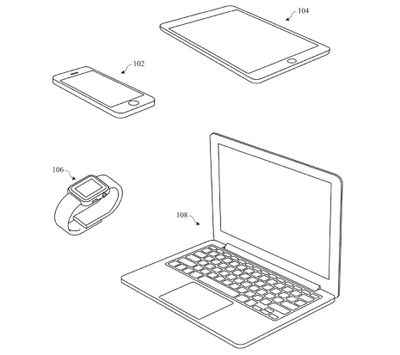
The filing also highlights that the oxide coating can be used "to form durable and cosmetically appealing finishes" on a wide range of Apple devices, including the iPad, iPhone, Apple Watch, and MacBook.
Following last month's news of Apple's curiosity about expanding the use of titanium for its devices, which is currently only available on the Apple Watch Edition, it is interesting that research in the area is leading to other technological innovations.
Apple's research suggests that the company is looking to move beyond standard anodized aluminum casings, but there is no telling if and when this may happen. Nonetheless, patent filings can provide insight into what Apple is exploring and developing behind the scenes, and hint at what we could see in the future.
Apps developed for the Mac don't typically receive as much attention as apps designed for iPhones and iPads, so we've created a series at MacRumors that highlights useful Mac apps worth checking out. This month's picks feature new apps for managing email, organizing calendar events, enhancing productivity, and more.
Shareful (Free) - Shareful enhances the built-in sharing options on the Mac. You can copy shared items to the clipboard to be pasted into another app, save a shared item to a specific directory, or open a shared item in any app. When enabled, Shareful is available in any app that has a built-in share button, which is applicable to both Apple's own apps like Safari and third-party apps. It's a simple app that adds additional sharing utility for those who need it.
Postbox ($40) - Postbox bills itself as a "Power Email" app with a built-in Message Triage feature for quickly getting through what's in the inbox. There's a Quick Bar with a series of quick actions for dealing with emails, a built-in unsubscribe feature, gesture support, filters, and deep organization to keep everything where it belongs. There are also quick reply features, canned responses, search tools, professional email examples, quick-insert clips, signatures, image effects, and more. There are also anti-tracking features to let you know if emails contain tracking tools.
Jettison ($4.95) - Jettison is a simple little app that's designed to eject all external drives automatically when you put your MacBook to sleep. With the app, there's no need to manually eject external drives, and when you open your MacBook back up, any drives that are still connected will mount again automatically.
Spotter (Free) - Spotter is a productivity tool that lets you search for and launch application actions and the apps themselves, so you can get everything done that you need to from one little app. It's open source and supports custom hotkeys.
Superpowered ($10/month) - Superpowered is a scheduling app that lets you see your upcoming events for the day and join Zoom and Google Meet meetings with a single click. A menu bar addition counts down the time to your next meeting or event, and lets you know when it's time to join. Multiple calendar accounts and subscriptions are supported so you can see everything you need to do at a glance. Superpowered has a free trial, but costs $10 per month after that.
Know of a must-have Mac app or game that we haven't highlighted yet? Let us know in the comments below and we might feature it in a future video. Many of our Mac apps that we share are recommended by MacRumors readers. For more of our Mac app picks, check out our Mac apps archive.
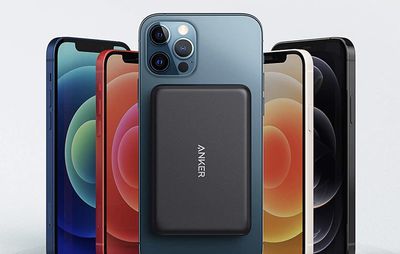
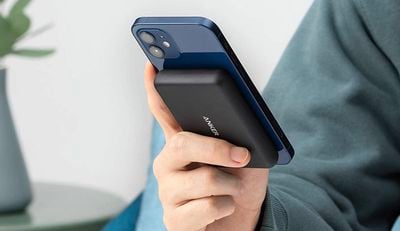
Following rumors that Apple is working on a MagSafe battery pack for iPhone 12 models, popular accessory maker Anker has beaten Apple to the punch with the release of its PowerCore Magnetic 5K Wireless Power Bank.
First previewed at CES 2021, the PowerCore battery pack magnetically attaches to the back of any iPhone 12 model and provides 5W of wireless charging. With a 5,000 mAh capacity, the battery pack is capable of charging the iPhone 12 mini from 0% to 100%, the iPhone 12 and iPhone 12 Pro from 0% to around 95%, and the iPhone 12 Pro Max from 0% to 75%, according to Anker. The battery pack itself recharges via USB-C.
While the battery pack is compatible with the MagSafe system, it is not an official accessory, so charging is limited to 5W. Apple's rumored MagSafe battery pack would likely be able to charge an iPhone 12 model at up to 15W, in line with the MagSafe Charger.
Note: MacRumors is an affiliate partner with Amazon. When you click a link and make a purchase, we may receive a small payment, which helps us keep the site running.
Over the past week, some M1 Mac users have been reporting alarming SSD health readings, suggesting that these devices are writing extraordinary amounts of data to their drives (via iMore).
Across Twitter and the MacRumors forums, users are reporting that M1 Macs are experiencing extremely high drive writes over a short space of time. In what appear to be the most severe cases, M1 Macs are said to be consuming as much as 10 to 13 percent of the maximum warrantable total bytes written (TBW) value of its SSD.
Flash memory on solid-state drives, such as those used in Macs, can only be written to a certain number of times before they become unstable. Software ensures that load is spread evenly across the drive's memory cells, but there is a point when the drive has been written to so many times that it can no longer reliably hold data. So while SSD wear is normal, expected behavior, drives should not be exhausting their ability to hold data as quickly as some M1 Macs seem to be.
One user showed that their M1 Mac had already consumed one percent of its SSD after just two months, while another M1 Mac with a 2TB SSD had already consumed three percent. The total data units written for these machines is running into many terabytes, when they would normally be expected to be considerably lower.
The user with three percent usage speculated that, were his machine a 256GB model, it could have used as much as 30 percent to date, and have reached maximum TBW in around two years. An SSD can continue to function once its TBW limit has been reached, but there is no knowing how long it will last past this point.
It is not known how widespread the TBW issue is, but reports of strange SSD behavior are also now emerging from users with Intel-based Macs, suggesting that the TBW issue may not be exclusive to M1 Macs.
The reported wear is so extreme on some M1 Macs that it suggests the problem is due to a bug rather than the expected behavior of the M1 chip, but it is unclear if the problem pertains to erroneous readings or macOS genuinely writing vast amounts of data to the drive. Drive monitoring tools are sometimes unreliable and it is likely that the issue can be fixed via an update to macOS Big Sur.
Amazon today is continuing to discount a few of Apple's keyboards for the iPad Pro and iPad Air, the highlight being the Magic Keyboard for 11-inch iPad Pro at $199.00, down from $299.00. This is still the lowest price that we've ever tracked for this Magic Keyboard, which can also be used with the fourth generation iPad Air.
Note: MacRumors is an affiliate partner with Amazon. When you click a link and make a purchase, we may receive a small payment, which helps us keep the site running.
You can also get the Magic Keyboard for the 12.9-inch iPad Pro, but this discount isn't quite as steep. It's priced at $329.00, down from $349.00. Both versions of the Magic Keyboard provide a full keyboard with a trackpad, backlit keys, and a new floating cantilever design that lets you adjust the iPad Pro to find the best viewing angle.
For even more iPad deals, head to our full Best Deals guide for iPad. In that guide we track the best discounts online for iPad, iPad mini, iPad Air, and iPad Pro.
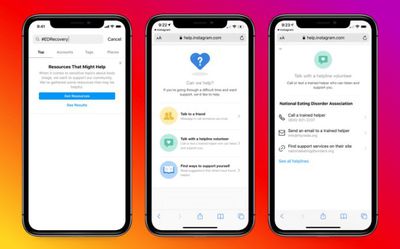
Instagram is launching new features to help support users on its platform who may be affected by negative body image or an eating disorder, the company has announced.
Previously, Instagram had limited its policy to obscuring content that may trigger users suffering from an eating disorder, but the new policy adds to this by aiming to surface more expert-backed resources when people search for content related to the issues.
While we don't allow content that promotes or encourages self-harm and eating disorders, we do allow people to share their own experiences and journeys around self-image and body acceptance. We know that these stories can prompt important conversations and provide community support, but can also be triggering for some. To address this, when someone tries to search for or share self-harm related content, we currently blur potentially triggering images and point people to helpful resources. However, we've heard from experts that we would support people more if we made available dedicated resources to cope with eating disorders or body dissatisfaction, which is why we are introducing new resources specific to body image issues.
Going forward, users in the U.S. who search for content related to topics like eating disorder recovery will now see links to built-in resources provided by the National Eating Disorders Association (NEDA), with equivalent links to local helplines in Australia, Canada, and the United Kingdom.
Likewise, links to these resources will be highlighted if someone tries sharing this content, or if a friend is concerned about something they see posted and wants to offer support. In the coming weeks, Instagram will also make it easier to connect with friends by adding the ability to message on Instagram directly from the above resources.
In addition, the Facebook-owned company says it will be hosting feedback sessions with community leaders and experts globally to learn more about emerging issues in the eating disorders space, and new approaches for offering support. It is also working with NEDA to share programming during National Eating Disorders Awareness Week in the U.S. for the third year in a row.
Instagram has further resources available online for anyone who wants to learn more about supporting a friend who may be struggling with any of the above issues.
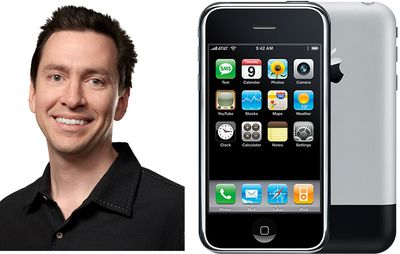
As part of its ongoing legal battle, Epic Games is now seeking testimony from Apple's former iOS software chief, Scott Forstall.
Forstall left Apple in 2013, in what was widely reported at the time to have been a forced exit, largely because of the botched early launch of Apple Maps. Since then, Forstall has kept a very low profile and has only made a few media appearances in the past few years, choosing instead to focus on Broadway production. Epic Games now wants to ask Forstall some questions, given his involvement around the launch of the App Store, to use as potential evidence for its case against Apple.
According to court documents (via FOSS Patents), on Decemeber 15, 2020, Apple offered to depose and later represent Forstall. Epic alleges, however, that Apple is now stating it never offered the deposition and that Apple "kept promising it would provide a date for Mr. Forstall's deposition but did not."
Epic says it didn't proactively attempt to reach out to Forstall itself, given Apple's indication that it would handle the logistics and planning of the deposition, according to the court document. Both Epic and Apple agreed to a tentatively scheduled deposition for February 11. Ten days earlier, Apple admitted that Forstall did not respond to its request to appear, according to Epic.
When Epic asked Apple for specific information about Forstall's whereabouts, Apple provided a PO box and Twitter handle, according to the court filing. Apple initially stated it did not have the authority to provide Epic with Forstall's phone number, but then later said it didn't believe it had that information in its possession. Epic continues to allege that both parties agreed that a deposition may occur after February 15, and that Apple set a deadline of March 10, 2021.
Epic says it is now "attempting to locate Mr. Forstall." In response, Apple says that it "does not object to a deposition of Mr. Forstall in advance of March 10, 2021," but reiterates the fact that it plans to represent him in the deposition, and that it cannot compel a former employee to take part in the ongoing legal dispute. Apple says that it will work "collaboratively" with Epic to resolve the issue, but says that Epic "cannot hold discovery open indefinitely while it seeks to locate, serve, and depose another witness."
Epic believes that Forstall could be of use in its ongoing battle with the Cupertino tech giant because of his involvement around the launch of the App Store, the center of its lawsuit. Apple may be reluctant to have Forstall testify, however, given the rocky departure he had from the company, and any form of deposition would be a test for Forstall's loyalty to his former employer.
Epic now has until March 10 to locate Forstall and seek his agreement to appear for a deposition. Whether he agrees or not, Apple CEO Tim Cook and SVP of Software Engineering Craig Federighi are set to testify. A judge ruled in December that both executives will need to appear for a deposition at the request of Epic.
The two companies are preparing to battle it out in court in a hearing currently set for July 2021, which will mark almost a year since the whole dispute between Epic and Apple began.
Disney+ today launched its adult-friendly Star channel for existing subscribers in Europe, Australia, New Zealand, and Canada. The Star brand includes content from Disney Television Studios, FX, 20th Century Studios, and 20th Television that's aimed more at grown-ups, as opposed to the all-ages content that's currently available on Disney+.
Star is the sixth brand to launch on Disney+, alongside Marvel, Pixar, Star Wars, National Geographic, and Disney. Star corrals titles from the back catalogs of Disney, ABC, and 20th Century Fox, as well as originals from Hulu that up until now weren't available outside the U.S.
Star in Europe features over 75 TV series and more than 280 movies, including four "Star Originals." To kick off the launch, Disney is highlighting series like "Modern Family," "Lost," "24," "Family Guy" and "Grey's Anatomy." Meanwhile, titles like "Deadpool 2," "Bachelor Party," "Commando," "Crimson Tide," "Con Air," and "The Grand Budapest Hotel" are amongst the movie offerings.
Movies including "Can You Ever Forgive Me," Danny Boyle's "The Beach," "Gone in 60 Seconds," and "Taken" will appear on the Star service in March, and every season of "The Golden Girls" is coming to Disney+ this summer. Disney is also set to bring more Marvel movies to subscribers in Europe within a year.
The first time users open Disney+ and select Star, they'll be asked if they want to manage parental controls. Different age ratings can be set for different profiles, with the ability to select content suitable for 6, 9, 12, 14, 16 and 18-year-olds. For an extra layer of security, each profile can also be PIN-protected, and a special kid-safe mode can be activated for the Under 7s.
In Europe, the Star channel is available in the U.K., Ireland, France, Germany, Italy, Spain, Austria, Switzerland, Portugal, Belgium, Luxembourg, The Netherlands, Norway, Sweden, Denmark, Finland, and Iceland.
The additional channel arrives alongside a price hike in Europe. In the U.K., the monthly subscription rate is set to increase from £5.99 to £7.99, or £59.99 to £79.90 per year, with an equivalent increase in the EU in euros. Current subscribers however will enjoy a pay freeze until August 23.
The increased cost is in line with a $1 price hike for subscribers in the United States that will come into effect on March 26.
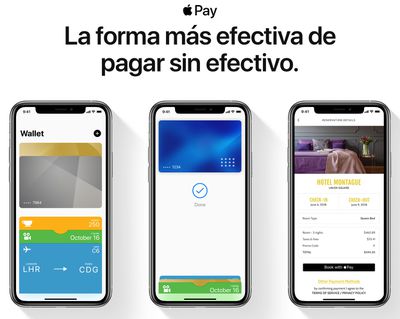
Apple today officially released Apple Pay in Mexico, offering users the ability to easily pay with their iPhone, Apple Watch, and online on their Macs with supporting banks.
At launch, Citibanamex, Banorte, American Express, and MasterCard customers can use Apple Pay in Mexico, according to Apple's website.
Last year, Apple updated the Apple Pay webpage on its Mexican site to say the feature would not be available until 2021. The small correction came after reports in March that users in Mexico were beginning to see Apple Pay prompts within the Wallet app on their iPhone.
Apple users and customers of supporting banks can go to the Wallet app on their iPhone to add their credit/debit card for easy and contactless payments. The card can also be synced with an Apple Watch for easier, contactless wrist payments.
Today's Apple Pay launch in Mexico was tentatively hinted at yesterday by Appleosophy.
In what could be seen as an attempt to catch up to Apple's legacy software support for older iOS devices, Samsung is now promising Galaxy users that they'll receive security software updates for "at least four years" after a device's initial release.
Samsung and Android have long had a reputation of being a fragmented ecosystem when it comes to OS updates. Samsung, unlike Apple, has multiple lines of smartphone devices, making it significantly harder to maintain all of them with frequent software updates.
Apple software releases typically support a range of older devices that have been superseded by newer models and are no longer sold by the company. For example, iOS 14 supports iPhone 6S models, which were released in 2015. On average, Apple tends to support devices with major iOS updates for at least five years after their launch.
It's important to note that Samsung's new commitment only targets security updates, not Android OS updates. Apple usually bundles security improvements and new features in a single update, however, it does occasionally release updates solely focused on security patches. In November of 2020, Apple released an update focused on patching major security issues for devices as old as the iPhone 5S, released in 2013.
Samsung's new four-year promise for security updates will only apply to devices launched after 2019. Any devices launched before then are still under Samsung's old policy. Samsung previously provided updates for its devices for at least two years after it initially launched, so the new announcement effectively doubles the timeframe.
As The Verge rightfully points out, Samsung says devices will receive "regular updates," which is the lowest tier of update frequency. The tier is typically only reserved for devices that Samsung no longer supports, but still receives updates, without a fixed time schedule. In contrast, Google only promises "at least three years" of security updates for its Pixel phones.
Last year, Samsung did promise to provide some of its devices with "three generations" of Android updates after their initial launch, but only for its S, N, and Z series. The A series, its low-end family of Galaxy devices, will receive software updates "until hardware allows," according to a statement provided to The Verge.
Facebook has announced that it will restore the ability for users in Australia to share news content on the social platform, following changes to the country's media code.
The company banned all news sharing last week in response to a proposed Media Bargaining Law, which aims to level the playing field between Australian news media businesses and digital platforms in terms of bargaining power.
The law would allow Australian news publications to negotiate for fair payment for their journalist's work, effectively forcing companies like Facebook and Google to pay for news content.
However, Facebook said on Tuesday that it had been reassured by discussions over the weekend with the Australian government about negotiated amendments to the bargaining code, adding that it was "satisfied" with the agreement they had reached.
"After further discussions, we are satisfied that the Australian government has agreed to a number of changes and guarantees that address our core concerns about allowing commercial deals that recognize the value our platform provides to publishers relative to the value we receive from them," Facebook's VP of global news partnerships, Campbell Brown, said in a statement.
"Going forward, the government has clarified we will retain the ability to decide if news appears on Facebook so that we won't automatically be subject to a forced negotiation. We have come to an agreement that will allow us to support the publishers we choose to, including small and local publishers," Brown said.
Australian authorities plan to introduce further amendments to the proposed law so that the government may not apply the code to Facebook if it can demonstrate a "significant contribution" to local journalism, and a two-month mediation period before enforced arbitration comes into effect, allowing parties additional time to reach a private deal.
Australian Treasurer Josh Frydenberg said Facebook chief Mark Zuckerberg had told him the ban would end "in the coming days", following the talks. "Facebook has re-friended Australia," he told reporters on Tuesday.
Despite Facebook's reversal, its original decision to ban news shared on its platform attracted negative headlines about the company around the world, and prompted other governments to consider moves to curtail its power. Canada has said that it is considering similar changes in its media law, while British politicians also called voiced concerns about Facebook's actions in Australia.
However, Facebook did receive support from some quarters when it complained that Australia's proposed law had been badly drafted. For instance, Sir Tim Berners-Lee, creator of the web, said he was concerned that forcing companies to pay for certain content could make the internet "unworkable."
"Specifically, I am concerned that that code risks breaching a fundamental principle of the web by requiring payment for linking between certain content online," Berners-Lee said.
Taiwanese company Ennostar will begin production of Mini-LED backlight units for an upcoming 12.9-inch iPad Pro in the late first quarter or second quarter of this year, according to industry sources cited by DigiTimes.
Ennostar is a holding company that was jointly established in January 2021 by LED-related manufacturers Epistar and Lextar Electronics.
Apple is expected to unveil the new 12.9-inch iPad Pro with Mini-LED backlighting in the first half of this year, with Epistar serving as the exclusive supplier of Mini-LED chips that will be packaged into backlight units by Lextar, the report claims. This timeframe has been rumored several times, with some reports narrowing down a release to the first quarter, so it is possible the new iPad Pro will be introduced in March.
It's unclear if Apple plans to introduce a new 11-inch iPad Pro at the same time, as many rumors have only mentioned the 12.9-inch iPad Pro. One possibility is that Mini-LED backlighting will be limited to the 12.9-inch model, with the 11-inch model's key new features limited to the A14X chip and 5G support, but it is unclear.
Apple will likely also adopt Mini-LED backlighting for new MacBook models to be unveiled in the second half of this year, according to the report. Apple analyst Ming-Chi Kuo expects new 14-inch and 16-inch MacBook Pro models to launch in the second half of 2021 with a new design, the return of an HDMI port and SD card reader, the removal of the Touch Bar, classic MagSafe charging with a breakaway power cable, and more.
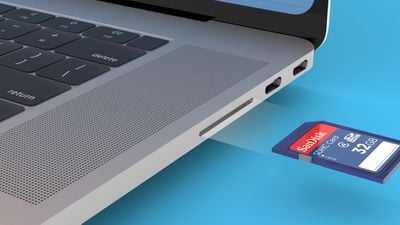
Apple plans to release two new MacBook Pro models equipped with an HDMI port and SD card reader in the second half of 2021, according to analyst Ming-Chi Kuo, who outlined his expectations in a research note obtained by MacRumors. The return of an SD card reader was first reported by Bloomberg's Mark Gurman last month.
"We predict that Apple's two new MacBook Pro models in 2H21 will have several significant design and specification changes," wrote Kuo. "Some of the practical changes for users are equipping with the SD card reader and HDMI port."
Last month, Kuo said Apple is planning all-new 14-inch and 16-inch MacBook Pro models with several changes, including the return of the classic MagSafe charging connector with a breakaway power cable, the removal of the Touch Bar, a new flat-edged design, and the return of more ports built into the notebooks for expanded connectivity. Bloomberg's Mark Gurman echoed many of these details in his reporting.
Kuo said Taiwan's Genesys Logic will be the exclusive supplier of the SD card reader in the 2021 MacBook Pro models.
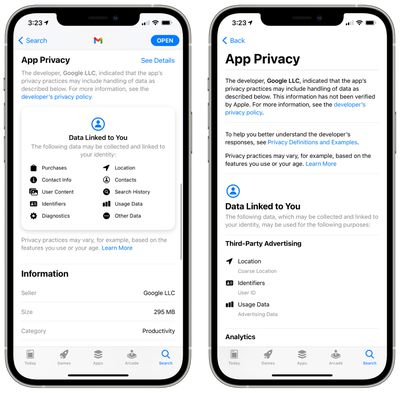
Google today quietly added App Privacy labels to its Gmail app, marking the first of its major apps to receive the privacy details aside from YouTube.
Though App Privacy information has been added to Gmail, Google has done so server side and has yet to issue an update to the Gmail app. It has been two months since the Gmail app last saw an update.
Earlier in February, the Gmail app was displaying warnings about the app being out of date as it has been so long since new security features were added, but Google eliminated that messaging without pushing an update to the app.
Apple has been enforcing App Privacy labels since December, and Google has been slow to support the feature. Google said in early January that it would add privacy data to its app catalog "this week or next week," but by January 20, most apps still had not been updated with the App Privacy.
Google has since been adding App Privacy labels to apps like YouTube and some of its smaller apps, but of major apps like Google Search, Google Photos, and Google Maps, Gmail is the first to get the new labeling.
There is nothing hugely unexpected in the Gmail App Privacy data, with Google listing location, user ID, and usage data as information that's shared with third-party advertisers.Purchases, location, contact info, user content, search history, identifiers, and usage data are used for analytics purposes, product personalization, and app functionality.
Though most Google apps went months without an update and still have yet to be updated, apps like Google Translate, Google Tasks, YouTube Music, and YouTube TV have been updated with new content and bug fixes. These apps were quietly updated with App Privacy labels prior to when their content was updated, however.
Now that Gmail has App Privacy labels in place, we may soon see the information made available for other Google apps, and Google may resume the regular updates that were offered for iOS apps prior to when Apple implemented the new rules.




 Note: MacRumors is an affiliate partner with Nomad. When you click a link and make a purchase, we may receive a small payment, which helps us keep the site running.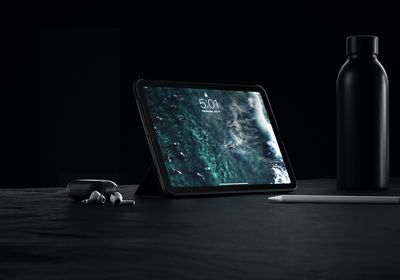
 Image via


 Note: MacRumors is an affiliate partner with Amazon. When you click a link and make a purchase, we may receive a small payment, which helps us keep the site running.