

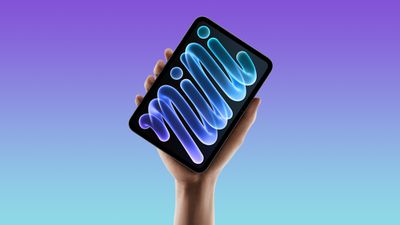
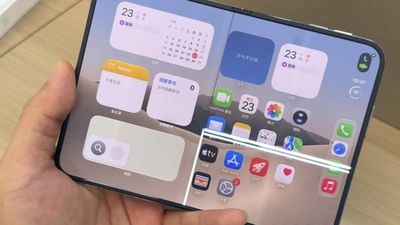
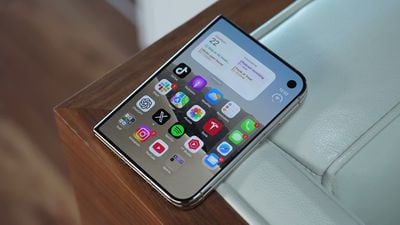








 After announcing a new iPad mini today, Apple is expected to introduce updated iMac and 14-inch MacBook Pro models on Tuesday, both with the M6 chip that debuted in the new Mac mini in August. No design changes have been rumored for these Macs. Finally, higher-end 14-inch and 16-inch MacBook Pro models with touch-enabled OLED displays are expected to be announced on Wednesday.
Apple and the NFL today announced that rapper Jay-Z ("JAŸ-Z") will headline the 2027 Apple Music Super Bowl LXI Halftime Show at SoFi Stadium in the Los Angeles area.


Super Bowl LXI will take place on Sunday, February 14 next year, meaning that Jay-Z will be performing on Valentine's Day. In the U.S., the big game will air on ABC and ESPN, with the Apple Music Halftime Show typically starting around 8:00 p.m. to 8:15 p.m. Eastern Time. It is not yet known who else will perform alongside Jay-Z.
Apple Music has sponsored the Super Bowl Halftime Show since 2022, with previous performers including Rihanna, Kendrick Lamar, Bad Bunny, and others.
With iOS 27.2 and tvOS 27.2, second- and third-generation Siri Remotes can be tracked using the Find My app.
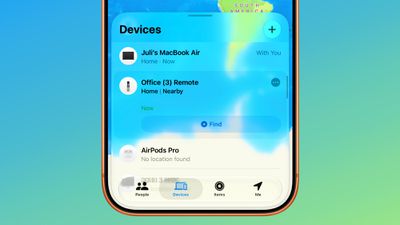
There has been an option to locate a lost Siri Remote with an iPhone since iOS 17, but remotes did not previously show up in the Find My app. Locating a remote had to be done with the Apple TV Remote widget in the Control Center, which made the option hard to find.
Supported Siri Remotes are now listed in the Find My app right alongside other devices, a more intuitive option for iOS and macOS users.
With the upcoming fourth-generation Apple TV 4K, Apple is adding a speaker and Precision Finding to the Siri Remote to make it easier to find when misplaced. Older remotes are not able to play a sound and do not have Precision Finding.
When the fourth-generation Apple TV was announced, Apple said Find My support would be available on the 2nd-generation Siri Remote and later, and it's here now.
You'll need iOS 27.2 and tvOS 27.2 installed to get Siri Remotes to show up in the Find My app. After installing tvOS 27.2, you may have to wait for new firmware to be delivered to the Siri Remote before it is added to Find My.
Tags: Find My Guide, Siri Guide
Buyer's Guide: Apple TV (Buy Now)
Related Forums: Apple TV and Home Theater, iOS 27
Apple released iOS 27.2, uniting the iPhone Duo and other iPhone models on the same version of iOS. iOS 27.2 is the first major iOS 27 update, and it adds several useful new features.
Siri AI Improvements
Siri AI can recall past conversations you had with it, so you can ask Siri about something it told you before, like a restaurant it previously recommended. It's also able to draw on more sources:
- Photos attached to Messages
- Calendar event attendees
- Voicemails
Apple says you'll also get better results from Safari history and Reading List.
There's a redesigned Excluded Apps feature that lets you quickly select which apps Siri, Search, and suggestions can access. The prior App Access feature required excluding apps individually.
There's also granular text selection, so you can select and copy just the part of a Siri response you need.
Siri AI requires an iPhone 15 Pro or later.
Siri AI Languages
Siri AI is now available in more languages, including French, Japanese, Korean, Portuguese, and Spanish. Siri AI is still not available in the EU or mainland China.
Messages
Suggestions in Messages have been added in iOS 27.2. The feature was available during the iOS 27 beta testing period, but was removed before launch.
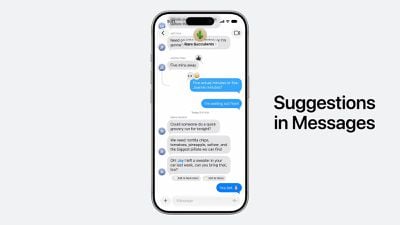
Messages suggestions show tappable shortcuts in a conversation based on context, so you can do things like track a package with a tap, or add a dinner invite to the Calendar app.
You can choose the suggestions you want, with options to add Calendar, Reminders, Notes, Maps, and Flights and Packages.
Apple Music
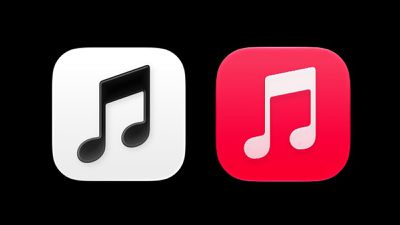
iOS 27.2 introduces a new Apple Music icon that goes with Apple's recent Apple Music rebranding. The icon is black and white, replacing the red icon. Apple also changed the color of the highlights in the navigation bar and other areas of the Apple Music app to remove the red color.
Photos
Shared Albums in the Photos app now have an edit option for captions and comments. Apple also added a feature for avoiding duplicate photos, and there's now a reminder before albums expire so users can save important photos and videos.
SynthID
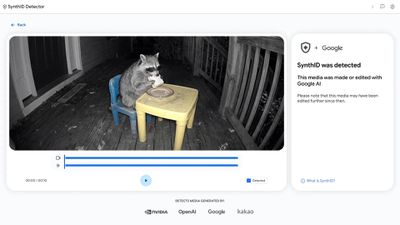
iOS 27.2 includes SynthID labeling for Image Playground images and some Photos app edits. Watermarks are added when using Extend and Reframe in Photos, and for large edits with the Clean Up tool. You can check images for SynthID using Google's SynthID Detector website.
Podcasts
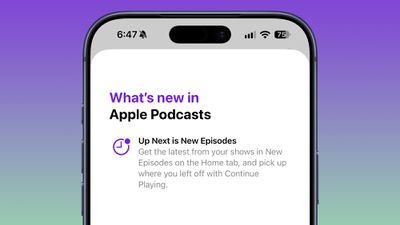
The Home tab in the Podcasts app has separate sections for New Episodes and Continue Playing. The new sections replace Up Next.
Games
The Friends tab in the Games app now includes context on friend suggestions and shows recent games played on friends' player pages.
Apple TV
Apple TV app users can now create profiles in the account settings section on the iPhone and iPad. Profiles only require a name, profile rating, and information about whether the user is a child.
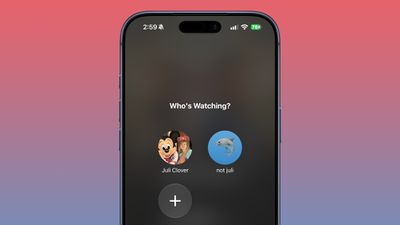
Creating a profile for a child limits content to a PG rating by default, but there is a customize option for finer control. Users can select age ratings for TV shows and movies that are appropriate for the child based on their age.
Phone
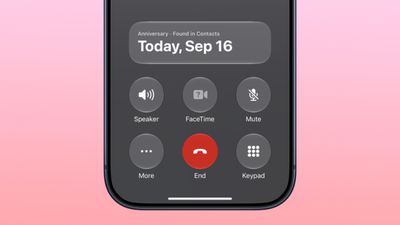
The Call Context feature in the Phone app reminds you of a contact's anniversary when you call them, as long as you've saved the date in the Contacts app.
FaceTime
FaceTime Dual Capture is now available in group FaceTime calls. Dual Capture is a feature that lets you stream FaceTime video content from the front and rear cameras at the same time. On a compatible device running iOS 27, flipping the camera while on a FaceTime call automatically turns on Dual Capture.
Dual Capture is available on the iPhone 17, iPhone 17 Pro, iPhone 17 Pro Max, iPhone Air, iPhone 18 Pro, iPhone 18 Pro Max, and iPhone Duo.
Apple also added an option to add a third-party sign language interpreter or live captioner to a call.
Shortcuts
iOS 27 includes new automations, actions, and improvements for the Shortcuts app. There's a new "when my iPhone is opened or closed" automation for the iPhone Duo.
An updated Workout automation adds support for the Fitness app, and the App automation can provide the name of the app that was closed.
Window layout can be configured with the "Show Actions" and Show Describe a Shortcut" menu items, and Shortcut names and icons can be edited from the library.
iPhone Duo Updates
iOS 27.2 adds Apple Pencil USB-C support to the iPhone Duo. It also includes Edge Light to illuminate your face during video calls.


Multiview
iOS 27.2 expands Multiview in the Apple TV app to the iPhone, so users can watch up to four live sports streams simultaneously.
Multiview works for sports events included in an Apple TV subscription: Major League Soccer (MLS), Formula 1 (F1) in the U.S., and Friday Night Baseball doubleheaders during the Major League Baseball season.
Clock App
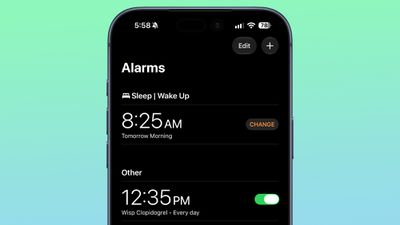
There are smaller a.m. and p.m. labels in the alarm list in the Clock app.
EU - App Tracking Transparency
App Tracking Transparency supports an alternative expanded prompt for EU users along with re-prompting on an annual basis. The alternative prompt is required for users in France, Germany, Italy, Poland, and Romania.
Health App
Apple tested its redesigned Health app in the iOS 27.2 beta, but it won't be coming out until later this year and is not included in iOS 27.2.
Security Fixes
iOS 27.2 addresses more than 160 security vulnerabilities. None of the vulnerabilities were actively exploited, but it's always a good idea to update when this many fixes are included.
Related Forum: iOS 27
FaceTime's Eye Contact setting is missing on the iPhone Duo, MacRumors can confirm. The setting was first flagged as absent by MacRumors forum member TwoBytes, who noticed their eyes looking "a little off" during a call.

Introduced in iOS 14, Eye Contact uses machine learning to subtly adjust your eyes during a video call to make it seem like you're looking into the camera lens, even though you're actually looking at the image of the other person on your screen.
While it may seem the obvious cause, the iPhone Duo's lack of Face ID and TrueDepth camera is unlikely to be the reason for Eye Contact's absence, since iPhone SE models with Touch ID also include the option in Settings. One possibility is the position of the inner display's under-display camera, which sits toward the right-hand side of the screen, away from the center where the other caller's face usually appears.
Correcting for that larger, sideways offset is going to be different than for the small vertical gap on a regular iPhone.
The Duo's design also means the camera's position relative to your gaze changes depending on which display you're using and what the device's folded state is. Apple already restricts Eye Tracking – a gaze-based accessibility feature – to when the Duo is fully open.
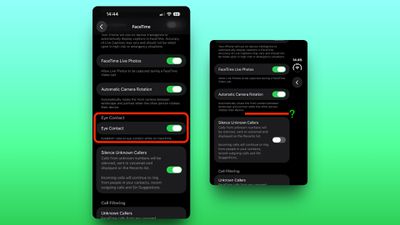
Eye Contact setting on iPhone 18 Pro (left) vs iPhone Duo
We've reached out to Apple for a technical explanation about the lack of Eye Contact on the iPhone Duo.
Apple's iOS 27.2 and iPadOS 27.2 updates fix more than 160 security vulnerabilities, which means it's a good idea to install the software as soon as you can.

An Apple Intelligence vulnerability that could let a remote attacker access sensitive data was fixed, as was a Hide My Email bug that could leak the user's real email address. There are more than 30 WebKit fixes, and approximately 15 kernel bugs have been addressed.
Six CVEs credit Calif, the team that jailbroke the iPhone Duo on launch day and demonstrated an untethered iOS 27.0.1 jailbreak. Calif researcher Stefan Esser recently said that "most" of the vulnerabilities used for its jailbreak are fixed in iOS 27.2.
Apple did not say any of the flaws are known to be actively exploited, but with details published, devices that are not updated could be subject to attack.
The number of security fixes in iOS updates continues to grow as AI models have gotten better at locating vulnerabilities. Anthropic Research is credited on three fixes, and four cite OpenAI.
Apple has also released iOS 26.7.2 for devices not yet updated to iOS 27. It has many of the same security fixes.
Related Forum: iOS 27
Images generated with Image Playground and some photos edited with Apple Intelligence will now include a SynthID watermark. Apple announced plans to add SynthID support back in June, and the feature is live in iOS 27.2.
SynthID is a Google-created tool that identifies AI-generated content. It watermarks images and videos at the pixel level instead of adding metadata. Google says it does not affect image quality and is meant to survive cropping, filters, and compression. SynthID is used by Google, Apple, OpenAI, and others.
There is no option on the iPhone for detecting SynthID watermarks, and to check for them, you need to use the SynthID Detector website.
When we tested the Photos app tools, images altered with Extend and Reframe had SynthID watermarks when checked, but Clean Up watermarking seemed to depend on the size of the edit. With small edits, no watermark was added. Larger Clean Up edits included a SynthID watermark.
Images created with Image Playground will all have the SynthID watermark.
Related Forum: iOS 27
iOS 27.2 expands Multiview to the iPhone, so users can watch up to four live sports streams simultaneously.

Multiview works for sports events included in an Apple TV subscription: Major League Soccer (MLS), Formula 1 (F1) in the U.S., and Friday Night Baseball doubleheaders during the Major League Baseball season.
With Formula 1, users can select a preset team Multiview for live events, or build their own from multiple F1 feeds like onboard cameras and track maps.
Multiview was previously available on the Apple TV 4K and the Vision Pro. The Apple TV supports watching four sports streams and the Vision Pro supports watching five.
Related Forum: iOS 27
The iOS 27.2 update Apple released today allows the FaceTime Dual Capture feature to be used in Group FaceTime calls.
Dual Capture is a feature that lets you stream FaceTime video content from the front and rear cameras at the same time. On a compatible device running iOS 27, flipping the camera while on a FaceTime call automatically turns on Dual Capture.
Dual Capture is available on the iPhone 17, iPhone 17 Pro, iPhone 17 Pro Max, iPhone Air, iPhone 18 Pro, iPhone 18 Pro Max, and iPhone Duo.
The iPhone Duo also supports Duo FaceTime, an option that uses the under-display camera on the inner display and the outer display camera to let a second person join a group call without having to squeeze everyone into a single frame.
With iOS 27.2, Apple also added an option to add a third-party sign language interpreter or live captioner to a call.
Tag: FaceTime Guide
Related Forum: iOS 27
Apple said the new iPad mini that it announced today will be available to pre-order starting at a quite specific time on Wednesday: 10:10 a.m. Pacific Time.
Apple invited selected tech reporters and content creators to an experience in Los Angeles on Wednesday at 10 a.m. Pacific Time. Bloomberg's Mark Gurman believes Apple will kick off the experience by playing a short video unveiling the rumored MacBook Pro with a touchscreen, and then start taking pre-orders immediately afterward.
In other words, the video should be around 10 minutes long, and this would explain why pre-orders for the new iPad mini and likely the MacBook Pro with a touchscreen are set to begin at exactly 10:10 a.m. Pacific Time. It is likely that pre-orders for new iMac and 14-inch MacBook Pro models with the M6 chip will begin at that time too.
One final "inside baseball" thought: If this plan proves to be accurate, a press release for the MacBook Pro with a touchscreen might not appear on the Apple Newsroom website until closer to 10 a.m. Pacific Time on Wednesday, whereas the new iPad mini's press release came out at a much earlier 6 a.m. Pacific Time today.
Related Roundup: iPad mini
Buyer's Guide: iPad Mini (Coming Soon)
Related Forum: iPad
 Apple today announced that Siri AI will gain support for Chinese (Traditional), Norwegian, Turkish, and Vietnamese later this year. The feature initially supported English only when it launched in September, with support for French, Japanese, Korean, Portuguese, and Spanish added in iOS 27.2 and corresponding updates.
Apple today released iOS 27.2 and iPadOS 27.2, the first major updates to the iOS 27 and iPadOS 27 operating systems that came out in September. iOS 27.2 is available for all iPhones able to run iOS 27, including the iPhone Duo, while iPadOS 27.2 is available for all iPads able to run iPadOS 27, including the newly announced OLED iPad mini.
The iOS 27.2 update expands Siri AI to new languages, including French, Japanese, Korean, Portuguese, and Spanish. It also adds profiles for the Apple TV app, a new icon and branding for Apple Music, and support for AI suggestions in the Messages app for taking quick actions in apps like Calendar and Reminders.
In the European Union, it introduces an alternative expanded prompt for App Tracking Transparency. Apple's release notes for iOS 27.2 are below.
Siri AI (All iPhone 16 models and later, iPhone 15
Pro, iPhone 15 Pro Max)
- Siri AI can recall your past conversations, so you can ask Siri about something it told you before, like the restaurants it recommended last week
- Siri AI can draw from more sources to give you a great answer, including photos attached in Messages, Calendar event attendees, your voicemails, and better results from Safari history and Reading List
- Excluded Apps lets you choose which apps Siri, Search, and suggestions can access, all from one setting
- Granular text selection lets you select and copy just the part of a Siri response you need
- Siri AI is available in more languages, with support tor French, Japanese, Korean, Portuguese, and Spanish. Siri AI is not available in the EU or mainland ChinaOther
- Suggestions in Messages help you take action based on the context of your conversations, like adding a Calendar invite for a dinner
- Shared Albums in Photos adds the ability to edit captions and comments, to avoid adding duplicate photos, and can display a reminder before albums expire so participants can save important photos and videos
- Support for SynthID watermarking to help identify whether an image was generated or modified with generative tools in Photos and Image Playground
- The Home tab in the Podcasts app offers two separate sections for New Episodes and Continue Playing, letting you find the latest updates from your shows and then pick up where you left off
- Friends tab in the Games app provides context on friend suggestions and shows recent games played on friends' player pages
- Simple Profiles in the Apple TV app lets everyone in your household have their own profile, with recommendations that fit what they like to watch
- FaceTime supports adding a third party sign language interpreter or live captioner to a call
Apple has separate release notes for the iPhone Duo:
This update provides enhancements to Siri AI with the ability to retain useful context from previous Siri interactions as well as draw from a wider range of personal context. iPhone Duo gets support for Apple Pencil, as well as Edge Light to illuminate your face during video calls. This update also introduces Suggestions in Messages that help you take quick actions in apps like Calendar and Reminders based on context from your conversation. This release includes additional features, bug fixes, and security updates for your iPhone Duo.
iOS 27.2 and iPadOS 27.2 can be downloaded over the air by going to Settings > General > Software Update. Apple also released iOS 26.7.2 with security updates.
Tag: Siri Guide
Related Forum: iOS 27
Apple today released macOS Golden Gate 27.2, the first major update to the macOS 27 operating system that launched in September.

Mac users can download macOS Golden Gate 27.2 by opening up the System Settings app and using the Software Update option.
macOS Golden Gate 27.2 overhauls the brightness and volume sliders, plus it expands Siri AI to new languages including French, Japanese, Korean, Portuguese, and Spanish. Apple's release notes for the update are below.
This update provides enhancements to Siri AI with the ability to retain useful context from previous Siri interactions as well as draw from a wider range of personal context. It also introduces Suggestions in Messages that help you take quick actions in apps like Calendar and Reminders based on context from your conversation. This release includes additional features, bug fixes, and security updates for your Mac.
More on the features in macOS 27 can be found in our macOS 27 roundup.
Related Roundup: macOS Golden Gate
Related Forum: macOS Golden Gate
Apple today released watchOS 27.2, the first major update to the watchOS 27 operating system.
watchOS 27.2 can be downloaded through the Settings app on the watch or the Apple Watch app on a connected iPhone. Software can only be installed when the Apple Watch is on the charger and has over 50 percent battery.
According to Apple's release notes, watchOS 27.2 introduces new Siri AI features and extends Siri AI to new languages.
This update provides enhancements to Siri AI, including the ability to retain useful context from previous Siri interactions, draw from a wider range of personal context, and deliver faster responses on your watch. This update also includes other features, bug fixes, and security updates for your Apple Watch.
- Siri AI can recall your past conversations, so you can ask Siri about something it told you before, like the restaurants it recommended last week
- Siri AI can draw from more sources to give you a great answer, including photos attached in Messages, Calendar event attendees, your voicemails, and better results from Safari history and Reading List from your phone
- Excluded Apps lets you choose which apps Siri, Search, and suggestions can access, all from one setting on your phone
- Siri AI now provides faster responses on Apple Watch
- Siri AI is available in more languages, with support for French, Japanese, Korean, Portuguese, and Spanish. Siri AI is not available in the EU or mainland China
Siri AI is also faster than before, and can draw on more sources when offering up answers.
Related Roundups: watchOS 26, watchOS 27
Tag: Siri Guide
Related Forum: Apple Watch
Apple today released new HomePod 27.2 software for the HomePod and HomePod mini.
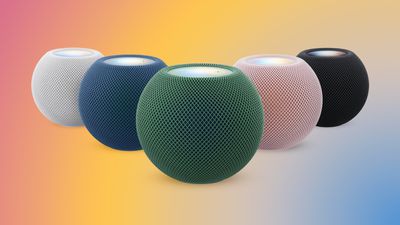
HomePod Software 27.2 brings a new Sound Glow option to the HomePod, HomePod mini, and upcoming HomePod mini 2. Sound Glow causes the top of a HomePod or HomePod mini to light up with color that pulses in sync with the music that's playing. The feature draws colors from album artwork, and it works with songs, podcasts, and Apple's ambient music feature.
The update also adds support for using HomePods as the default speaker for a Mac, plus it allows four HomePods or HomePod mini 2 speakers to be used as surround sound for the new Apple TV. A new Lock Controls option disables tough interactions with the top of the HomePod. Apple's release notes are below.
HomePod software version 27.2 brings the new Sound Glow visual experience, home theater surround sound with Apple TV 4K (4th generation), and support for using HomePod speakers with your Mac, along with bug fixes and security updates for your HomePod.
- Sound Glow on HomePod mini, HomePod mini 2, and HomePod (2nd generation) turns the top of HomePod into a visual display that pulses and glows in sync with your media and shows matching light animations for soundscapes
- Home theater surround sound supports connecting four HomePod speakers to Apple TV 4K (4th generation) for an immersive listening experience. Requires matching front and rear pairs of HomePod mini 2 or HomePod (2nd generation)
- HomePod speakers with your Mac lets you set HomePod as the audio output for everything you do on your Mac, with a responsive and persistent AirPlay connection
- Lock controls let you disable the touch controls on top of HomePod to prevent accidental taps from pausing music, skipping songs, or changing the volumeThis update brings enhancements to the Apple Music, Podcasts, and AirPlay experiences on tvOS. It also brings captions to more content, adds the ability to block individual apps, and provides bug fixes and security updates for your Apple TV 4K.
HomePod software can be installed on the Home app on the iPhone, iPad, or Mac by tapping on the More button, choosing Home Settings, and then using the Software Update option. If automatic updates are turned on, the new HomePod software will be installed automatically.
The HomePod mini 2 is launching on Friday, October 30, while the new Apple TV 4K is coming out on November 13.
Related Roundups: HomePod, HomePod mini 2
Buyer's Guide: HomePod (Caution), HomePod Mini (Buy Now)
Related Forum: HomePod, HomeView, CarPlay – Home & Auto Tech
Apple today released tvOS 27.2, the first major update to the tvOS 27 operating system that runs on the Apple TV 4K.

tvOS 27.2 can be downloaded using the Settings app on the Apple TV. Open up Settings and go to System > Software Update to get the new software. Apple TV owners who have automatic software updates activated will be upgraded to tvOS 27.2 automatically.
Today's update adds support for four-speaker surround sound, a feature that works with the HomePod, HomePod mini 2, and the upcoming Apple TV 4K.
It allows the Apple TV 4K to be used with four HomePod mini 2 speakers, four second-generation HomePods, or two HomePods and two HomePod mini 2 speakers to get surround sound.
The HomePod mini 2 launches on October 30, while the fourth-generation Apple TV 4K will come out on November 13.
Buyer's Guide: Apple TV (Buy Now), HomePod (Caution)
Related Forum: Apple TV and Home Theater
Apple today released visionOS 27.2, the first big update for the visionOS 27 operating system that runs on the Apple Vision Pro.

visionOS 27.2 can be downloaded by opening the Settings app, selecting the General section, and choosing Software Update. Installing the update requires the headset to be removed, and a progress bar appears on the EyeSight display.
The visionOS 27.2 update provides bug fixes and security updates, per Apple's release notes.
Related Roundup: Apple Vision Pro
Buyer's Guide: Vision Pro (Neutral)
Related Forum: Apple Vision Pro
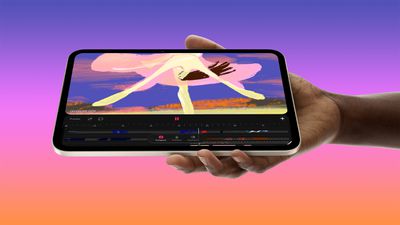
Apple today announced the eighth-generation iPad mini, introducing a larger OLED display, a thinner and lighter design, the A20 Pro chip, and water and dust resistance, but how much does it differ from the previous model?
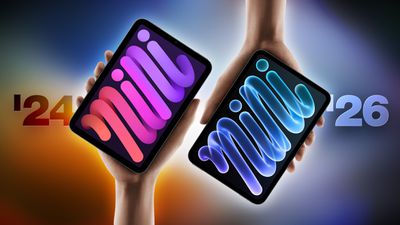
The new iPad mini starts at $699 for the 128GB Wi-Fi model and $849 with cellular connectivity. With the prior generation now discontinued, buyers also face a choice between paying for the new features and finding a cheaper A17 Pro model. Both offer the same storage capacities, advertised battery life, Touch ID authentication, and USB-C transfer speeds, so the new model does not improve every aspect of the experience.
Here are the key differences between the iPad mini with the A17 Pro chip from 2024 and the iPad mini with the A20 Pro chip from 2026:
| iPad mini (seventh generation, 2024) | iPad mini (eighth generation, 2026) |
|---|---|
| 8.3-inch display | 8.5-inch display |
| Liquid Retina display with LED backlighting and IPS technology | Super Retina XDR OLED display with 1-nit minimum brightness and 2,000,000:1 contrast ratio |
| 2266-by-1488 resolution | 2316-by-1512 resolution |
| Wider display borders | 24% thinner display borders |
| 500 nits maximum brightness | 600 nits maximum SDR and full-screen HDR brightness; 1,200 nits peak HDR brightness |
| Optional nano-texture display glass on 256GB and 512GB models for an additional $100, supplied with a polishing cloth | |
| Extended external display mode with iPadOS 27.2 | |
| IP67 water and dust resistance, rated for a maximum depth of 1 meter for up to 30 minutes | |
| A17 Pro chip | A20 Pro chip, with CPU and Neural Engine configurations varying by storage capacity |
| Portrait front camera | Landscape front camera |
| Center Stage front camera with ƒ/2.4 aperture | Center Stage front camera with ƒ/2.0 aperture |
| True Tone rear flash | Adaptive True Tone rear flash |
| Landscape stereo speakers with external speaker holes | Acoustic Display with display-coupled woofers and concealed tweeters, without external speaker holes |
| Third-party wireless module | Apple N1 wireless networking chip |
| Wi-Fi 6E connectivity | Wi-Fi 7 connectivity |
| Bluetooth 5.3 connectivity | Bluetooth 6 connectivity |
| Thread networking technology | |
| Qualcomm Snapdragon X70 5G modem (Cellular models only) | Apple C2 5G modem; up to 50% faster cellular data speeds according to Apple (Cellular models only) |
| U.S. cellular model (A2995) supports 5G band n76 | U.S. cellular model (A3596) supports LTE band 106 |
| UMTS/HSPA/HSPA+/DC-HSDPA cellular support | UMTS/HSPA/HSPA+ cellular support |
| 19.3Wh battery | 18.9Wh battery |
| Fast charging up to 50% in around 30 minutes with a 35W or higher USB-C power adapter | |
| Available in Space Gray, Starlight, Purple, and Blue | Available in Midnight and Starlight |
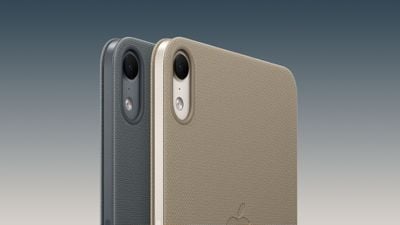
| Previous polyurethane Smart Folio design | Redesigned two-panel TechWoven Smart Folio with adjustable viewing angles, available separately in Navy Blue and Taupe for $79 |
| More than 25% recycled content overall | 35% recycled content overall |
| Originally started at $499 (Wi-Fi) or $649 (Wi-Fi + Cellular); Wi-Fi starting price subsequently increased to $599; now discontinued | Starts at $699 (Wi-Fi) or $849 (Wi-Fi + Cellular) |
A17 Pro vs. A20 Pro
Unlike the previous model, the new iPad mini's chip hardware now varies according to storage capacity:
| iPad mini (seventh generation, 2024) | iPad mini (eighth generation, 2026) | |
|---|---|---|
| Chip | Apple A17 Pro | Apple A20 Pro |
| Manufacturing process | 3-nanometer | 2-nanometer |
| CPU | 6 cores | 128GB and 256GB: 5 cores 512GB: 6 cores |
| Higher-performance CPU cores | 2 performance cores | 2 super cores |
| Efficiency CPU cores | 4 cores | 128GB and 256GB: 3 cores 512GB: 4 cores |
| GPU | 5 cores | 7 cores |
| GPU Neural Accelerators | Dedicated Neural Accelerators in each GPU core | |
| Neural Engine | 16 cores on all storage configurations | 128GB and 256GB: 16 cores 512GB: Dual 16-core Neural Engine, totaling 32 cores |
| Unified memory | 8GB | Increased capacity, according to Apple; exact amount not yet known |
| Unified memory bandwidth | 51.2 GB/s | 115.2 GB/s |
Apple also claims that the new model has the following maximum improvements over the previous model with the A17 Pro chip:
- Up to 60% faster multithreaded CPU performance.
- Up to 2.7 times faster graphics performance.
- Up to 4.5 times faster AI performance.
Dimensions and Weight
| iPad mini (seventh generation, 2024) | iPad mini (eighth generation, 2026) | |
|---|---|---|
| Height | 7.69 inches (195.4 mm) | 7.69 inches (195.3 mm) |
| Width | 5.3 inches (134.8 mm) | 5.22 inches (132.6 mm) |
| Thickness | 0.25 inch (6.3 mm) | 0.21 inch (5.4 mm) |
| Weight (Wi-Fi) | 0.65 pound (293 grams) | 0.56 pound (255 grams) |
| Weight (Wi-Fi + Cellular) | 0.66 pound (297 grams) | 0.58 pound (263 grams) |
The new model is approximately 14% thinner, with the Wi-Fi model approximately 13% lighter and the cellular model approximately 11% lighter.
Should You Upgrade?
Most A17 Pro iPad mini owners can comfortably keep their current device. The new model offers the same advertised battery life, storage capacities, Apple Pencil support, and USB-C transfer speeds. If your iPad mini still meets your needs, there is little reason to upgrade for everyday performance alone.
The slightly larger display now with OLED technology may be the strongest reason to consider replacing it, particularly if you frequently use your iPad mini for watching videos or reading. The thinner and lighter design may also make a worthwhile difference if you spend long periods holding it.
For users who regularly encounter distracting reflections or enjoy reading on their device, nano-texture glass could provide a more specific reason to upgrade. It does raise the cost considerably, since it requires at least 256GB of storage as well as the additional $100 display option.
The landscape camera, water resistance, and fast charging are useful additions, but are highly unlikely to justify replacing a A17 Pro model on their own. An upgrade makes more sense when several of these changes address things you find limiting about your current device.
Which Model Should You Buy?
For most new buyers, the A20 Pro model should be the starting point. The OLED display and new design are its main advantages, and both largely matter more to the everyday experience than the chip.
The A17 Pro model may still be worth considering when it offers substantial savings. It retains many of the same capabilities and remains a sensible choice for reading, browsing, taking notes, and watching videos, even if it uses the design of an older device.
For the A20 Pro model, it is important to remember that the 256GB version makes nano-texture glass available, while the 512GB version adds a CPU core and a second Neural Engine.
Related Roundup: iPad mini
Buyer's Guide: iPad Mini (Coming Soon)
Related Forum: iPad

















