Apple Releases iPadOS 26.2 With Multitasking Improvements - MacRumors
Skip to Content

Apple Releases iPadOS 26.2 With Multitasking Improvements

Apple today released iPadOS 26.2, the second major update to the iPadOS 26 operating system released in September. iPadOS 26.2 comes a month after iPadOS 26.1.
ipados 26 1 slide over
The new software can be downloaded on eligible iPads over-the-air by going to Settings > General > Software Update.

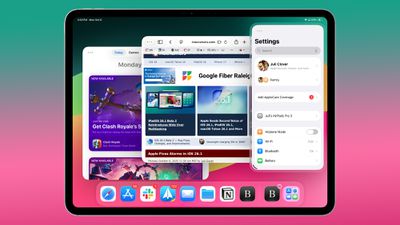
iPadOS 26.2 continues with the multitasking improvements that were added with iPadOS 26.1. You can now drag and drop apps from the Dock, Spotlight Search, or the App Library to different multitasking views, including Slide Over.

Apps can be dragged to the far left or far right to enter Slide Over mode, or to the left or right to enter a tiled view. There's also an option to drag an app to the middle to open up a larger or smaller window, with visual indicators to make it simple. It's an easier way to manipulate apps than the prior controls accessible through the window buttons. Apple's release notes for the update are below.


Multitasking
- Multitasking gestures to quickly tile windows or place an app in Slide Over by dragging app icons from the Dock

Apple Music
- Favorite Songs playlist appears in Top Picks on the home tab
- Offline lyrics for downloaded songs so you can view them without an internet connection

Podcasts
- Automatically generated chapters make it easier to navigate episodes
- Links to mentioned podcasts let you see and follow other podcasts mentioned in the episode you’re listening to directly from the player and transcript

Games
- Filters in the Games library let you find games by category, size, and more
- In-game challenge score banners provide real-time updates when someone new has taken the lead
- Improved support for connected controllers such as Backbone and Razer

This update also includes the following enhancements and bug fixes:
- Additional Lock Screen time customization option lets you further adjust its appearance, giving the Liquid Glass material more or less opacity
- Alarms for Reminders help you stay on top of urgent tasks, and provide snooze and Live Activity support if you’re not ready to check the reminder off
- AirDrop codes offer an additional layer of verification when using AirDrop with unknown contacts by providing a code on the receiver’s device that the sender must enter to complete the transfer
- Apple News Section links in the sidebar of the News app offer easy navigation to popular topics like Sports, Politics, Business, and Food
- Multipack accessory pairing in the Home app lets you use the same setup code to easily enroll multiple accessories when sold together
- Flash for alerts in Accessibility Settings offers the additional option to have the device screen flash when you receive a notification
- Tables in Freeform can hold text, images, documents, and drawings, with cells that intelligently resize to fit, bringing structure to the infinite canvas
- Fixes an issue where pre-release albums in the Apple Music library were not immediately playable at their release time
- Fixes an issue where a Privacy and Security setting may incorrectly be marked as managed by an enterprise organization.

More info on ‌iPadOS 26‌ is available in our roundup.

Related Roundups: iOS 26, iPadOS 26
Related Forum: iOS 26

Popular Stories

iOS 27 Feature Dark

Apple Now Pushing iPhone Users Still on iOS 26 to Install iOS 27

Thursday October 8, 2026 1:17 pm PDT by
Starting today, iPhone users still running iOS 26 will see iOS 27.0.1 as the prominent software update in the Settings app under General → Software Update, with iOS 26.7.1 now relegated to a smaller "Also Available" section at the bottom. iOS 27 was released on September 14, but until now that update and later iOS 27.0.1 were shown under the "Also Available" section, with iOS 26.7 and...

apple lock security bug vulnerability fix privacy

iOS 26.7.1 Fixes Vulnerability Used in Targeted Attacks

Monday September 28, 2026 11:45 am PDT by
iOS 26.7.1, iPadOS 26.7.1, macOS Tahoe 26.7.1, and macOS Sequoia 15.8.1 address a major vulnerability that Apple believes was used against a small number of people. Apple's security support pages say there was a CoreGraphics out-of-bounds write issue that could be exploited with a maliciously crafted file, allowing for arbitrary code execution. It has been fixed with improved bounds...
iphone duo screen crack in store

Crackgate? iPhone Duo Owners Report Screens Breaking Along the Hinge

Friday October 23, 2026 11:05 am PDT by
Some iPhone Duos are already experiencing hinge issues that cause display cracks, based on photos shared on Reddit and the MacRumors forums. Almost all of the display faults are right along the hinge, and most result in a line of bright pixels across one side of the screen. An iPhone Duo owner in Australia said his device cracked after being opened fewer than 20 times, and there was no...

Top Rated Comments

11 months ago
So in playing around with the funky App Library animation I referenced a couple of posts ago, it appears to be a bug associated with not having the App Library folder in the Dock. If you have the App Library icon in the Dock, when you exit the Library it minimizes to the icon in the Dock. What I was seeing without the Icon being present in the Dock was the same closing animation, except instead of going to the Dock it went to a random spot on the TOP of the HomeScreen, paused there briefly, and then slid off the top of the screen. Annoying and weird.
Score: 7 Votes (Like | Disagree)
11 months ago
Happy with all the changes to iPadOS this year and nice to see multitasking improve. Will wait for a few days before updating my M4 iPad Pro. Hopefully there are no major bugs with the release.
Score: 4 Votes (Like | Disagree)
11 months ago
Wahhhh Friday updates
Score: 3 Votes (Like | Disagree)
11 months ago
Just noticed this happening on my iPad 11 Pro M4. While in Settings, I press and hold in a black area where there are no buttons, etc., and the screen starts going berserk. Notice my finger does not move. Some of the times I do it, the control center pops down and goes through different panels pushing buttons on it's own.

EDIT: it does something similar if I push and hold on the home screen in an empty area.


[Click to view video attachment]
Score: 2 Votes (Like | Disagree)
11 months ago
I'm glad I wasn't the only one who thought that App Library animation was bad. I don't have mine in the dock, and the folders flying in and out to the top of the screen looks bad to me, and it adds lag.
Score: 2 Votes (Like | Disagree)
11 months ago

Yeah, I cant believe how much I miss that. Maybe on the 13 inch versions the current windowing replacement is fine, but it eats massive amounts of precious real estate on the 11 inch ipads, and is awkward to use to boot. It’s like the worst of macos combined with the worst of ios
Honestly even on the 13" it doesn't make sense. It really does feel like the worst of both worlds. All those demos showing 4 windows open at once are glazing over that they're unusuable at that size.

Touch Window Management is also clunky, Slideover in previous iOSes got it right that any Window in a Touch UI should be always on top and easy to hide & show.

At least they brought Slideover back but the main windowing system is kind of a pain to use.
Score: 1 Votes (Like | Disagree)
Latest Stories
Apple Announces New iPad Mini With Larger OLED Display and More
5 minutes ago
Apple Watch Users in Europe Report Daylight Saving Glitch
44 minutes ago
iPad Mini 8 With These 10 New Features Expected Today or Tomorrow
55 minutes ago
Gurman: Apple's Three-Day Announcement Run Could Start Today
1 hour ago
iPhone Duo: Give Your Camera Subject a Picture Preview
2 hours ago
Conversion Kit Aims to Put PC Hardware Inside 2019 Mac Pro
2 hours ago
MacBook Pro's Switch to OLED Could Spell Trouble for Mini-LED Industry
3 hours ago
Apple Display Veterans Step Back as New Leaders Take Over
9 hours ago
OLED MacBook Air and iMac Remain in Testing
9 hours ago
Apple Addresses Web Security Threat, Working on macOS Update With Additional Fix
14 hours ago
iPhone Duo Can Run Automations When You Open or Close It
15 hours ago
Adjust iPhone Duo's Outer Display to Accommodate Your Case
15 hours ago
iFixit iPhone Duo Teardown Points to Possible Cause of Screen Cracks
15 hours ago
Apple Stores Reportedly Rolling Out New Anti-Theft System for iPhones
22 hours ago
AirTag 2 Drops to New Low Price of $23 on Amazon
23 hours ago
New iMac and 14-Inch MacBook Pro With M6 Chip Expected This Week
23 hours ago
Apple Reportedly Announcing New MacBook Pro With OLED Touchscreen on Wednesday
23 hours ago
Apple Wants to Fix Safari's Cramped Layout on iPhone Duo
1 day ago
Instagram Launches Apple TV App With Reels and More
1 day ago
Apple's 'Servant' Copyright Lawsuit Win Upheld on Appeal
1 day ago
'Arguably Better Than Face ID': the iPhone Duo Touch ID Tip to Try
2 days ago
Verizon Apologizes for iPhone Duo Pre-Order Delays, Giving Customers $100 Gift Card
2 days ago
Skip the Touch ID Scan: Unlock iPhone Duo With Apple Watch
2 days ago
iPhone Duo Fails JerryRigEverything's Dusty Durability Test
2 days ago
Make iPhone Duo Volume Buttons Follow Screen Rotation
2 days ago
iPhone Duo Teardowns Reveal Two Batteries and More
2 days ago
M5 MacBook Air Returns to Prime Day Low With $200 Amazon Discount
2 days ago
Top Stories: Apple 'Pro and Tell' Debut, iPhone Duo Launch, and More
2 days ago
Apple Store Pickup System for iPhone Duo Just Went Live Again in U.S. and Canada
2 days ago
Apple Closes French Stores Ahead of Further Protests
2 days ago