iOS 9.3 Displays Exact Wi-Fi Assist Data Usage Numbers
Apple's iOS 9.3 beta introduces major new features like Night Shift, but there are also dozens of little tweaks to be discovered in the operating system update. It appears that one of those minor changes applies to Wi-Fi Assist, adding a much-needed feature that allows users to see just how much data it's using.
Wi-Fi Assist data usage can be checked within the Settings app by choosing the Cellular section and scrolling down to the Wi-Fi Assist option. Next to the toggle that turns the feature on and off, there's now a data usage number that displays how much data has been consumed when it is in use.
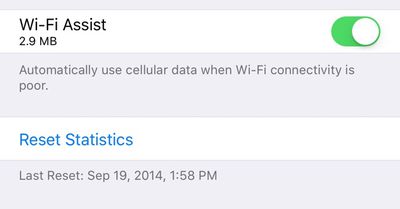
Wi-Fi Assist was first introduced with iOS 9. It's a feature that allows an iPhone to seamlessly switch over to a cellular connection whenever a local Wi-Fi connection is weak. Enabled automatically when updating to iOS 9, Wi-Fi Assist proved to be unpopular with users who claimed it was eating up a lot of data. One recent news story even accused Wi-Fi Assist of causing a teenager to receive a cell phone bill for upwards of $2,000.
Concerns about Wi-Fi Assist led Apple to publish a support document on the feature, explaining how it works and assuring users that data usage should only be a "small percentage higher" than previous usage. Wi-Fi Assist only turns on in a limited number of circumstances and won't activate when data roaming, when apps are downloading background content, or when using third-party apps that stream audio or video.
Despite Apple's reassurances about Wi-Fi Assist, unhappy customers filed a $5 million class action lawsuit over the feature, with the plaintiffs claiming they were subjected to overage charges on their iPhones after updating to iOS 9. The lawsuit also claims Apple did not do an adequate job explaining the feature when iOS 9 was released.
Wi-Fi Assist is available on any iOS device running iOS 9 or later, with the exception of the iPhone 4s, the iPad 2, the third-generation iPad, and the original iPad mini. Wi-Fi Assist can be turned off using the Settings app for those who don't want to risk using extra data.
Popular Stories
Apple is not expected to release a standard iPhone 18 model this year, according to a growing number of reports that suggest the company is planning a significant change to its long-standing annual iPhone launch cycle.
Despite the immense success of the iPhone 17 in 2025, the iPhone 18 is not expected to arrive until the spring of 2027, leaving the iPhone 17 in the lineup as the latest...
Language learning app Duolingo has apparently been using the iPhone's Live Activity feature to display ads on the Lock Screen and the Dynamic Island, which violates Apple's design guidelines.
According to multiple reports on Reddit, the Duolingo app has been displaying an ad for a "Super offer," which is Duolingo's paid subscription option.
Apple's guidelines for Live Activity state that...
The company behind the BlackBerry-like Clicks Keyboard accessory for the iPhone today unveiled a new Android 16 smartphone called the Clicks Communicator.
The purpose-built device is designed to be used as a second phone alongside your iPhone, with the intended focus being communication over content consumption. It runs a custom Android launcher that offers a curated selection of messaging...
Apple plans to introduce a 12.9-inch MacBook in spring 2026, according to TrendForce.
In a press release this week, the Taiwanese research firm said this MacBook will be aimed at the entry-level to mid-range market, with "competitive pricing."
TrendForce did not share any further details about this MacBook, but the information that it shared lines up with several rumors about a more...
Apple is planning to release a low-cost MacBook in 2026, which will apparently compete with more affordable Chromebooks and Windows PCs. Apple's most affordable Mac right now is the $999 MacBook Air, and the upcoming low-cost MacBook is expected to be cheaper. Here's what we know about the low-cost MacBook so far.
Size
Rumors suggest the low-cost MacBook will have a display that's around 13 ...
Apple today announced a number of updates to Apple Fitness+ and activity with the Apple Watch.
The key announcements include:
New Year limited-edition award: Users can win the award by closing all three Activity Rings for seven days in a row in January.
"Quit Quitting" Strava challenge: Available in Strava throughout January, users who log 12 workouts anytime in the month will win an ...
Apple hasn't updated the Mac Pro since 2023, and according to recent rumors, there's no update coming in the near future. In fact, Apple might be finished with the Mac Pro.
Bloomberg recently said that the Mac Pro is "on the back burner" and has been "largely written off" by Apple. Apple apparently views the more compact Mac Studio as the ideal high-end pro-level desktop, and it has almost...