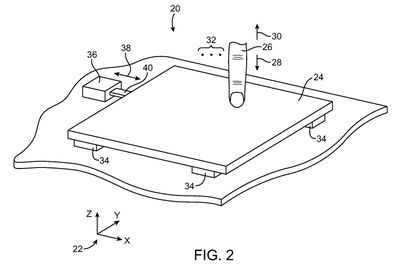
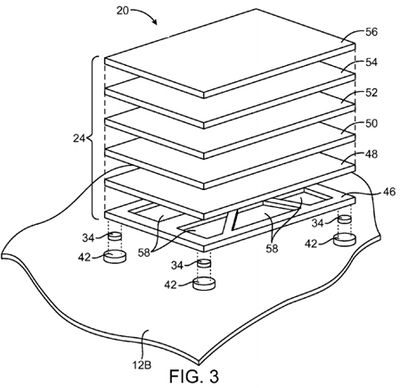
Apple today was awarded U.S. Patent No. 8,633,916 (via AppleInsider), which describes a touchpad that utilizes force sensors and acuator feedback. The buttonless design uses an array of sensors and an actuator to mimic the function and tactile feedback of the current trackpad found in the company's MacBook product lines.
Currently, Apple's trackpad technology is based on an integrated button design. Surface touch sensors track the movement of fingers and a hinged button allows the trackpad to click when a user presses down on it. A switch located under the trackpad is actuated when a click pivots the trackpad downward on its rear hinge. The pivoting motion of this button makes it difficult to click near the rear edge of the trackpad and requires extra space within the chassis of the notebook.
In the newly awarded patent, which was filed in December 2009, Apple builds upon its current design by using a surface touch sensor and four corner force sensors to track finger movement and clicking input from the user. An actuator would be used to provide tactile feedback. Also similar to the current trackpad, a buttonless trackpad may have user-customizable settings that adjust the sensitivity levels for the click pressure or the tactile feedback.
In addition to processing touch sensor signals to determine the location of touch events, signals from the force sensors may be processed. A rectangular touch pad may have four corners. Force sensors may be mounted under each of the four corners. When a user presses on the surface of the touch pad, the force sensors may pick up four corresponding independent force signals.
Tactile feedback may be provided using an actuator. The actuator may be controlled by actuator drive signals. As a user of an electronic device interacts with the touch pad, the user may make gestures and perform other touch-related tasks. When the user desires to select an on-screen object or perform other tasks of the type traditionally associated with button actuation events, the user may press downwards against the surface of the track pad. When sufficient force is detected, appropriate action may be taken and drive signals may be applied to the actuator. The actuator may impart movement to the touch pad.
Whether Apple chooses to incorporate this new trackpad technology or not is unknown, but a move to do so would make sense considering that Apple's multi-touch trackpad debuted with the MacBook Air in 2008, and has made its way to every MacBook since then. But given the fact that it has been over four years since the patent's filing, Apple may simply have abandoned the proposed design for unknown reasons.
Thursday December 11, 2025 8:49 am PST by Joe Rossignol
Apple seeded the second iOS 26.2 Release Candidate to developers earlier this week, meaning the update will be released to the general public very soon.
Apple confirmed iOS 26.2 would be released in December, but it did not provide a specific date. We expect the update to be released by early next week.
iOS 26.2 includes a handful of new features and changes on the iPhone, such as a new...
Friday December 12, 2025 10:56 am PST by Joe Rossignol
Macworld's Filipe Espósito today revealed a handful of features that Apple is allegedly planning for iOS 26.4, iOS 27, and even iOS 28.
The report said the features are referenced within the code for a leaked internal build of iOS 26 that is not meant to be seen by the public. However, it appears that Espósito and/or his sources managed to gain access to it, providing us with a sneak peek...
Friday December 12, 2025 10:10 am PST by Juli Clover
Apple today released iOS 26.2, the second major update to the iOS 26 operating system that came out in September, iOS 26.2 comes a little over a month after iOS 26.1 launched. iOS 26.2 is compatible with the iPhone 11 series and later, as well as the second-generation iPhone SE.
The new software can be downloaded on eligible iPhones over-the-air by going to Settings >...
Thursday December 11, 2025 11:28 am PST by Juli Clover
Apple today released new firmware designed for the AirPods Pro 3 and the prior-generation AirPods Pro 2. The AirPods Pro 3 firmware is 8B30, up from 8B25, while the AirPods Pro 2 firmware is 8B28, up from 8B21.
There's no word on what's include in the updated firmware, but the AirPods Pro 2 and AirPods Pro 3 are getting expanded support for Live Translation in the European Union in iOS...
Friday December 12, 2025 10:08 am PST by Juli Clover
Apple today released macOS Tahoe 26.2, the second major update to the macOS Tahoe operating system that came out in September. macOS Tahoe 26.2 comes five weeks after Apple released macOS Tahoe 26.1.
Mac users can download the macOS Tahoe update by using the Software Update section of System Settings.
macOS Tahoe 26.2 includes Edge Light, a feature that illuminates your face with soft...
Thursday December 11, 2025 10:31 am PST by Juli Clover
The AirTag 2 will include a handful of new features that will improve tracking capabilities, according to a new report from Macworld. The site says that it was able to access an internal build of iOS 26, which includes references to multiple unreleased products.
Here's what's supposedly coming:
An improved pairing process, though no details were provided. AirTag pairing is already...
Friday December 12, 2025 10:09 am PST by Juli Clover
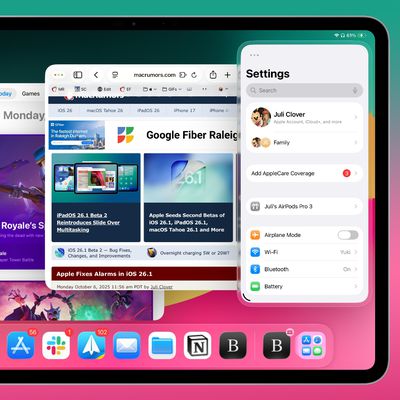
Apple today released iPadOS 26.2, the second major update to the iPadOS 26 operating system released in September. iPadOS 26.2 comes a month after iPadOS 26.1.
The new software can be downloaded on eligible iPads over-the-air by going to Settings > General > Software Update.
iPadOS 26.2 continues with the multitasking improvements that were added with iPadOS 26.1. You can now drag and...
Friday December 12, 2025 3:55 am PST by Tim Hardwick
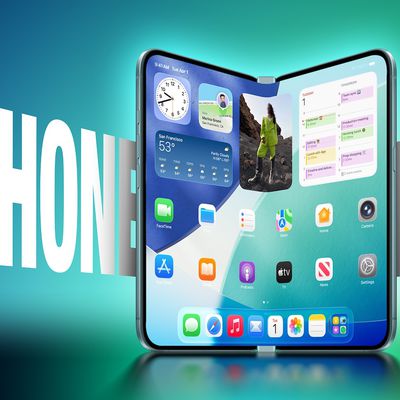
Foldable smartphone panel shipments are projected to jump 46% year-over-year in 2026, with Apple's entry into the market serving as the main catalyst, according to Counterpoint Research's latest Foldable-Rollable Display Shipment Tracker.
"Apple is the key driver as it starts to procure panels for its first foldable iPhone," said Counterpoint's Guillaume Chansin. The research firm expects...
Is anyone on this forum capable of reading, or just moaning?
It explains quite clearly that when you press down it would still function and feel a button now you miserable sods.
The benefit is that they can remove the dated hinge mechanism which makes more power for good things and you'll be able to click at both the bottom AND the top of the trackpad...basically its like now, but better.
No thanks. I like my buttons. Never been a huge fan of touch. Trackpads are fine, but without two buttons for clicking, I'm out. And no doubt living in the past. :(
A TrackPad without a button definitely seems like a good idea. I changed my settings to 'tap to click' practically on day 1 because it's much easier and quicker
Same here, it works perfectly fine for me. IMO Trackpads don't need a button anymore - a one- or two-finger tap is enough.
But i also think that we don't need force sensors and acuator feedback in the trackpad - but Apple will prove me wrong :p
I can't remember a single instance of a patent filing revealing an upcoming Apple product's feature. Could you guys point me to some recent one that turned out to be true?